- FULL-DUPLEX SPEAKERPHONE: What’s the Difference Between Half Duplex and Full Duplex a full duplex speakerphone setup allows multiple users to communicate simultaneously,a half duplex system only allows one party to speak at any given time. Just like a walkie-talkie. Yealink CP700&CP900 support built-in full-duplex microphone . so calls sound their best on both ends compare with half duplex speakerphone of another brand in the market .
- SIMPLE SETUP & STABLE CONNECTION:YEALINK conference speakerphone could be connected via USB, Bluetooth, dongle without any extra IT required or drivers. Not only connect YEALINK conference speaker in Windows, macOS, plugging USB, but also smartphone, iPad, Samsung S7+ tablet work well by Bluetooth. YEALINK speaker and microphone for computer also have been Certified by Zoom,Teams, whatsapp, Skype, etc
- IDEAL SOLUTION OF NOISE CANCELING:Yealink Bluetooth speakerphone could eliminate background noise whether working in a shared or public workspace or office. Common noise at work such as air conditioning, mouse or keyboard click, desk and chair friction sound could be reduced efficiently with speaker phone so that the far-end attendees can enjoy the best communication. This mode is optional in YEALINK computer speakers with microphone to meet your different demands.
- SPEAK SMOOTH & HEAR CLEAR:More than 2,000,000 users have a good conference experience with YEALINK, Redefine Your Workspace. 2 built-in noise-canceling microphones of YEALINK Bluetooth speakerphone set in a 360° array realize voice pickup could work for a business conference room of 6.5 feet*6.5 feet, and full-duplex audio solution ensures accessible and clearly meeting experience.
- CONTACT US WHEN ANY QUESTION. This Package including 1 Pc CP700 speakerphone, 1 Pc collecting zipper bag,1 Pce user manual.
Product description
Ideal for personal use, private space and on-the-go
Why Yealink Teams Certified Speakerphone ?
Full-Duplex Audio Technology by Yealink Speakerphone
Half Duplex and full duplex
360° Voice Pick-Up Speakerphone
Build up an effective collaboration
Sound quality test
Sound quality test
Music quality test
Music quality test
No matter where are
No matter where are
Long distance testing
Long distance testing
Everyone is suitable for use
Everyone is suitable for use
YOU MAY FACE or HOW THE YEALINK SPEAKERPHONE SERVE YOU
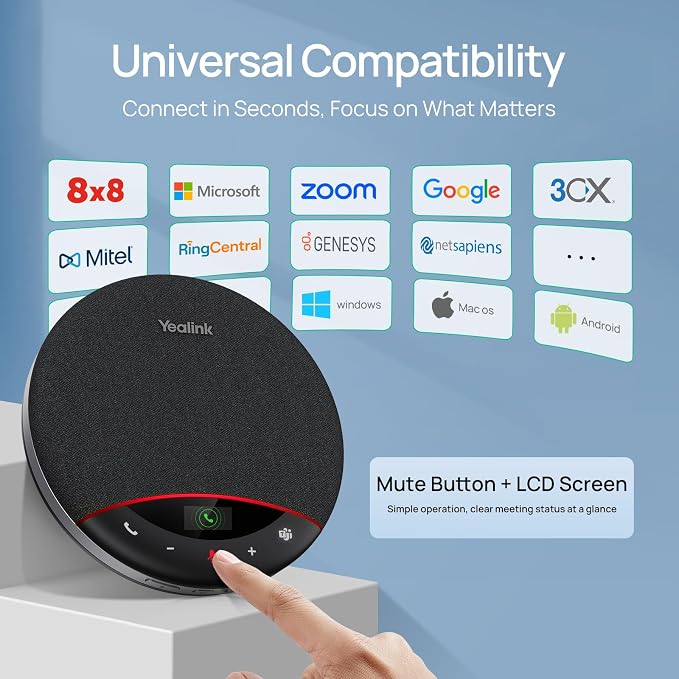
Universal Compatibility
Plug & Play
Why can't I turn on the phone, the answer key and hang up key flash slowly
Why do you fail to connect speakerphone via Bluetooth?
Why is the other party unable to hear the voice during a call?
Why there are no voice prompts or touch tones?
Why cannot the computer recognize the connected BT50?
Advanced Comparison Chart
More than 15 million Yealink Communication Solution Product have been sold globally.
Yealink UC Communication Product serve more than 500,000 companies around the world.
One in every 500 people on earth owns or is using a Yealink product.
Yealink CP700 as a Professional Audio Device, Supports Full-Duplex Audio Technology And Yealink's Unique Audio Algorithm. No Matter What Occasion You Are In, The Full-Duplex Function (Allows Multiple Users To Communicate Simultaneously) Can Bring You a Good Interactive Experience And Create The Best Conference Call Experience For You.
Allow multiple users to communicate simultaneously
Yealink CP700 Provides You With a Built-In Omnidirectional Microphone With a Transmission Distance Of Up To 6.5 Inches, Which Can Achieve 360° Voice Pick-Up. Even If You Are In a Large Conference Room, It Can Provide You With High-Definition Sound Quality To Achieve The Best Voice Collaboration.
The Omnidirectional microphone and full-duplex allows meeting participants to be heard and involved.
Ideal for business professionals on the go, the CP700 comes with a protective pouch.
by connecting the CP700 through Bluetooth on one device, and with USB-connection on another device
Deep integrated with Microsoft Teams through a dedicated Teams button for easier Teams collaboration
YOU MAY FACE
Long time frequent communication / Usually an open calling / Sometimes noisy environment / Less interruption in background
HOW THE YEALINK SPEAKERPHONE SERVE YOU
Thanks to the broad compatibility of Yealink speakerphones, users can enjoy consistent call experience across UC platforms, which promises better communication quality, higher productivity and lower IT costs.
Connecting Your PC or MAC by USB or Dongle(option) , No Driver Required for Stable Meeting Communication Experience.
Certified for Microsoft Teams, the devices designed with a dedicated Teams button for activating Microsoft Teams with one touch.
Why can't I turn on the phone, the answer key and hang up key flash slowly
Low battery. Speakerphone will reboot automatically once it is connected to PC or charger cradle
Why do you fail to connect speakerphone via Bluetooth?
Do the following:
1. Check whether speakerphone is in Bluetooth pairing mode.
2. Check whether speakerphone has been connected to two devices via Bluetooth
Why is the other party unable to hear the voice during a call?
Do the following:
1. Check whether you remove the protective film from the speakerphone,other wise,the microphone might be blocked.
2. Check whether you set speakerphoneas the default microphone device for the mobile phone/PC and softphone.
Why there are no voice prompts or touch tones?
Check whether speakerphone is at the minimum volume.
Why cannot the computer recognize the connected BT50?
Check if the BT50 is inserted in the correct direction.