- PLEASE NOTE:XPPen Artist12Pro drawing tablet Need to connect with computer,you need to use it with your computer or laptop
- Drawing Tablet with Screen: Tilt function-Artist 12 Pro supports up to 60 degrees of tilt function. So now you don't need to adjust the brush direction in the program again and again. Simply tilt to add shading to your creation and enjoy smoother and more natural transitions between lines and strokes
- Drawing Pad: Improve your Workflow-A sleek Red Dial interface to make your workflow as smooth as possible. 8 fully customizable shortcut keys let you capture and express your ideas faster and more easily
- Graphics Tablets: Perfect for Beginner-Features a super-portable screen with an 11.6-inch display area and a convenient 3-in-1 cable design. There's no need to use any adapter and it quickly connects to your computer. Start sketching, doodling, and drawing directly on Artist 12 Pro and begin your creative journey
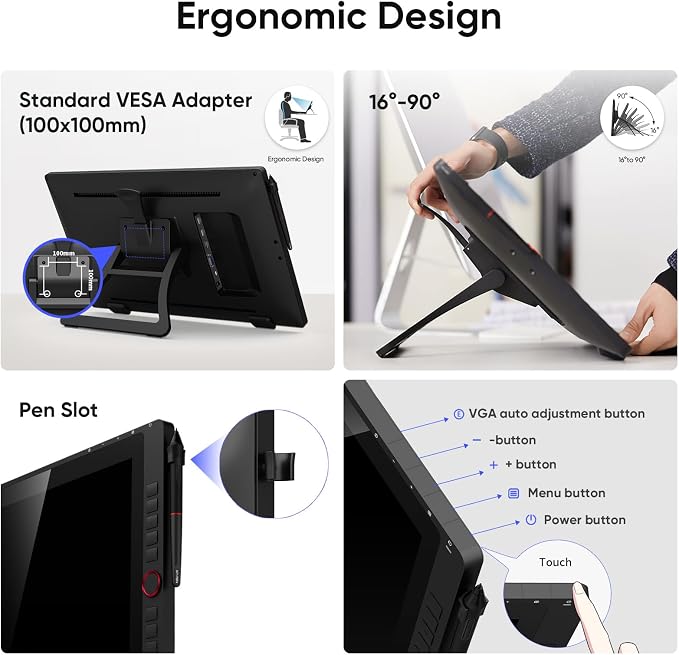
- Pen Display: Adjustbale Stand -r-Included with the Artist 12 Pro, the portable stand prevents shaking or sliding and relieves eye fatigue and hand stiffness. The multi-function pen holder keeps your pen and pen nibs safe and doubles as a pen stand or pen holder
- Drawing Display: Fully-laminated Screen-Artist 12 Pro seamlessly combines the glass and screen. With virtually no parallax, your cursor appears exactly where you want it, offering a real paper-like feel drawing experience
Product description
Please Read Below Important Notice Before Purchase:
The XP-PEN Artist12 Pro Drawing Tablet Also Can Be Used For Online Teaching/E-learning/Remote Work
1. XP-PEN Artist12Pro drawing tablet is NOT a standalone product!!!
2.1 For Windows Users:
2.2 For Mac Mojave (10.14), Catalina (10.15) and above Mac OS Users:
XP-PEN Provides assistance on all Our Drawing Pen Tablets/Displays
Artist12 Pro drawing tablet pairs a superb color accuracy of 72% NTSC with a 178-degree viewing angle and delivers rich colors, vivid images, and dazzling details in a wider view. Your creative world is now as powerful as it is colorful!
It also comes with a replaceable anti-glare optical film and features high transparency and scratch resistance while reducing glare and keeping your screen crisp and clear even bright light.
Artist 12 Pro drawing tablet seamlessly combines the glass and screen to create a distraction-free working environment.With virtually no parallax, your cursor appears exactly where you want it, offering a real paper-like feel while drawing on this 11.6 inch fully-laminated IPS Display with a 178-degree viewing angle and 1920*1080 high resolution.
The XP-Pen Artist 12 Pro drawing tablet supports up to 60 degrees of tilt function, so now you don't need to adjust the brush direction in the software over and over again. Simply tilt to add shading to your creation and enjoy smoother and more natural transitions between lines and strokes.
The dial fits comfortably in your hand and can be programmed for more customization options, letting you capture and express your ideas faster and more easily.
8 fully customizable shortcut keys and puts more customization options at your fingertips to suit you preferred work style, allowing you to capture and express your ideas easier and faster for optimized workflow. It also features a slim 11mm profile, and with an easily accessible smart screen-brightness button, you can easily adjust it to your preferred brightness for comfortable drawing
With up to 8,192 levels of pressure sensitivity, it provides you with increased accuracy and enhanced performance to create the finest sketches and lines, even presenting the nuance of different hairs. Draw and paint naturally and smoothly with our battery-free stylus.
Included with the Artist 12 Pro drawing tablet, the AC 42 easy-to-use stand is built to prevent shaking or sliding as well as relieve eye fatigue and hand stiffness. The multi-function Pen Holder keeps your pen and pen nibs safe, and doubles as a pen stand or pen holder.
1. Online Teaching. Teachers and students can create and explain interactive content visually by writing, editing, and annotating directly in files and sharing their screen in real-time.
2. Web-conference. The Artist12 Pro drawing tablet allows you to start broadcasting for distance education or web conferencing, entering an interactive classroom or meeting room anytime, anywhere.
3. E-Learning. XP-PEN graphics tablets make your education journey much smoother and easier, and your education broadcasting more intuitive and attractive.
4. More to Explore. Simultaneous digital inking with an XP-PEN drawing tablet compatible with Microsoft Office apps like Word, PowerPoint, OneNote, etc. Visually present your handwritten notes, signatures precisely, and more.
1. About the Protective Film
2. Connection Tips
3. Driver Download and Installation Tips
4. Before Driver Installation: