- 【Three-Mode Connection Mechanical Keyboard】: The AULA Nova75 mechanical gaming keyboard supports Bluetooth 5.0, 2.4GHz, and USB-C wired connections. It can connect to up to five devices simultaneously and switch between them easily via the Fn + keys combination or the side button. The Nova75 computer keyboard is suitable for desktops, laptops, tablets, smartphones, PlayStation, and more, meeting all your connection needs. Additionally, this rechargeable keyboard is equipped with an 8000mAh high-capacity battery for long-lasting use.
- 【75% Compact Design, Core Functionality】: The Nova75 professional gaming keyboard features 80 programmable keys, a customizable display, and sleek side lighting, striking the perfect balance between reliability and innovative features. Experience effortless control with the volume knob, enjoy the visual feast of dynamic icons, and customize your experience with 20 backlight modes. This gaming keyboard integrates connection management, battery monitoring, and status indicators, while its TFT smart display makes it an indispensable assistant and productivity booster for both gaming and daily life.
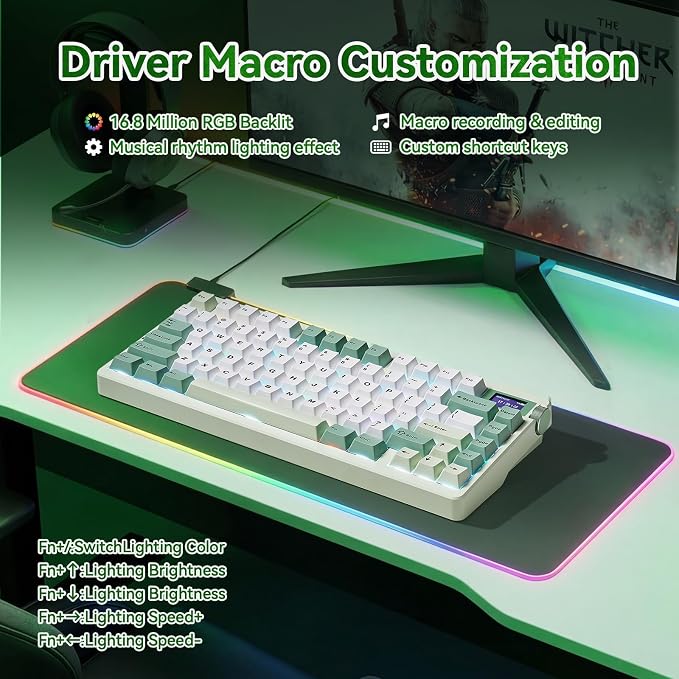
- 【Ultra-Responsive Low-Latency & 16.8M RGB Illumination Customization】: This Gaming keyboard features 20 RGB lighting effects with adjustable brightness and flow rate. The meticulously designed Black&White&Grey Tri-color injection-molded PBT keycaps add a touch of fashion and romance to your desktop. With Aula's dedicated software, you can easily create keyboard shortcuts, macros, and customize RGB LED colors. It's time to fully enjoy the fun of creating a personalized keyboard.
- 【Premium Hot-Swappable Custom Keyboard】: Nova 75 keyboards feature pre-lubricated linear switches paired with south-facing transparent light diffusers, delivering a comfortable typing experience and an impressive, authentic typing sound right out of the box. This Gasket-mounted keyboard's hot-swappable PCB is compatible with 3-pin or 5-pin switches.
- 【Colorful multimedia Display TFT】: The keyboards with TFT screen DIY multimedia display design located in the upper right corner of the keyboard allows you to intuitively display custom GIF images, language selection, volume adjustment, connection mode, WIN/MAC/iOS/Android, backlight brightness/speed, RGB mode effects/colors, and more. The 11°tilt angle of the display will be more in line with visual habits.
- 【FR4 Plate with ENIG Finish】: The Leobog x AULA Nova75 Gaming Keyboard features a premium FR4 positioning plate with an ENIG (Immersion Gold) finish. Compared to softer PC plates, the FR4 material offers greater rigidity, delivering a firmer, more responsive typing feel with a clear, satisfying bottom-out. It produces a crisp, "raindrop-like" sound that keyboard enthusiasts love, while the gold-plated surface ensures excellent durability and a refined, premium aesthetic.
- (Note: For setting custom screen images/GIFs or adjusting the date/time, simply download the official AULA software for Windows and connect your keyboard using the USB cable. The software is completely safe and will not affect your computer.)
- 【Premium Service for One Year】:Encounter quality issues within one year? We'll replace it with a brand-new unit at no cost. Every quality enhancement permeates our entire process?from R&D and production to marketing and sales. We'll respond within 24 hours, ensuring you'll never want to put down our keyboard.
Product description
LEOBOG X AULA Nova 75 Wireless Gaming Keyboards
Introduction to Nova 75 Gaming Keyboard Video
LEOBOG x AULA Nova75 Gaming Keyboard Introduce
8000mAH
PBT Keycaps
Side Function Keys
Ergonomic Kickstand
Switches Parameter Comparison
How do I connect the keyboard?
How do I customize the keyboard?
Is the keyboard compatible with Mac OS?
How can I put the keyboard into sleep mode when not in use?
Is there anything to note when charging the Aula Nova 75 Mechanical keyboard?
The large battery capacity increases the battery life in wireless mode. Please note that don't use a fast charging cable to charge this keyboard.
Double shot PBT keycaps, made from many colors material molded into each others, make the keycaps characters maintain the vibrance and saturation.
Support BT 3.0/5.0, 2.4GHZ wireless and USB-C wired connection. Users can quickly switch between connection modes using the mode switch on the side.
It adjustable Keyboard Stand has 2 adjustable height levels and can make users adjust the keyboard tilt according to their own requirements.
How do I connect the keyboard?
Toggle the side button to 2.4G/BT/Wired mode, then:
2.4G mode: press FN+’~ key for 3s, then plug in the receiver.
BT mode: press FN+1/2/3, search for the device named AULA-F75 3.0KB/AULA-F75 5.0 KB on your pc/tablet/phone, select it to connect.
How do I customize the keyboard?
Download the AULA Nova75 driver software on the website , switch the keyboard's side button to wired mode, then open the software to customize settings via the interface.
Is the keyboard compatible with Mac OS?
Yes, the keyboard is compatible with Mac OS, Windows and Laptop After connectivity, press FN+E = Mac system (the light of E key red flashes for 3s).
Note: driver software only supports Window system in wired mode.
How can I put the keyboard into sleep mode when not in use?
The keyboard will automatically enter sleep mode after 1 minute(you can reset the time via the Driver) of inactivity. To wake it up, simply press any key.
Is there anything to note when charging the Aula Nova 75 Mechanical keyboard?
1. Please use only the USB Cable interface of the computer to charge the keyboard;
2. Don’t use the mobile phone fast charging charger/over-voltage/over-current power adapter to charge the keyboard.