CoreDrive
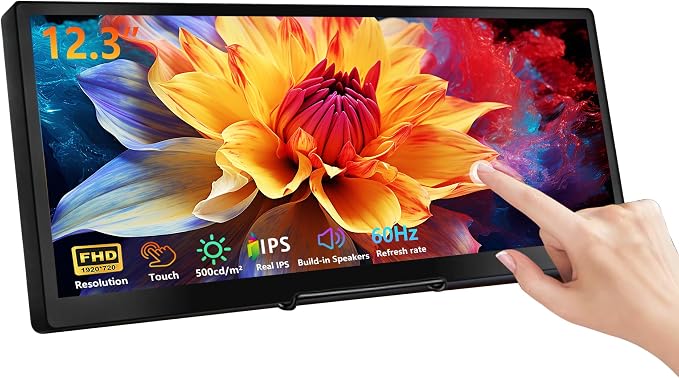
wisecoco 12.3 Inch Touch Screen Monitor IPS 1920x720 Stretched Bar LCD CNC Shell Mini Secondary Screen Portable Display HDMI for Laptop PC Temperature Aida64 GPU CPU RAM Monitoring
wisecoco 12.3 Inch Touch Screen Monitor IPS 1920x720 Stretched Bar LCD CNC Shell Mini Secondary Screen Portable Display HDMI for Laptop PC Temperature Aida64 GPU CPU RAM Monitoring
Couldn't load pickup availability
- 【Upgraded CNC Metal Chassis + 12.3" FHD IPS Touchscreen】:Upgraded model features a one-piece CNC-machined metal back chassis (replacing plastic) for improved durability, scratch resistance and heat dissipation. 12.3" FHD IPS touchscreen with 1920×720 resolution, 178° wide viewing angles and 60Hz refresh rate. Provides distortion-free clear visuals, ideal for multitasking, data monitoring and media playback. - Exceptional Display Quality: The 12.3-inch touch monitor features an FHD screen, 1920x720 resolution, 60Hz refresh rate, and 1000:1 contrast ratio, delivering sharp, vibrant visuals with excellent color accuracy, perfect for both work and entertainment (All displays do not include AIDA64 or similar software; buyers must purchase and download the software themselves, Calibration of the touchscreen is required for first-time use, and the two calibration steps can be found on the product details page.) - Hassle-free Versatile Connectivity: Effortlessly connect with a single USB-C cable for power, data, and display, or use the HDMI and USB ports for broader compatibility with laptops, PC, cameras, and more. *For Type-C one cable connection, ensure your device features a full-featured USB-C port, USB 3.0 or above. *NOT compatible with MacOS and Android - Interactive Multi-Touch & Built-In Speakers: Enjoy precise and responsive multi-point touch functionality, perfect for creative and interactive tasks, paired with built-in dual speakers for clear and convenient audio without external equipment. *The touch function is not available for Mac OS and IOS. - Compact and Sleek Second Monitor: Featuring a slim profile and lightweight build, this 12.3-inch touch monitor is designed for portability and space-saving setups, making it perfect for both on-the-go use. Interfaces are hidden in the back for a tidy workspace. - Flexible Display Modes for Versatile Use: Supports multiple display modes, including duplicate, extended, and secondary, allowing you to mirror your screen, expand your workspace, or use it as a primary display for various tasks, enhancing your workflow and multitasking capabilities.
Product description
The screen shows "no signal", what can I do?
Why is the touch inaccurate?
What can I do if there's vertical lines or dead pixels on the screen?
The screen shows "no signal", what can I do?
If you see "No Signal" screen, please check and confirm all cables are connected correctly, unplug and re-plug the HDMI cable, or try a new HDMI cable.
Why is the touch inaccurate?
Please go to the Control Panel, select View by Large Icons, select Tablet PC Settings, select Tablet PC Settings, select Setup and follow the on-screen instructions to identify your screen as a touchscreen
What can I do if there's vertical lines or dead pixels on the screen?
Please keep the monitor connected with the PC/laptop for 24 hours, the lines will disappear itself.
Share