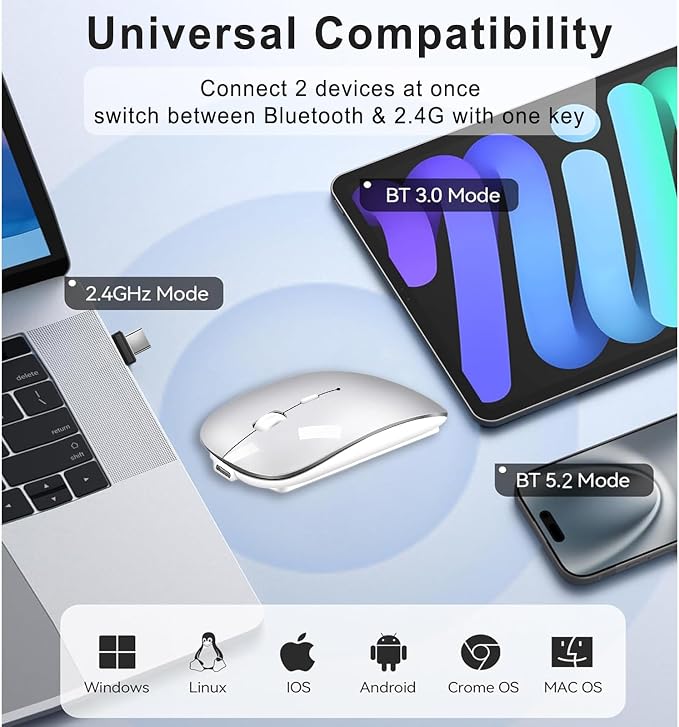
- 2025 New Upgrade 4-Mode Wireless Mouse - The usb c wireless mouse easily switches between 4 connections (BT5.2 & BT3.0 + USB-A/C). Switch from office laptop to MacBook in 2s. USB-A & USB C dual-head receiver compatible with all electronic devices' port - USB-C and USB-A. (Requires a Bluetooth-enabled macOS 10.15 or later, iOS/iPadOS 13.6 or later)
- Upgrade Newly Mouse with Jiggler Mode- Press the DPI button for 3s to Turn ON/OFF Random Jiggler Mode to keep your Mac active during online reading/online courses/games tasks/Zoom meeting/OS updates/cloud backups/video calls/downloads. Fit for remote workers needing "away" protection, students safeguarding download progress.
- Advanced Bluetooth Technology - BT5.2 delivers 30% faster response than standard mice. The wireless mouse for mac fits for Excel and CAD users. 3 DPI(800/1200/1600) presets adapt to spreadsheet navigation, presentation mode. (Note: Please use a mouse pad for a better experience)
- Silent and Ergonomic Design - 96% noise-reduced clicks + 68g lightweight design. Work in library without disturbing others. Ergonomic design with elegant profile ensure maximum comfort after long working hours. (Suteke quiet wireless bluetooth mouse is fit for small or medium palm grip/finger grip)
- Charge 1-2 Times Monthly - 30 days office use (about 10 days in BT mode), 2.5h USB-C charge (can work while charging). Suteke wireless rechargeable mouse for macbook air will enter auto-sleep mode after 10 minutes of inactivity to save power. (One-click instant wake-up)
- Universal Performer - The electronic mouse for macbook air works with multi-device systems including Mac OS/Win7/8/10/11/Linux/Android/iPad OS. Enjoy Suteke 18-month warranty.
Product description
Wireless Bluetooth USB C Mouse with Jiggler
Does it work with my Macbook Pro?
How to use the Jiggler?
Why does the Bluetooth disconnect frequently?
I can't find "BT5.2 Mouse".
Does its jiggler mode interfere with normal mouse usage?
Does it work with my Macbook Pro?
Yes, it works with iOS, Mac OS, iPad OS, Windows, Linux, Android, etc. (Requires a Bluetooth-enabled Mac OS 10.15 or later, iOS/ iPadOS 13.6 or later)
How to use the Jiggler?
Please press the DPI button for 3s to turn on/off the jiggler.
Why does the Bluetooth disconnect frequently?
Please try the following methods. Charge it; Click any button to wake up (in sleep mode); Set the computer power mode to "Balanced".
I can't find "BT5.2 Mouse".
Please delete the connection record (check if other devices are in connection), turn off the device and mouse for 10s, restart the device first, then restart the mouse Bluetooth mode, press the Right & Left buttons and rolling wheel together for 4s.
Does its jiggler mode interfere with normal mouse usage?
Please don't worry, it becomes an normal mouse after turning off the Jiggler mode.