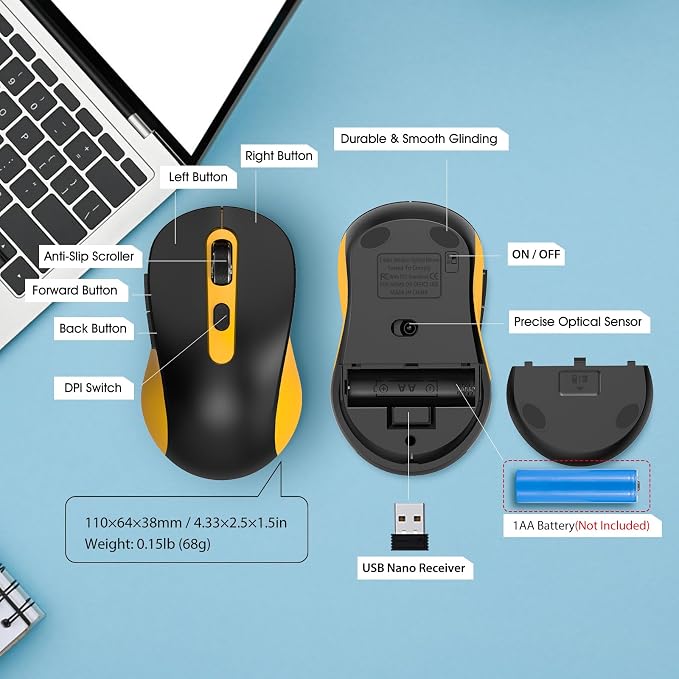
- Plug and Play - 2.4GHz wireless technology can provide a stable signal. The use range is up to 33 feet(10m), ensuring no delay or dropout.without downloading any drivers?just plug the USB receiver (stored on the back of the mouse) into your device, and it's ready to use
- Multi-function & Efficiency - 6 efficient buttons for excellent productivity, convenient forward/back buttons for increased work efficiency. 3 DPI (1000/ 1600/ 2400) and 5 million keystrokes tested, making every click precise and accurate
- Ergonomic Design - The contour shape of the 2.4G wireless mouse is suitable for the palm, sweat resistant, skin friendly, and can achieve maximum comfort. The rubber wheels of the USB wireless mouse are sturdy and enduring, ensuring that your hands do not slip while scrolling. Significantly reduces stress on thumbs and wrists when in use
- Energy Saving & Eco-friendly - Only 1 AA battery lasts up to 12 months (battery not included). It enters sleep mode after you leave for 10 minute, Double click the left and right keys to wake up Reduces the need to replace batteries
- Wide Compatibility - Well compatible with Windows7/8/10/11/XP/Vista, Mac OS, Linux, Chrome OS and Android operating systems. Fits for desktop, laptop, PC, Macbook, Chromebook and other devices with USB-A port
Product description
3 Adjustable DPl & Quiet Click
Ergonomic Design
Hidden Light Design
Auto-Sleep Mode
If the mouse does not respond how can l re pair the mouse?
Is it compatible with Mac OS?
Why is there no laser response at the bottom when turning on the mouse switch?
Can I adjust the DPI speed of this wireless mouse?
Mouse has a 3-level adjustable DPI-1000/1600/2400, allowing for easy adjustment of cursor sensitivity as needed.Quiet design allows you to use the mouse anywhere without disturbing others.
Ergonomic design to fit snugly and with a smooth finish to make it comfortable to use.
Which avoids discomfort caused by strong lightat the bottom of the mouse to the eyes
The mouse will automatically enter sleep mode after a period of inactivity, ensuring the durability of the battery.
If the mouse does not respond how can l re pair the mouse?
1.Unplug the receiver of computer.
2.Simultaneously press and hold the wheel button, the left button, and the right button for 5 seconds. (no lights wilight up)
3.nsert the USB receiver into the computer within 15 seconds
Is it compatible with Mac OS?
The mouse cannot use the side button function on Mac OS system.
Why is there no laser response at the bottom when turning on the mouse switch?
Mouse adopts a hidden laser design, it avoids discomfort to the eyes caused by strong light at the bottom of the mouse.
Can I adjust the DPI speed of this wireless mouse?
Yes, the mouse has 3 adjustable DPI levels: 1000, 1600 and 2400. You can switch freely to suit office work, document editing and casual gaming needs.