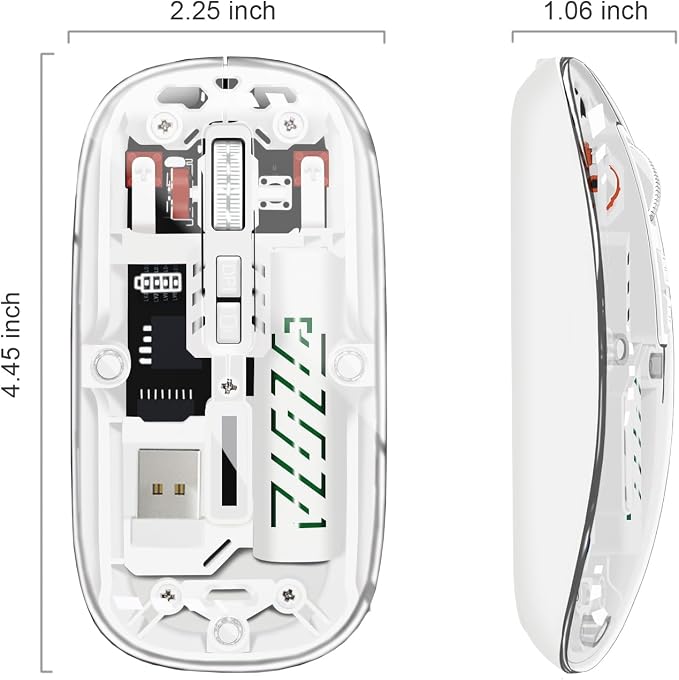
- Wireless Mouse with Dual Mode: The bluetooth mouse switches easily swap between two devices once Bluetooth (BT 5.2) pairing has been completed or plugged into the USB. It can connect to one device via Bluetooth and another via a 2.4 GHz USB receiver
- Unique Design: The USB C mouse is a slim wireless mouse with a removable top cover made of transparent PC material. It matches the colorful breathing light within, which changes at random while in use and appears fashionable and cool
- One-Click Desktop: One-click back to the desktop is a shortcut button on this bluetooth mouse that allows you to return to the desktop with a single click, making it useful for work and privacy protection
- PC Mouse with Wide Compatibility: This laptop mouse is easy to use. Bluetooth mode works with Windows, Android, and MAC OS systems. 2.4Hz Wireless Mode works with the laptop, desktop, or any device with a USB port, plug and play with USB receiver
- System Support: BT5.2 System Requirement: Windows 8.0, Windows 10 or later; Mac OS X 10.10 or later;iPad OS 13 or later/ Android 5.0 or later. Please check or update the operating system before using it
- Three Adjustable DPI: The computer mouse with three adjustable precision levels (800/1200/1600 DPI); you can choose the cursor speed that suits you
- Rechargeable Mouse: Built-in 400mAh rechargeable battery, charge the mouse with a Type-C charging cable (included) simply. No need to change batteries. Battery indicator shows current battery level. It turns off when the mouse is working to save power
- Silent Click, More Focus: The silent mouse uses silent click technology to create a calm environment, allowing you to stay focused on your work. It is an ideal wireless mouse for an office, conference room, cafe, library, or bedroom
Product description
Transparent Rechargeable Two Mode (BT5.2+2.4G) Wireless Bluetooth Mouse
Transparent Mouse with 7 RGB Lighting Effects
Rechargeable with Battery Level Display
Breathing Light
User-friendly design provide all-day comfort for work and entertainment
PLEASE NOTE:
Why the LED battery display dose not light up?
What is DPI? Is it mouse sensitivity? How to adjust it?
Why can't the mouse connect to your iPhone/iPad?
Why Bluetooth is connected and then disconnected after few minutes?
If found the 'BT5.2 Mouse', but can't connect, what should you do?
The mouse has a built-in rechargeable battery that lasts for several weeks on a full charge with a short charging time. Please simply charge the mouse with Type C charging cable (included), no need to change batteries.
This computer mouse with seven different colorful LED breathing lights, the colorful breathing light on the mouse changes randomly while in use(It can't be set to one specific color). Offering soothing lighting. Creating a cool and fancy atmosphere for office and play, adds more fun to the life.
Why the LED battery display dose not light up?
To save the power, the display will only light up when you turn on the mouse and show the remaining battery.
What is DPI? Is it mouse sensitivity? How to adjust it?
Yes, the DPI is mouse sensitivity, the higher the number (Max. 1600) is, the more sensitive the mouse is. To adjust the DPI please press the DPI button (placed between the left and right click). Each press switches to the next sensitivity.
Why can't the mouse connect to your iPhone/iPad?
Very sorry! Please check if your version is updated to iOS 13.1..2 or later version.For IOS system, our mouse is only compatible with iOS 13.1.2 or later version.
Why Bluetooth is connected and then disconnected after few minutes?
1.Low bateery (please charge) 2.Computer hibernation (please set the power mode to 'balance' mode)
If found the 'BT5.2 Mouse', but can't connect, what should you do?
Please delete 'BT5.2 Mouse '--turn off the mouse--turn on the mouse and click button--blue light flash--Reconnect 'BT5.2 Mouse'