CoreDrive
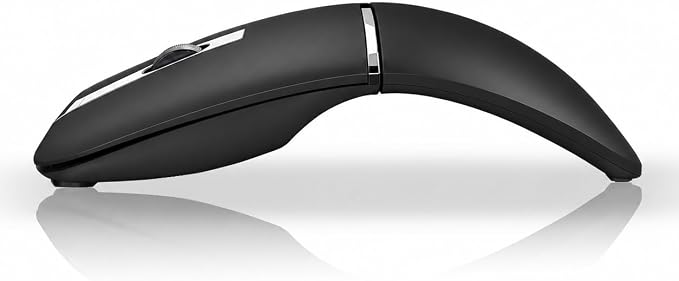
Wireless Mouse Bendable – Rotating Design Tri-Mode (BT 5.0/4.0 + 2.4GHz)arc Rechargeable Travel Wireless Mouse for Microsoft Laptop PC Tablet Graphite Black
Wireless Mouse Bendable – Rotating Design Tri-Mode (BT 5.0/4.0 + 2.4GHz)arc Rechargeable Travel Wireless Mouse for Microsoft Laptop PC Tablet Graphite Black
Couldn't load pickup availability
- 【Whisper-Quiet Comfort】 Enjoy your work or browsing without the constant clicking noise. This Bluetooth mouse offers soft, noise-reduced clicks for a calm, distraction-free experience?perfect for late-night use, meetings, or travel. - 【Ultra-Slim, Ready to Go】 Designed with a sleek arc shape and lightweight body, this mouse easily slides into any bag, backpack, or even your pocket. Ideal for travelers, digital nomads, and anyone who works on the move. - 【Slim Rotatable Design, Fits Anywhere】 Twist and flatten the mouse in seconds for effortless portability. Slip it into your pocket or laptop sleeve without bulk. Wide compatibility with Windows 7?11, Linux, Dell, Lenovo, Chromebook, laptops, PCs, and more. - 【Work on 3 Devices at Once】 Connecting 2 device through Bluetooth 5.0 and Bluetooth 4.0 and the 3rd one through a 2.4GHz USB dongle. Switch between devices in a heartbeat. perfect for moving seamlessly between a desktop and tablet, or laptop and Mac, without re-pairing. - 【Recharge Once, Use for Days】 Built-in rechargeable battery that lasts up to about 30 days on a single charge. Includes a USB-A to Type-C charging cable (USB-A plugs into your computer, Type-C connects to the mouse) for quick and convenient recharging. No more battery swaps. - 【Warranty Service】 This bluetooth mouse enjoys 60-day money-back + 36-month warranty.
Product description
Features a unique elevated design that keeps your hand in a natural, relaxed posture, helping to minimize fatigue and muscle tension.
Switch effortlessly between three sensitivity levels ? 800, 1200, and 1600 DPI ? to match your gaming, work, or everyday browsing needs.
How to Adjust: Press and hold the Left and Middle Mouse Buttons together for about 3 seconds. The indicator light will start flashing ? count the flashes to confirm your new DPI setting, then release the buttons once the flashing stops.
1 flash = 800 DPI
2 flashes = 1200 DPI
3 flashes = 1600 DPI
Each press cycles through the three levels in order.
This silent mouse works seamlessly with PC, Mac, Chromebook, Laptop, Notebook, Tablet, Desktop, Smartphone, and other devices.
How to Connect
2.4GHz Wireless Mode:
1. Take out the USB receiver from the storage compartment located at the bottom of the mouse and plug it into your computer’s USB port.
2. Switch the power to the 2.4G mode (left side). The mouse will be ready to use immediately.
Bluetooth Mode:
1. Switch the power to the Bluetooth mode (right side).
2. Press and hold the Bluetooth pairing button for about 3 seconds until the scroll wheel indicator flashes blue.
3. On your device, search for “BT5.0 Mouse”, then click to pair. Once connected, the scroll wheel light will turn off, and the mouse is ready to use.
Share