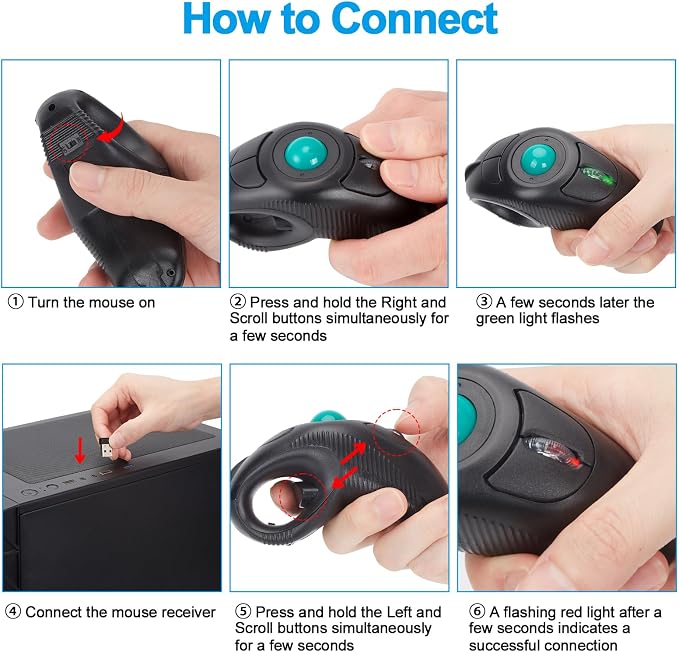
- Wireless - Charged by AAA battery, plug and play, easy to install.Easy to use - left or right hand, or cradled between both. Press then appear laser pointer for presentation. Please use your own batteries instead of the ones included in the package.
- Off table and without limitation of operational space. Scrolling function can be controlled simply by your thumb. USB 2.0 interface, plug and play, no software required
- Ergonomic Design - handheld trackball mouse wireless, which can avoid any harm on your wrist and muscle, greatly reducing the chances for Arthritis and CTS suffers
- Ideal for both laptops and desktops. Place end of index or middle finger on trigger button & thumb on roller ball
- Package Included - 1 x Wireless Finger HandHeld USB Trackball Mouse with Laser Pointer, 1 x USB Receiver, 1 x bag
Product description
Wireless Mouse Specifications
Can it be used while charging?
Does it work with Mac computers?
Is it easy to carry around?
Does it require any software to install?
Can it be used by left-handed people?
USB 2.0 interface, plug and play, no software required.
Ideal for laptops and desktops, NOT for mobile phone and tablet.
Compatible with: Win7/ Win10/ Windows XP / VISTA /Linux / Unix / Mac OS.
This mouse is very convenient for changing batteries. When the original battery runs out, you only need to replace it with a new AAA battery to continue using it.
Can it be used while charging?
The mouse uses a single AAA battery. You can simply swap in a new one when it dies. Customers say the battery lasts a long time due to low power consumption, especially if you use the on/off switch when not in use.
Does it work with Mac computers?
Yes, the mouse is compatible with Mac OS, as well as Windows XP, Vista, Win7, Win10, Linux, and Unix. With USB 2.0 plug-and-play connectivity and no software required, it works seamlessly on Mac once you plug in the USB receiver.
Is it easy to carry around?
Yes, the Welspo Wireless Mouse is portable and travel-friendly. Customers say it's especially handy when you need to move around while using your computer?ideal for presentations, classroom use, or working from different locations.
Does it require any software to install?
No, the Welspo Mouse requires no software installation. It's USB 2.0 plug-and-play?just insert the USB receiver and it's ready to use. Customers say it works out of the box with no drivers needed on any compatible device (Windows, Mac, etc.).
Can it be used by left-handed people?
Yes, the mouse is designed for both left and right-handed users. It features left/right clickers and fits comfortably in either hand, with the thumb controlling the trackball?making it equally suitable regardless of which hand you prefer.