CoreDrive
VisionTek VT4800 Thunderbolt 3 Docking Station Dual 4K Monitor USB-C 60W | Dual 4K Display via HDMI/DP 60W PD Thunderbolt 3/USB-C/USB4 Universal Compatibility 40Gbps data Hybrid Workstation Hub
VisionTek VT4800 Thunderbolt 3 Docking Station Dual 4K Monitor USB-C 60W | Dual 4K Display via HDMI/DP 60W PD Thunderbolt 3/USB-C/USB4 Universal Compatibility 40Gbps data Hybrid Workstation Hub
Couldn't load pickup availability
- DUAL 4K MONITOR DOCKING STATION - Connect up to two 4K monitors at 60Hz via DisplayPort and expand your workspace for video editing, design, and multitasking. A powerful dual monitor docking station for MacBook Pro and Windows laptops. (Note: Base M1/M2/M3 chips support 1 display; Pro/Max support 2) - THUNDERBOLT 3 & USB-C DOCKING STATION - Get up to 40Gbps bandwidth for fast file transfers and smooth multitasking. Compatible with Thunderbolt 5, Thunderbolt 4, Thunderbolt 3, and USB-C DP Alt Mode laptops for flexible, plug-and-play connectivity without the cost of high-end docks - ONE CABLE FOR A CLEAN, CONSISTENT WORKSPACE ? Connect your monitors, keyboard, mouse, storage, and internet through a single cable. Perfect for hybrid work and home office setups that need a simple, repeatable workstation - WORK AND CHARGE WITH 60W POWER DELIVERY ? Keep your laptop powered while you work with a single connection. Reduces cable clutter and keeps your desk organized for daily use - MORE RELIABLE THAN BASIC USB-C HUBS - Built for stable, everyday performance, this dock reduces display dropouts, disconnects, and lag common with lower-cost adapters, making it a dependable choice for professional work and creative tasks
From the manufacturer
Supported Resolutions - Thunderbolt 3 / Thunderbolt 4 Host System
VT4800 Dual Display Thunderbolt 3 / USB-C Docking Station with 60W Power Delivery - 901292
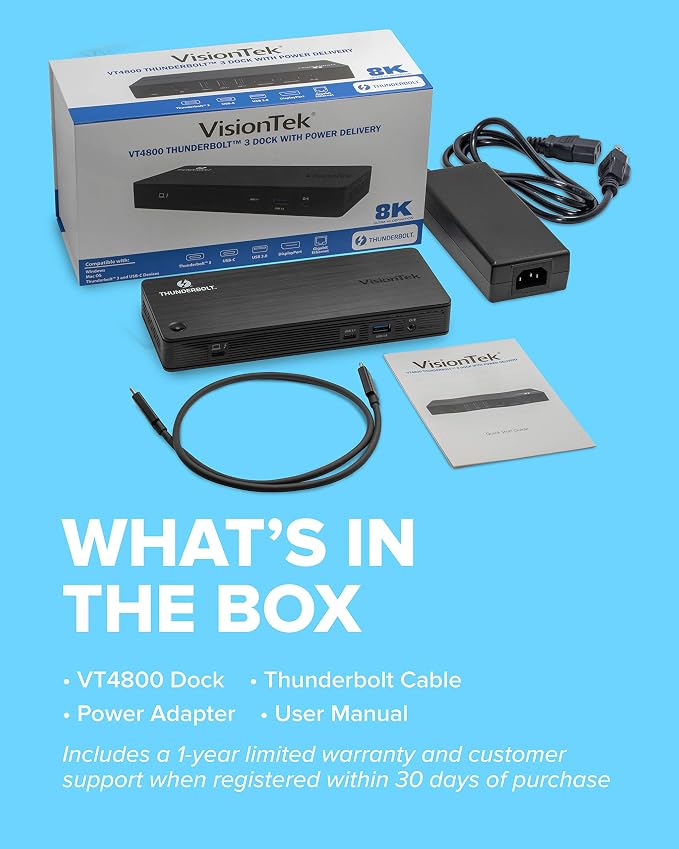
In the Box
VT4800 Docking Station | 130W DC 20V/6.5A Power Adapter | Thunderbolt 3 Cable (0.7m) | User Manual
Key Features
System Requirements:
Note: For USB-C connection, transfer speeds and supported resolutions are dependent on the host system USB-C port capabilities. For best performance connect to Thunderbolt 3, Thunderbolt 4, USB4 or USB-C 3.2 Gen 2 host.
Featuring genuine universal driverless compatibility for Windows and Mac, USB-C and Thunderbolt 3 systems, the VT4800 is the perfect dock for multi-display mixed environment systems where multitasking is crucial. Providing 60W power delivery, the VT4800 dual display dock uses a single Thunderbolt 3 or USB-C connection.
Powered by DP Alt mode over Thunderbolt 3 or USB-C technology transforming your system into a workstation. Connect up to 2 x 4K UHD displays via DisplayPort.
Works in PC and Mac environments
Compatible with Thunderbolt 3, Thunderbolt 4 or host systems with full featured USB-C with DP Alt Mode and USB-C PD. Connect 2 external monitors, transfer files up to 10Gbps, and add wired ethernet all from a single port.
Connectivity Elevated to the Next Level
Increase productivity with the VT4800 plug-and-play, power delivery docking station. The VisionTek VT4800 Thunderbolt 3 and USB-C Docking Station with Power Delivery is built to work hand-in-hand with Windows and macOS systems. With a one USB-C or Thunderbolt 3 connection, you can connect up to two external monitors, transfer files and data at up to 10Gbps, play audio, charge mobile devices and your system.
Thunderbolt 3
Intel’s Thunderbolt 3 technology offers fast data transfer and DP Alt Mode video transmission over a single cable. With Thunderbolt 3, one port is now able to connect to every display, countless USB devices, and docking stations without digging for separate cables or adapters. This single-cable dock connection provides the highly valued connection that makes docking stations such a powerful solution.
USB-C DP Alt Mode
DP Alt Mode is an optional capability of USB Type C that enable it to transfer video signals. Previously connecting to external monitors required the use of HDMI or DisplayPort adapters. However, with the introduction of DP Alt Mode, host devices can extend to an additional display using the USB-C cable directly without any adapters.
Single Display Support:
Dual Display Support:
Supported Resolutions - USB-C Host System
Single Display Support:
Dual Display Support:
Share