- Innovative Touch Pad for Effortless Control: Stand out with the VEIKK A30 graphic tablet's unique touch pad featuring 4 customizable touch keys and a gesture pad ? perfect for young artists and designers seeking a modern, intuitive experience that delivers stable, responsive performance for seamless digital creation
- Pro-Level 8192 Pressure Sensitivity with Battery-Free Pen: Achieve natural, precise strokes on this drawing tablet with 8192 levels of pressure sensitivity, ensuring smoother lines and lifelike details; the included battery-free stylus eliminates interruptions, allowing endless drawing sessions without charging or replacements
- Versatile Compatibility Across Devices and Software: Designed for drawing, graphic design, online teaching, e-signatures, and photo/video editing, this pen tablet works flawlessly with Windows 7+, macOS 10.12+, Android 6.0-13.0 (via OTG connector for phones ? note: iPhone/iPad not supported), Linux, and top programs like Photoshop, Illustrator, SAI, Clip Studio, Krita, and more
- Spacious 10x6 Drawing Area with User-Friendly Type-C Port: Unlock expansive creativity on the A30 digital art tablet's ultra-large 10x6-inch active area, ideal for detailed work; the reversible Type-C port ensures quick, stable connections in either direction, while ambidextrous design suits both left- and right-handed users for ultimate comfort
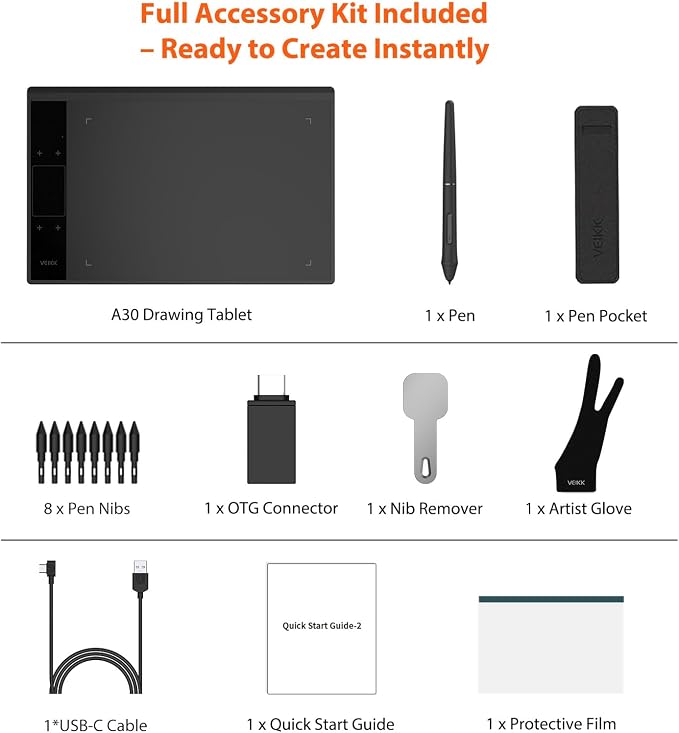
- Exceptional Value with 1-Year Warranty and Free Accessories: Get everything you need right out of the box ? including 8 replacement nibs, OTG connector, artist glove, and pen pocket ? backed by VEIKK's top-rated customer service, lifetime free driver updates, and a full hardware warranty to support your artistic journey without extra costs
Product description
Feel Every Unique Touch Moment
Easy Connect
Battery-free,High Performance
Large Creative Area
Multi-Software Support
Draw, Write and Learn with A30 Drawing Pad
Start Your Drawing Journey
Learn and Work From Home
Make Design Quicker and More Fun
Build Your Own Role
Edit Photos Precisely
A30 Graphics Drawing Tablet Technical Specifications
VEIKK Creator Series Drawing Tablet
VEIKK Drawing Tablet x Medibang Paint
By default, The A30 Graphics Tablet's Touch keys functions are set up for Photoshop. All touch keys can be customized to different functions on driver according to your drawing habit. With the TrackPad, you are able to rapidly adjust brush size, hardness, flow, and opacity, as well as perform actions like zooming in and out and dragging an image.
NOT a standalone product. Compatible with Windows 7 or later, Mac OS X 10.12 or later, Android 6.0 or later and Linux.
8192 levels of pressure sensitivity, 290 PPS and 60° tilt battery-free stylus constantly deliver precise and natural lines and strokes.
10 x 6 inch large working area, which provides more space for art creation. Only 9 mm thickness and 570g lightweight, it’s portable to take anywhere.
Compatible with most software,such as Adobe Creative Software, Sai, Corel Painter, MediBang Paint,Clip Studio, Krita, ibisPaint,Zbrush, Zoom and etc.
Supports digital drawing, painting, sketching, E-signatures, E-learning, remote work, photo editing, etc. One pen tablet, can be used for at least 5 different fields.
Instead of drawing on paper, using a A30 drawing tablet to help you start your art creation easier, simply and environmentally. Come join us to build a digital art world!
Whether your study or job requires a lot of annotations, video conference presentations, A30 drawing tablet will make it easier to interact with and engage your students, teachers or colleagues.
You have no need to lift up and move when you want or go to a differnet part of the computer screen with a pen tablet, which giving you the natural flow of your hand motions.
It can utilize the tablet’s pressure sensitivity to make tasks such as digital sculpting and texturing easier on Zbrush, Blender or Maya.
With the pressure settings on the pen, paired with the freedom of movement using a stylus instead of a mouse, allow for more precise changes while working on fine details like dodging, burning, etc.
All you need is a Veikk Drawing Tablet and MediBang Paint.