CoreDrive
Upperizon Portable Monitor 15.6 inch 4K UHD 3840X2160 100000:1 100% DCI-P3 60Hz OLED Touchscreen HDR HDMI USB-C Travel Monitor for Laptop MacBook PC Surface PS5 Xbox External Display with Kickstand
Upperizon Portable Monitor 15.6 inch 4K UHD 3840X2160 100000:1 100% DCI-P3 60Hz OLED Touchscreen HDR HDMI USB-C Travel Monitor for Laptop MacBook PC Surface PS5 Xbox External Display with Kickstand
Couldn't load pickup availability
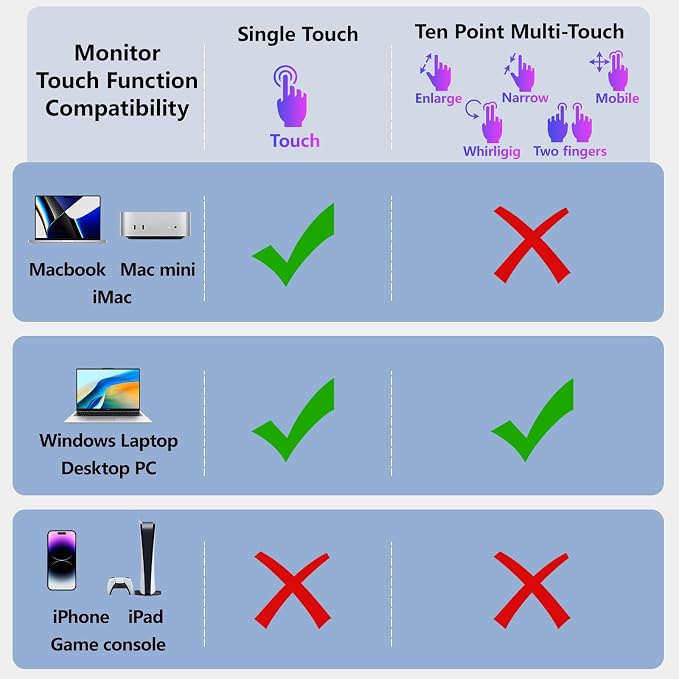
- Portable Monitor OLED 4K Touchscreen: Upperizon 15.6 Inch portable monitor is OLED UHD 4K 3840 x 2160 Super Clear screen, and it delivers 100% DCI-P3 color gamut, 100000:1 Contrast Ratio, 350 cd/m² Brightness, 178° Wide viewing angle, 60 Hz refresh rate - Professional for Color Grading: The color gamut DCI-P3 covers a 25% larger area of the chromaticity diagram, pretty similar to AdobeRGB. This 100% DCI-P3 portable display can output more saturated and vivid colors across the board. Best for color grading, colorists and designers will have more enjoy in post-production, and creatively use color to bring mood, excitement, and drama to a scene - Portable, Ultra Slim & Light Weight: Measuring only 0.17 inch at the slimmest point and 1.9 lbs weight, beautiful design, it's a good choice for business trip and travelling. This portable OLED monitor supports portrait and landscape mode to meet your different needs. We also provide a sleeve case in the box. With the patented kickstand, this portable monitor for laptop is ease to set up and stable, also saves your space on the desk - To use the Touchscreen: 1)When using HDMI cable for display, please use the USB-A to USB-C cable to connect your Windows laptop/computer PC to the monitor for touching signal. 2)“10-point” Touchscreen is only supported on Windows, and is NOT supported on MacOS. 3)iPad, iPhone, game consoles (PS4, PS5, Xbox, ...) do NOT support touchscreen - Get Start to Plug and Play: This 4K portable monitor is equipped with two USB-C ports (for video&power) and one mini HDMI port. It’s compatible with most of the laptops. Also this OLED monitor has a USB-C OTG port for you to connect with keyboard or mouse. We recommend to use the original 45W PD power adapter for sufficient power supply
Product description
Why it doesn't work when I connect the monitor with my device by my own USB-C to USB-C cable?
What can I do if my portable monitor flickers?
What if my laptop doesn't have a USB-C or HDMI port?(e.g Old Surface Pro/ HP Elitebook/ old MacBook )
What should I do if touchscreen does not work?
My Android phone has a USB-C port, does this monitor work with my phone/tablet by the original USB-C to USB-C cable?
Why it doesn't work when I connect the monitor with my device by my own USB-C to USB-C cable?
Please make sure the USB-C port on your laptop is a thunderbolt 3/4 port or supports DisplayPort Alt mode.
There're two kinds of USB-C cables, USB-C charging cable and USB-C video cable (our original one). Your own cable may be only a charging cable.
What can I do if my portable monitor flickers?
Please make sure you’re powering the monitor by the original wall charger we provided in the package. And also please do NOT connect the USB-C OTG port to power source.
What if my laptop doesn't have a USB-C or HDMI port?(e.g Old Surface Pro/ HP Elitebook/ old MacBook )
You need a (mini)DP to HDMI adapter for connection.
What should I do if touchscreen does not work?
1)For HDMI/DP connection, please use the USB to USB-C cable for touching signal transmission.
2)All gaming devices like PS4, PS5, Xbox do NOT support touchscreen.
3)Do NOT support iPhone or iPad for touching. Do NOT support multi-touch with MacOS.
My Android phone has a USB-C port, does this monitor work with my phone/tablet by the original USB-C to USB-C cable?
These Samsung phones (Galaxy S8/S9/S10/S20/S21/S22series; Galaxy Note8/9/10/20series; Galaxy Fold, Z Fold 2/3/4) can work with monitor by our original USB-C cable.
Other phones/tablets need HDTV cable and mini HDMI to HDMI adapter for connection.
Share