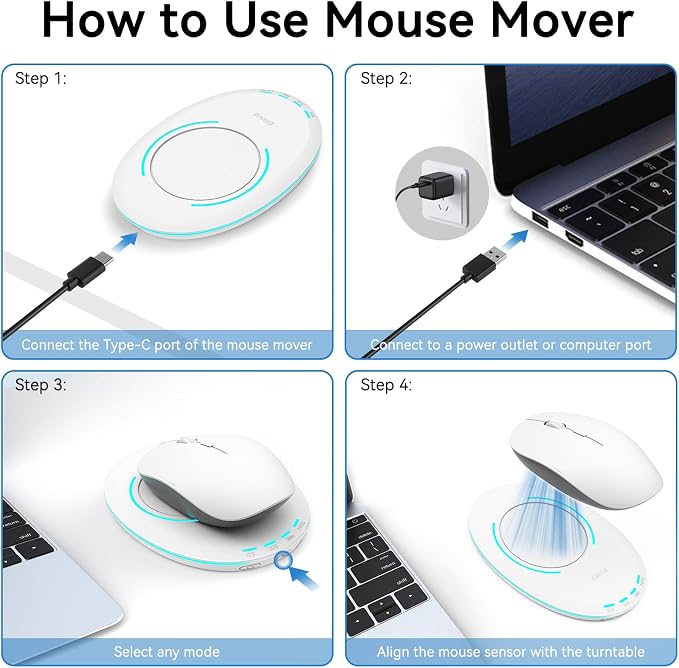
- Ultra-Slim Design for Efficient Use: The Giecy Ultra Slim Mouse Mover features a sleek and lightweight design, with a thickness of only 16mm, making it easy to carry and use anywhere?whether at home, in the office, or on the go. Keep your computer active and productive at all times.
- Adjustable Interval Timer: Equipped with an adjustable interval timer, Giecy mouse mover allows you to set the frequency and duration of the mouse movements according to your needs. Prevent your computer from entering sleep mode and maintain your workflow without interruptions.
- Realistic Mouse Movement Simulation: Giecy undetectable mouse jiggler simulates natural mouse movements to keep your computer active. It’s undetectable by most systems, ensuring continuous operation without being flagged.
- Silent Operation with Breathing Light: The Giecy Mouse Mover operates silently and undetectably, with a gentle breathing light that adds a touch of technology without disturbing your work or rest.
- Compatibility and Ease of Use: Compatible with various systems and devices, the Giecy Mouse Mover requires no software installation. Simply plug it in and start using it, making it ideal for users who need to keep their computers active for extended periods.
- Note: The "Power Button" on this product actually functions as a Pause Button; pressing it stops the turntable, but the internal timer continues to run. When powering the device back on, the turntable will not begin rotating until it has completed the remainder of the previous countdown; therefore, it may not start immediately. To fully reset the timer, please unplug the USB power source and plug it back in; this will restore the device to its default 10-second setting.
Product description
After pressing the power button to turn it off and then back on, why does the turntable spin intermittently?
The product is powered on, but the turntable is not rotating. Is it broken?
What should I do if the turntable still doesn't spin after lightly tapping the back?
How do I loosen the screw in the center of the turntable?
After pressing the power button to turn it off and then back on, why does the turntable spin intermittently?
The power button effectively functions as a "pause button." Upon restarting the device, the dial will resume and complete the remaining duration of the previously unfinished interval. This is normal behavior and does not indicate a malfunction.
The product is powered on, but the turntable is not rotating. Is it broken?
Please do not worry; this does not indicate that the product is damaged. You may first try gently tapping the back of the product (the side without the turntable) 1?2 times; the turntable will typically resume rotating.
What should I do if the turntable still doesn't spin after lightly tapping the back?
If gentle tapping proves ineffective, you may try loosening the screw located at the center of the dial. This screw may have been overtightened during manufacturing; loosening it slightly can effectively restore the dial's functionality.
How do I loosen the screw in the center of the turntable?
Locate the small circular washer at the exact center of the turntable and remove it; underneath lies a screw?loosen it only slightly, taking care *not* to remove it completely.