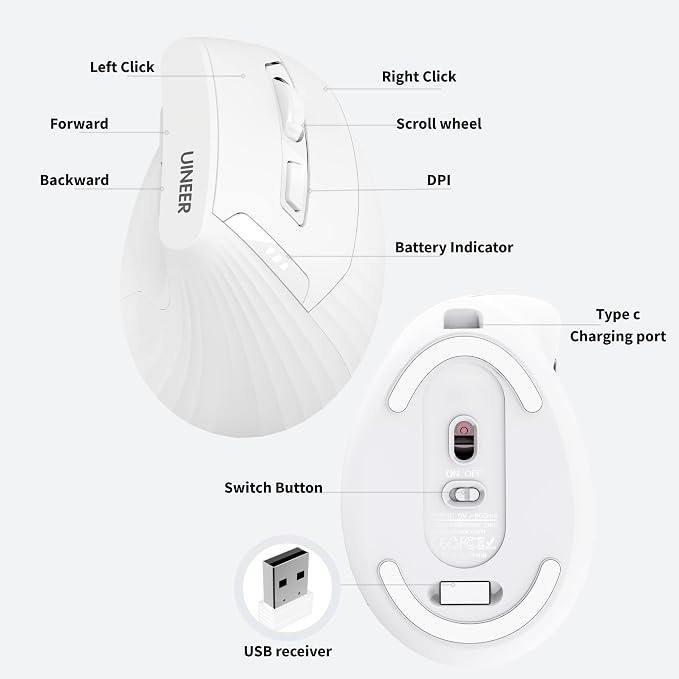
- 【Ergonomic Vertical Design】This ergonomic wireless mouse keeps your wrist naturally extended, positioning your forearm and wrist in a more natural, relaxed posture. Compared to standard mice, it reduces discomfort and fatigue, helping boost productivity while lowering the risk of repetitive strain injuries. Optimized for right-handed use, it promotes healthy posture for all-day work, study, or gaming. This mouse for laptops features a side scroll wheel for efficient horizontal scrolling, along with forward and back buttons for quick page switching or returning to the previous page, making web browsing and document editing effortless.
- 【Plug-and-play 2.4G wireless connection for stable transmission】 This wireless mouse utilizes 2.4G wireless technology with plug-and-play functionality?simply insert the USB receiver (built into the mouse bottom) into any USB-A port for a stable connection. Its one-to-one receiver design minimizes interference, delivering faster transmission speeds and more reliable connectivity. With an effective working range of up to 10 meters, this vertical wireless mouse is highly portable. Its lightweight and minimalist design makes it an ideal choice for travel, office, and home use.
- 【4 Adjustable DPI for Versatile Scenarios】This optical tracking mouse features a high-performance chip supporting four adjustable DPI levels (800/1200/1600/2400), delivering heightened sensitivity for precise optical tracking. It ensures smooth operation across various surfaces, catering to diverse needs?from document processing and design work to casual gaming. Effortlessly navigate web pages and boost your productivity. Note: None of the buttons are programmable.
- 【Responsive Click & Rechargeable Smart Power Saving】This wireless laptop mouse features responsive left and right buttons for precise clicking. Ideal for offices, libraries, or any environment requiring focused work or gaming. Rechargeable with long-lasting battery life: Say goodbye to frequent battery changes! Smart power-saving mode: Automatically enters sleep mode after 10-30 minutes of inactivity, waking up with a single click. Low-battery LED indicator alerts eliminate power anxiety.
- 【Adjustment Period】It may take some time to adapt to the shape of our ergonomic mouse upon first use, which could initially feel uncomfortable in your grip. We recommend allowing 1-2 weeks for adjustment. Many users find this helps reduce wrist strain and pain from prolonged mouse use while enhancing overall comfort.
Product description
Wireless Ergonomic Mouse
59°Ergonomic Comfortable Angle
My mouse sometimes loses connection, what should I do?
The mouse pointer is too slow or too fast, how can I adjust it?
The mouse includes a USB receiver, but I cannot find the receiver in the package I received. what should I do?
Vertical Mouse allows you to hold it in a "natural handshake" posture, making your workday more relaxed and enjoyable. It provides an unprecedented level of comfort in front of your computer.
This unique angle elevates your wrists, reduces stress, and keeps your forearms in a comfortable position?providing significant comfort after a long day at your desk.
My mouse sometimes loses connection, what should I do?
The mouse will enter sleep mode after 8 minutes of inactivity.press any key to wake it up, and then click again to use it normally. Note: This is not a disconnection, it's just entering power-saving mode.
The mouse pointer is too slow or too fast, how can I adjust it?
This wireless mouse has 4 levels of DPI adjustable: 800-2400DPI. It is recommended to use 800/1200 for browsing and 1600/2400 for precision. You can adjust the appropriate DPI by pressing the button below the scroll wheel
The mouse includes a USB receiver, but I cannot find the receiver in the package I received. what should I do?
The USB receiver of the mouse is stored at the bottom of the mouse.