CoreDrive
UGREEN Wireless Mouse Ergonomic Bluetooth 5.0 Mouse for Laptop 2.4G Cordless with USB Receiver 1000/1600/2000/4000 DPI 5 Buttons Silent Mice for MacBook PC Desktop Chromebook White
UGREEN Wireless Mouse Ergonomic Bluetooth 5.0 Mouse for Laptop 2.4G Cordless with USB Receiver 1000/1600/2000/4000 DPI 5 Buttons Silent Mice for MacBook PC Desktop Chromebook White
Couldn't load pickup availability
- [Dual Mode] UGREEN Wireless Bluetooth Mouse offers two connection modes: Bluetooth 5.0 and wireless 2.4G; It supports seamless switching between the two modes with a simple button press, eliminating the need for repetitive connections. For added convenience, it features automatic pairing pop-up support on WIN10 and above - [Full Size Ergonomic Design] This wireless mouse is designed to fit the natural curve of the right hand, catering specifically to right-handed users; Featuring a larger design that fits perfectly in the palm of your hand, you'll have a more pleasant working experience - [Accurate Sensor] The UGREEN Bluetooth mouse has an excellent optical sensor and four adjustable DPI levels (1000/1600/2000/4000). Its accurate positioning enables smooth and precise operation, making it suitable for various desktop environments - [Quieter Click] It is an ideal companion for electronic gadgets in the workplace, conference room, coffee shop, library, or home since our Bluetooth mouse for laptops is made with a quiet click that makes less noise, allowing you to use it without being concerned about bothering others - [Broad Compatibility] This wireless mouse supports both Bluetooth 5.0 and 2.4GHz receiver connectivity options; It is compatible with a wide range of operating systems, including Windows (7/8.1/10/11), macOS (10.15 and above), iOS (13.4 and above), Android (5.0 and above), ChromeOS, and Linux
Product description
How to Use
aplus content video
Where is the USB receiver?
Why is the scroll wheel oriented differently on a mac?
What is DPI ?
The product cannot be paired automatically, how to perform manual pairing?
What can I do if the Bluetooth pairing fails?
Compare Wireless Mice
2.4G Manual Pairing Operation
Bluetooth Mode Connection Operation
Force Pairing in Bluetooth Mode
The grip is more comfortable, and the use is more labor-saving, which makes people love it.
Where is the USB receiver?
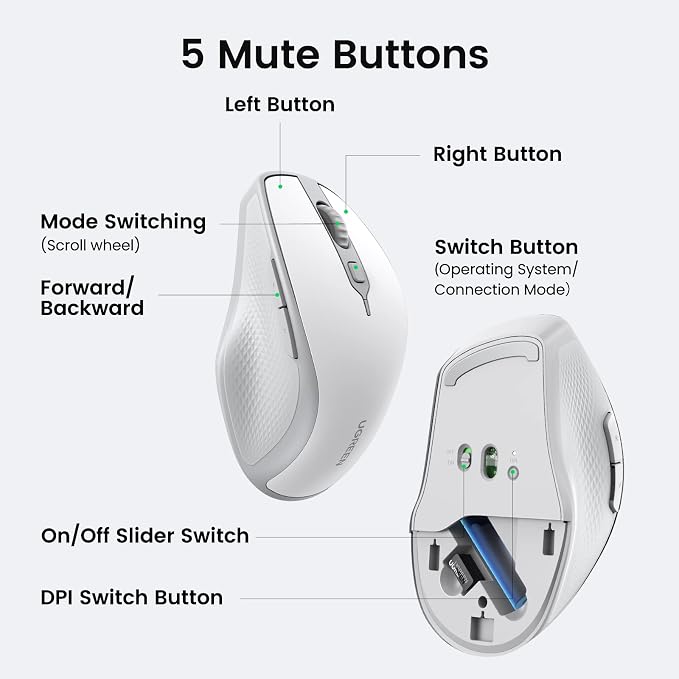
Yes, turn the device over and open the back cover to reveal the receiver.
Why is the scroll wheel oriented differently on a mac?
This is caused by the default system of mac, which is opposite to the direction of Windows.
What is DPI ?
DPI refers to the scanning accuracy, the higher the value, the higher the sensitivity of the mouse, and the smoother the operation.
The product cannot be paired automatically, how to perform manual pairing?
2.4G mode:Press and hold the left + middle + right keys for 3 seconds, then insert the 2.4G Dongle.
Bluetooth mode: When the product saves the ID, long press the left + middle + right for 3 seconds to enter the pairing state.
What can I do if the Bluetooth pairing fails?
Press the switch button to enter into Bluetooth mode. The indicator will flash in blue when it is switched successfully.
Share