CoreDrive
UGREEN FineCam Pro 4K Webcam with 1/2 Sensor for PC/Mac | AI Noise-Canceling Mic Gesture Control Face AE PDAF for Streaming Conference OBS Zoom Switch 2 Privacy Cover & Tripod
UGREEN FineCam Pro 4K Webcam with 1/2 Sensor for PC/Mac | AI Noise-Canceling Mic Gesture Control Face AE PDAF for Streaming Conference OBS Zoom Switch 2 Privacy Cover & Tripod
Couldn't load pickup availability
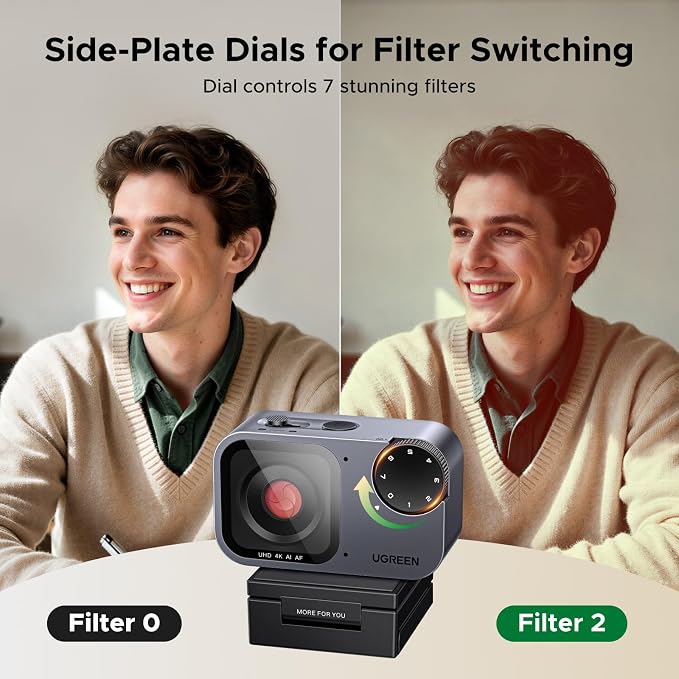
- Flagship 4K Visual Experience: UGREEN FineCam 4K AI webcam with 1/2" Sony sensor captures sharp 4K@30FPS(backward supports 1080P@60FPS) video with accurate colors. Superior low-light performance ensures clear visuals for professional streaming even in dimly lit rooms - Instant Focus& Face AE: Phase Detection Auto Focus (PDAF) provides immediate focusing for crisp video, while Face AE acts as an intelligent fill-light. It ensures you remain radiant when sitting in front of windows or in variable lighting - Dual Noise-Canceling Mics: Featuring a dual-microphone array with AI noise reduction, it picks up a clear voice within a 360-degree range. Optimized for home office environments to suppress background chatter for reliable audio - AI-Powered Auto Framing: Experience effortless video calls as FineCam automatically adjusts composition and zoom. Works stably across platforms to keep all participants in the spotlight during group discussions - Gesture Recognition: Effortless gesture control, no need to touch devices. Stay focused on your stream without breaking flow. Use intuitive hand gestures to instantly enable AI Framing or zoom in/out, offering a seamless and touch-free camera control experience - Privacy Care and Plug and Play: Integrated privacy cover allows you to activate privacy mode with one press. Made with high-quality materials and includes an extendable tripod for stable desktop placement and maintenance. Easy setup with no driver required for Windows 11/10/8, Mac OS, and Linux. This webcam offers a professional upgrade over built-in laptop cameras for OBS, Zoom, Teams, and Twitch - 7 Filters & Portrait Mode: Digitally replicate classic photographic tones with 7 built-in filter modes. Support 2K 9:16 portrait mode by rotating 90 degrees, making your mobile-optimized live streams more outstanding - Package: UGREEN AI 4K FineCam Pro x 1,USB C cable x 1,USB C to A adapter x 1, Extendable Tripod x 1, Manual x 1
Product description
Does this camera have adjustment software? How to adjust brightness, color, white balance?
Colors look warm/yellowish. How to adjust white balance or color tone?
Why does 4K resolution feel laggy? Any computer requirements for 4K?
Camera is locked in portrait mode in Windows Camera app. How to restore normal?
Gesture control is unresponsive or triggers accidentally. What should I do?
Does this camera have adjustment software? How to adjust brightness, color, white balance?
Plug-and-play, no extra driver/software needed. Adjust brightness/contrast via system settings (Windows Camera, macOS Photo Booth). For advanced control (white balance), use OBS Studio or Zoom.
Colors look warm/yellowish. How to adjust white balance or color tone?
Please refer to the instruction file on our Amazon product page to upgrade the firmware to see the result.
Why does 4K resolution feel laggy? Any computer requirements for 4K?
Please use the included USB cable & plug in USB 3.0 port on the computer. Requirements: i5 5th Gen or above, 8GB RAM, Windows 10 / macOS 11.
Camera is locked in portrait mode in Windows Camera app. How to restore normal?
Briefly press the landscape/portrait button on the device top. Wait about 10 seconds to revert to landscape mode. Re-select the camera in your app.
Gesture control is unresponsive or triggers accidentally. What should I do?
Ensure full face is visible, no hand covering it. Place hand 10-15cm from face on left or right side. Indicator flashes purple when gesture is recognized successfully.
Share