CoreDrive
Touchscreen Portable Gaming Monitor 16 Inch QHD 2.5K(2560x1600) Monitor 144Hz(USB C Port) IPS Display Gaming Monitor for PC Laptop Ras Pi PS4 PS5 with HDMI USB C Built-in Speakers
Touchscreen Portable Gaming Monitor 16 Inch QHD 2.5K(2560x1600) Monitor 144Hz(USB C Port) IPS Display Gaming Monitor for PC Laptop Ras Pi PS4 PS5 with HDMI USB C Built-in Speakers
Couldn't load pickup availability
- 【2.5K 144Hz Portable Monitor】16 inch portable touch screen monitor with QHD 2.5K(2560x1600)resolution, IPS screen, 100% sRGB, 400cd/㎡ brightness 178° full viewing angles and HDR technology to provide clearer, smoother, superior gaming/multimedia performance. The 144hz high refresh rate eliminates screen smear and avoids motion blur in gaming. - 【10-Point Touchscreen Monitor】This laptop monitor touchscreen boasts a 10-point capacitive touch feature, providing a highly accurate, responsive, and seamless touch experience regardless of switching, swiping or zooming, boost your work efficiency through intuitive touch. - 【Wide Compatibility】Touch screen monitor equipped with 2 full-featured USB Type-C ports(support USB 3.1 interface), 1 standard HDMI port and OTG port(connect mouse or keyboard), effortlessly connected to a variety of devices such as laptop, PC, Xbox, PS3/PS4/PS5, smartphones(USB Type-C 3.1 version)or Switch etc with just one USB Type-C cable. - 【Optional Display Modes】USBC touchscreen monitor has multiple display modes to choose from: duplicate mode/extension mode/second screen mode. It can copy your laptop's content as second screen to share with others during meetings, and can be used as a second extended screen to enhance productivity at work as well. - 【Built-in Speakers& Kickstand】No additional driver is needed, just plug and play. The VESA and adjustable kickstand integrated design makes the touchscreen usbc monitor an ideal travel partner for laptops and phones as second screen to boost work productivity. Two built-in speakers provide an amazing viewing and gaming experience.
Product description
Built for Your High-End Visual Experience - 2.5K 144Hz Touchscreen Monitor
Upgraded field of view, 2.5K Quad HD Experience - Details As Far As the Eye Can See
Enhancing the visual feast - 144Hz High Refresh Rate Let You Swim in the World of Gaming
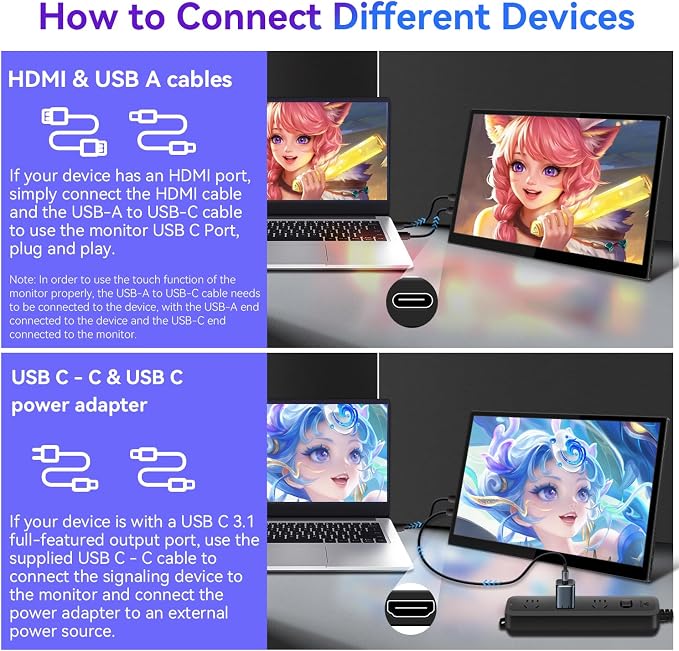
Efficient and Convenient Connectivity - Full-featured USB C Interface for Connecting Different Devices
Optimal Configuration - More Than Your Expect
Monitor Specifications
Question and Answer
This portable touchscreen monitor is built for users who seek the ultimate experience, providing a superior immersive environment, whether for design, gaming or learning.
**Extraordinary Visual Enjoyment**
**Enhance Work Efficiency**
**Designed with Intelligence**
The high refresh rate of 144Hz monitor seems to put you in the scene of movie special effects, dynamic images like shadows, whether it is an intense shooting duel or delicate plot twists, can be perfectly rendered, so that every duel is like witnessing. Whether you are a hardcore gamer or a visual pursuer, you can find your ultimate enjoyment here.
Not only that, it also has ultra-low input latency, so that the reaction speed is synchronized with the screen, so that you can seize the opportunity to be one step ahead in the game. Long time gaming is not afraid of eye fatigue, because we know that comfort is equally important. Carefully tuned color reproduction and wide viewing angle make every game sound, and explore the infinite possibilities of the gaming world with faster speed and higher precision.
(Note: This feature requires that the signaling device to which the monitor is connected also has a full-featured USB C port.)
All of this is designed to create an all-around monitor that combines performance and comfort for a borderless upgrade in work and entertainment enjoyment.
Q: Why can't this monitor reach 144Hz refresh rate?
A: The monitor itself is configured for 144Hz. 1. Please check whether your host's independent graphics card signal interface and graphics card driver support 144hz monitor. 2.Whether the signal connecting cable between the host and the monitor supports 144hz output 3. Whether the display has been set to 144Hz refresh rate in the operating system 4. Whether other settings limiting the output of the frame rate, such as Vsync, etc., have been turned on. 5. If your independent graphics card has a Type C port, try connecting the Type C port, which is the DP signal output. 6. If you are using a third-party converter, make sure the converter is configured and performing properly.
Q: Why does the monitor flicker/reboot/speaker sound intermittently when connected to a laptop/mobile power supply with only one Type C cable?
A: Because the monitor is high-resolution and high refresh rate with touch, if the output power of the USB C port of the notebook or the USB port of the mobile power supply is too low, it will cause the monitor not to run normally, please connect an additional power supply for the monitor to solve the problem.
Q: How do I connect this monitor?
A: 1. If your device comes with a full-featured USB C port, connect the supplied power adapter and USB C-C cable to the monitor. 2. If your device comes with HDMI and USB 2.0 ports, connect the supplied HDMI cable and USB cable (USB-A end to the device and USB-C end to the monitor).
Q: Why is the touch function on my monitor not working?
A: This situation can be caused by the following: 1. The monitor's signal cable is not properly connected. After connecting to the monitor's HDMI port, connect the supplied USB-C cable to the computer's USB port so that the touch signal can be transmitted. (Connect the Type C side of the cable to the monitor's Type C port and the USB side to the computer's host USB port.) 2. third-party converter is not connected properly or is malfunctioning. Some devices that do not have a USB port may need to be paired with a third-party converter to connect to this monitor. Make sure the converter is properly connected and functioning correctly.
Q: Why is it that when I touch this monitor's screen, another screen responds?
A: This is because the computer system fails to correctly recognize which screen is the correct touch screen. The correct touch screen needs to be set up in the computer. Confirm that your computer is in Extended Mode, please follow these steps for touch settings: Control Panel -- Table PC Settings -- Set up -- Follow the prompts to click on the screen until Windows recognizes the correct touch screen. P.S.: If you can't find Table PC Settings in the Control Panel, please change the view mode to "Small Icons" to find it. (If your problem remains unresolved, please provide us with more details by sending us a message via Amazon and we will find a solution for you as soon as possible. Thank you.)
Share