CoreDrive
TobenONE DisplayLink Docking Station 4 Monitor 20-in-1 Quad 4K@60Hz Display | 4HDMI+4DP 150W Power Supply Thunderbolt 5/4/3 & USB-C Compatible Windows Chrome MacBook 6 USB Ethernet SD/Micr
TobenONE DisplayLink Docking Station 4 Monitor 20-in-1 Quad 4K@60Hz Display | 4HDMI+4DP 150W Power Supply Thunderbolt 5/4/3 & USB-C Compatible Windows Chrome MacBook 6 USB Ethernet SD/Micr
Couldn't load pickup availability
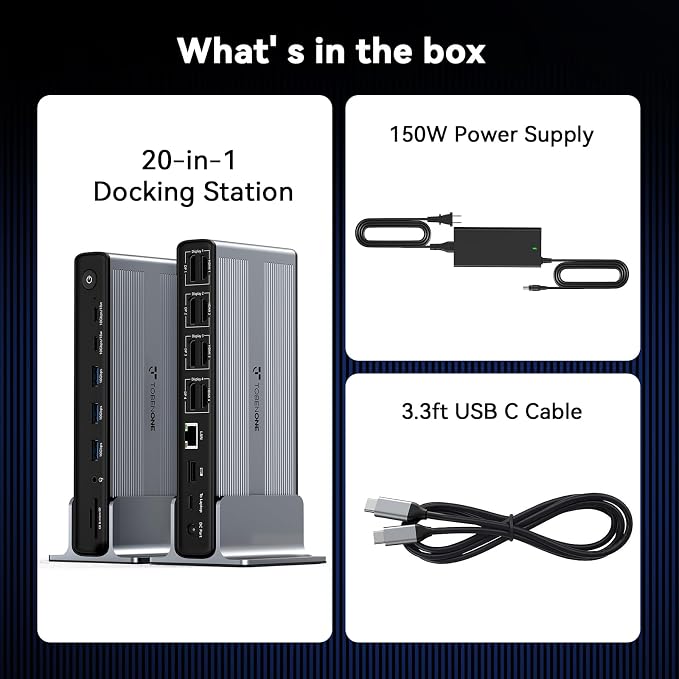
- Enhanced Expansion Connection: This universal docking station can expand to 4 displays and features 20 ports, equipped with 4 HDMI, 4 DP, 3 USB 3.2, 2 USB C 3.2, 1 USB 2.0, along with SD/micro SD card slots, Ethernet, and audio ports. It also has a power button that controls all external devices. Quad monitor docking station is suitable for professional multitasking, meeting all your needs for connecting high-speed peripherals and optimizing workflow, effortlessly enhancing work efficiency - Quad Display: The upgraded displaylink 4 monitor docking station features 4 HDMI and 4 DP ports, allowing both Windows laptops and MacBooks to connect to 4 external monitors (Note: M1 chip MacBooks can only extend to 3 monitors). All monitors deliver a stunning 4K@60Hz resolution, providing a seamless multitasking experience - Powerful and Convenient Charging:With a 150W power adapter, this mac quad display docking station can provide your laptop with 100W of charging power for fast charging, the laptop’s USB-C PD port needs to support 100W charging, and the docking station's USB-C port supports up to 18W phone charging, making it an ideal choice for keeping your workspace tidy - Universal Compatibility: The DisplayLink thunderbolt 4 docking station works seamlessly with Windows laptops (Windows 10+), MacBook Neo, MacBooks, Mac Minis, and Android systems. Supports Thunderbolt 3, Thunderbolt 4, Thunderbolt 5, USB4, and USB-C ports. Also compatible with Chrome OS 100+, macOS 11+, and Ubuntu systems. Note: Need to install the Displaylink driver before use, and HDCP is not supported - Each TobenONE laptop docking station with 4 HDMI comes with a 2-year defect coverage and long-term technical support. We understand the importance of customer service and have a dedicated support team to assist with any issues, ensuring your purchase experience is fully protected. Please feel free to contact us if you have any questions
Product description
Do I need to install Displaylink before using this quad monitor docking station?
Why does the monitor screen flicker after I connect the docking station?
Why is my laptop's performance slowing down even though I have four monitors connected?
Why are only two of the three monitors I connected via the docking station showing up?
When installing Displaylink on my MAC, it prompts "Screen Recording permission is required." Why is this?
Do I need to install Displaylink before using this quad monitor docking station?
Yes, Displaylink needs to be installed before use to fully utilize the functions of UDS050A.
Why does the monitor screen flicker after I connect the docking station?
If you encounter screen flickering issues, try flipping the USB-C connector and reconnecting it to the laptop. If the issue persists, please contact client care for assistance, and we will assist you in resolving the problem.
Why is my laptop's performance slowing down even though I have four monitors connected?
Please check whether your laptop operating system has been updated. If it has, please try updating the DisplayLink version.
Why are only two of the three monitors I connected via the docking station showing up?
Please try replacing the HDMI/DP cable, and then connect it to a different video port. If the issue persists, please contact client care for assistance, and we will assist you in resolving the problem.
When installing Displaylink on my MAC, it prompts "Screen Recording permission is required." Why is this?
For macOS, the DisplayLink technology requires screen recording permission to display the screen. No data, images, or pixels are being stored or recorded. It only uses screen recording functionality to enable seamless extended display support.
Share