CoreDrive
TobenONE 15-in-2 MacBook Docking Station Dual 4K Monitor Plug and Play | 2 HDMI VGA PD 3.0 7 USB Ethernet 3.5mm Audio MacBook Compatible Compact for Home Office & Professional Productivi
TobenONE 15-in-2 MacBook Docking Station Dual 4K Monitor Plug and Play | 2 HDMI VGA PD 3.0 7 USB Ethernet 3.5mm Audio MacBook Compatible Compact for Home Office & Professional Productivi
Couldn't load pickup availability
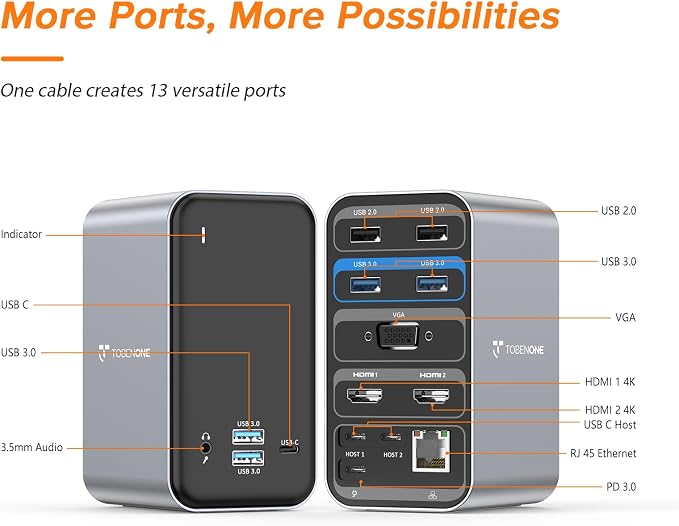
- Built Exclusively for MacBook Users: The TobenONE MacBook docking station is designed for MacBook Pro and MacBook Air with Thunderbolt 3/4/5 USB-C ports. Supports ???????? ???????????????? ?????????????? ?????????????????? for MacBook models with ??????????, ???? ??????/??????, ???? ??????/??????, ???? ??????/??????, ????, ???? ??????/??????, ?????? ????, ???? ??????/?????? chips. ???????????? ????????: MacBooks with ???????? ????, ????, ???? ???? ?????????? (??????-??????/??????) ?????? ?????????????? ?????? support ???????? ?????? ???????????????? ?????????????? ?????????????????? due to Apple chip limitations. NOT compatible with Windows laptops, Mac mini, iMac, or Mac Studio - Docking Station Dual 4K Monitor for MacBook:This MacBook Pro docking station can support connecting 2 external displays via the HDMI port, Resolution up to 4K@60Hz(Single HDMI USED),if Dual HDMI used simultaneously(support 2 different monitors),Resolution up to 4K@30Hz. Perfect for multitasking, gaming, or streaming. An ideal Gadget for Video Editor, Photography, Programmer - Multi-Function Interface: This 15-in-2 USB C docking station dual monitor for MacBook Pro have plenty of port to connect your external devices. Mac docking station dual monitor features with 2 4K HDMI, 1x VGA, 4 x USB 3.0 and 1 x USB C(up to 5Gbps), 2 x USB 2.0 (for wireless devices), USB C PD 3.0 port (support max 85w output ), 3.5 mm Audio/Mic, Gigabit Ethernet, and dual HOST port (connect to the MacBook and dock). No Displayport - Multiple USB ports: The USB C Dual Monitor docking station for MacBook Pro is equipped with 4 USB 3.0 ports and one USB C port support transmission speed up to 5 Gbps. This MacBook Pro Adapter has two USB 2.0 Ports allows you to connect usb devices: keyboard, mouse, etc to MacBook, offer you a stable WiFi connection. Note: The front USB-C port supports data transfer only, NOT for Alternate mode DisplayPort - Powerful Fast PD3.0 100W Charging: This macbook docking station dual monitor supports up to 100W power input(PD3.0), and offers max 87W power charging for your connected USB C/ Thunderbolt 5 / Thunderbolt 4/ Thunderbolt 3 MacBook. This dual monitor MacBook pro USB C adapter hub offers high-speed charging for all connected phone or other devices simultaneously. NOTE: Power adapter is not included
Product description
Compact and Powerful USB C Macbook Pro/Air Docking Station Dual 4K Monitor
aplus content video
Multiple Display Mode For MacBook
1. How to set up dual monitors with Your MacBook?
2. Can MacBook with M1 M2 M3 chip extend dual monitor?
3. Does the MacBook docking station comes with a power adapter?
4. What ports does this docking station have?
5. Can this dock work with windows laptop/ PC?
The TobenONE USB C MacBook docking station allows you to extend dual 4K monitors, and connect your peripherals via ONE cable connection. The USB C docking station dual monitor with up to 13 ports of connectivity, more features, and more possibility. Quickly come and go from your desk with ease.
1. Support Dual Display for MacBook with the Intel/M1 Pro/M1 Max/M2 Pro/M2 Max/M3 Pro/M3 Max/M4/M4 Pro/M4 Max chip.
2. In extend mode, allow you to display the content of your MacBook to 2 monitors via HDMI1 and HDMI2/VGA. The 2 HDMI port's max output is up to 4K, and VGA max output is up to 1080P
1. Only Can Extend 1 external display for the MacBooks with Apple M1/M2/M3 chip. It means that the two external monitors are the same, CANNOT display different content at the same time.
2. To avoid issues caused by compatibility, must confirm your MacBook with which chip Before purchasing!!!
1. How to set up dual monitors with Your MacBook?
1> Please ensure your Mac is MacBook Pro 2016-2025 or MacBook Air 2018-2020, 2025(NOT with an Apple M1/M2/M3 chip)
2> Attach the power supply to the PD port of our dock
3> Attach the dual USB C cable to the dock and MacBook
4> Attach other devices
2. Can MacBook with M1 M2 M3 chip extend dual monitor?
MacBook with M1 M2 M3 chip cannot extend dual monitor, Due to the limitations of M1/M2/M3 chip.
3. Does the MacBook docking station comes with a power adapter?
1> NO, this docking station does not include a power adapter.
2> You could connect your USB C power adapter(more than 65W) to the dock's PD port or directly connect your MacBook's power adapter to your Mac for stable usage.
4. What ports does this docking station have?
2 4K HDMI, 1x VGA, 4 x USB 3.0 and 1 x USB C (up to 5Gbps), 2 x USB 2.0 (for wireless devices), USB C PD 3.0 port (support max 85w output ), 3.5 mm Audio/Mic, Gigabit Ethernet, and dual HOST port (connect to the MacBook and dock). NO displayport
5. Can this dock work with windows laptop/ PC?
NO! This dock only for MacBook and not for windows laptop/ PC
Share