- A professional HDMI KVM switch that lets you manage four computers on two 4K@60Hz monitors using a single keyboard, mouse, and audio setup, engineered for stable multi-PC switching without signal drop or device loss
- All-in-One 11-Port HDMI KVM with Built-In Docking Hub: Thoughtfully designed to replace cluttered setups, featuring 1× Gigabit LAN, 4× USB 3.0 ports (2 with 7.5W power charging), 2× USB 1.1 ports dedicated for keyboard and mouse, 1× 3.5mm audio jack, and 3× HDMI outputs?combining a KVM switch and docking station in one powerful device
- True Dual 4K@60Hz Output: This 4-port KVM upports HDMI 2.0 resolutions up to 3840×2160 at 60Hz on both monitors, delivering crisp text, smooth motion, and accurate color for professional work
- Enterprise-Grade Gigabit LAN Built In: Designed for HDMI KVM users who rely on stable wired networks for remote access, office systems, and professional workflows
- Flexible Switching Options: Instantly switch between computers using front-panel buttons, keyboard hotkeys, mouse wheel, or IR remote, with no software or drivers required for a smooth, reliable workflow
- EDID Emulation for Stable Displays: This KVM prevents resolution reset, screen flicker, or icon rearrangement when switching between computers, keeping both monitors exactly as configured
Product description
TESmart HDMI KVM Switch 4 Computers 2 Monitors USB 3.0, Gigabit Network, EDID
kvm switch 4 computers
What makes the TESmart HKS402-P24 special?
Can I use this KVM right out of the box, and are cables included?
Does this KVM Switch 4 Computers support seamless switching?
What kind of display quality can I expect?is it good for gaming too?
Can I disable the shared Ethernet connection?
Streamline Your Workflow ? Find the TESmart KVM Solution for Your Setup
What makes the TESmart HKS402-P24 special?
It’s an HDMI 2.0 KVM switch with TESmart’s exclusive EDID emulation. Share 2 HDMI monitors, USB devices, and 1 keyboard/mouse across 4 computers. Supports 4K@60Hz, 2K144Hz, Gigabit Ethernet, and hotkey/button/IR control.
Can I use this KVM right out of the box, and are cables included?
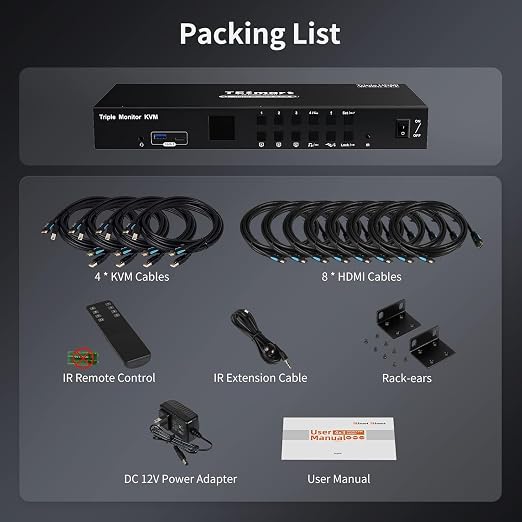
Yes, it is plug-and-play with no drivers required. We provides 8 HDMI 2.0 cables and 4 USB A-B cables. Monitor HDMI cables are not included to reduce waste, as monitors typically come with cables.
Does this KVM Switch 4 Computers support seamless switching?
Keyboard and mouse switch seamlessly, while video switching completes within 2?3 seconds?typically under 1 second in lab tests. Actual time may vary by cable quality, port oxidation, or transmission distance.
What kind of display quality can I expect?is it good for gaming too?
This KVM delivers crystal-clear 4K@60Hz video and also supports 2K@120Hz and 1080p@144Hz for smoother motion. Whether you’re gaming, editing, or streaming, you’ll enjoy lag-free performance and stunning image clarity across all displays.
Can I disable the shared Ethernet connection?
Yes. This KVM switch allows you disable the network for any connected PC. Simply press [Right Ctrl] + [Right Ctrl] + [F4] to turn off the Ethernet for the current input, keeping your workstation secure and isolated.