CoreDrive
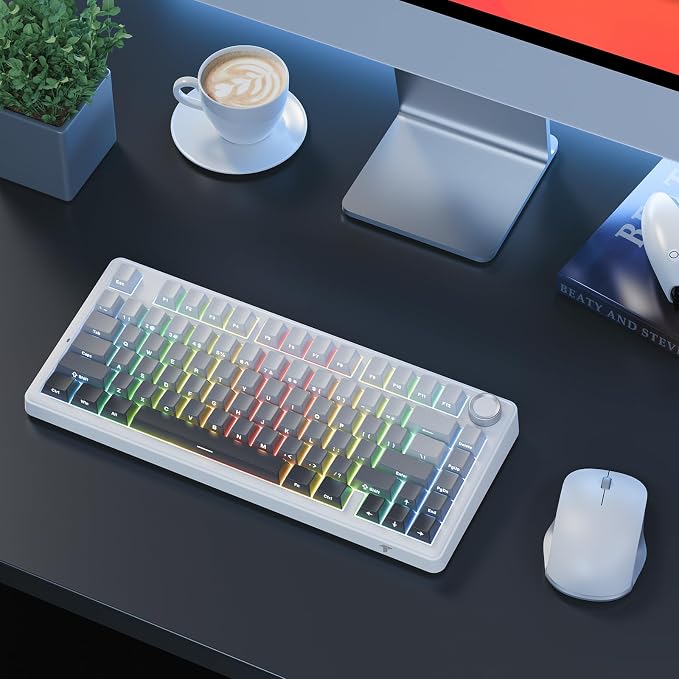
TECURS 75% Mechanical Keyboard for Gaming & Office Creamy Sound Gasket Mount Hot-Swap RGB Backlit 81 Keys Keyboard for Laptop/PC/Mac 2.4G/Bluetooth/Wired Mode Gradient Grey
TECURS 75% Mechanical Keyboard for Gaming & Office Creamy Sound Gasket Mount Hot-Swap RGB Backlit 81 Keys Keyboard for Laptop/PC/Mac 2.4G/Bluetooth/Wired Mode Gradient Grey
Couldn't load pickup availability
- 【 Gasket Mount for Blissful Typing】5-layer dampening for creamy sound & reduced noise greatly. Pre-lubed Reaper Switches, soft & bouncy keystrokes, suitable for both gaming and office work - 【 Hot-swap Custom Keyboard】 This wireless mechanical gaming keyboard featuring a hot-swappable PCB (3-pin/5-pin compatible) for solder-free switch customization, includes 1 switch puller, and extra 2 switches - 【 Tri-Mode for Any Setup】 Seamlessly switch 2.4G /Bluetooth 5.0 /wired modes. Universal compatibility with PC/laptop/Mac/tablet/phone/PS/Xbox etc, powered by a 4000mAh battery for long last battery life - 【Custom Your Style】Various lighting effects can be adjust to suit your preferences. Easy knob instantly adjusts volume (office mode) or RGB lighting (gaming mode). Keys macro also programmable(in wired mode, WIN system only), you can customize the function of single key or key combination function - 【 NO Lag, Anti-Ghosting】Fast response, easily register each click, effortlessly complete any combining functions without conflicting keys for flawless gaming performance - 【Sleek & Special Design】Side-printed legends resist wear, shine-through design ensure perfect visibility in night use. 75% compact layout save space but keep the necessary arrow keys for gaming
Product description
How to adjust the backlight effect and use the knob function?
Adjust the backlight effect and knob function
Charging Indicator + Connection Mode + Operating System + Caps Lock + WIN Lock
Melodic Lightshow ? 10 Dynamic Modes to Match Your Music
Is this keyboard noisy? Can I use this for daily office work?
How do I customize keys or lighting? Is software required?
Why choose side-printed keycaps?
How about gaming performance?
Best For?
Is this keyboard noisy? Can I use this for daily office work?
? 5-Layer Sound Dampening - reduce noise greatly, delivering a deep "thocky" sound profile
? Pre-Lubed Linear Red Switches ? Smooth keystrokes with minimal clackiness.
? Soft & bouncy typing feel, enhancing comfort for long typing/gaming sessions
How do I customize keys or lighting? Is software required?
? In Wired Mode Only
? Windows-Exclusive Software ? Download "MK209 Gaming Keyboard US Drive":
? Remap any key (e.g., assign macros to F-keys)
? Create RGB lighting zones/effects
Note: Mac/iOS supports basic functions without software customization.
Why choose side-printed keycaps?
For durability and aesthetics:
? Wear-Resistant ? Laser-etched side legends won’t fade, even after heavy typing use.
? Night Visibility ? Shine-through design ensures clear backlight in dark environments.
How about gaming performance?
Built for speed and precision:
2.4GHz Mode ? 1ms ultra-low latency.
Anti-Ghosting + N-Key Rollover ? Every press registers, even during complex combos.
Hot-Swappable ?Includes switch puller, extra switches
Best For?
Gamers ? Fast response, anti-ghosting, low-latency 2.4G.
Typists ? Gasket mount for smooth, quiet keystrokes.
Office Use ? Long battery life, Bluetooth, volume knob
Share