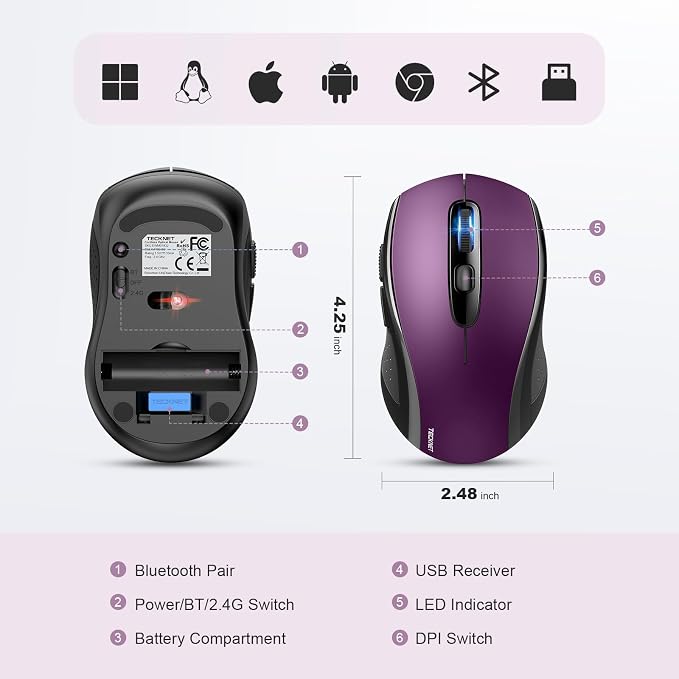
- Multi-Mode Connectivity: wireless mouse switches between 2 devices via BT5.0/BT3.0/2.4GHz. Compatible with laptops/tablets/MacBooks, realizes free switches between 2 devices(with Bluetooth mode and 2.4G mode) in a switch button on the computer mouse wireless.
- 2 in 1(Bluetooth+2.4Ghz USB) Connection Options: Use Bluetooth (Windows/macOS/Android) or 2.4GHz USB receiver. Store adapter in mouse, and no WiFi support
- Dual-Device Control: Switch between laptop/tablet instantly. MacBooks require Bluetooth (no USB port). Supports control 2 devices(one with usb-a, one with bluetooth), without the trouble of plugging and pairing
- Customizable DPI: 6 adjustable levels (800/1200/1600/2400/3200/4000). Tru-Wave tracking works on most surfaces. Plug-and-play with Nano receiver storage (stored in the back of the wireless mouse for laptop)
- Ergonomic Build: Contoured design for comfort. 10 million times click durability. Compact size for travel. Computer mouse wireless is not ideal for large hands.
- Smart Features: Auto-sleep extends battery (18 months, 2 AA required). Back/Forward buttons make moving quickly forward or back between documents or browsing websites a breeze (Windows/Android only, Mac not suitable)
- Warranty & Note: 36-month warranty with registration. Troubleshoot via battery replacement/LED indicators (green=2.4G, blue=BT). (247 characters). No USB-C support and not rechargeable, iPad shows round cursor, Mac disables side buttons.
- Usage Reminders: Audible clicks(not silent). Sleep mode activates after 10min (double-click to wake). Windows 7/XP note: Manual driver install required for USB adapter. Contact the seller for damaged/missing parts.
- 2.4G Mode: Insert batteries → Toggle switch to 2.4G (green LED) → Plug receiver into USB-A → Press any button to connect
- Bluetooth Mode: Insert batteries → Toggle to BT mode (blue LED) → Hold pairing button 3s → Enable device Bluetooth → Search "BM20X-3.0" or "BM20X-5.0" → Connect
Product description
Computer Wireless Mouse Compatible with Laptop Macbook Air Pro
Computer Wireless Mouse
How to Connect Device Correctly - troubleshooting & connect steps
How to Connect Device Correctly
Let's guess who will win?
TECKNET vs. Amazon
TECKNET vs. Amazon
Let's guess who will win?
Transparent Mouse vs. Standard Mouse
Transparent mouse vs. standard mouse
Let's guess who will win?
Regular Mouse vs. Ergonomic Mouse
Regular mouse vs. ergonomic mouse
Recommended by the blogger.
Comfortable and Versatile Ergonomic Mouse.
comfortable and versatile ergonomic mouse.
Recommended by the blogger.
High-Sensitivity 4000 DPI Mouse.
high-sensitivity 4000 DPI mouse.
Not support two BT device
Mouse will enter sleep mode after 10mins of inactivity, mouse won't work, press 2 times to wake up