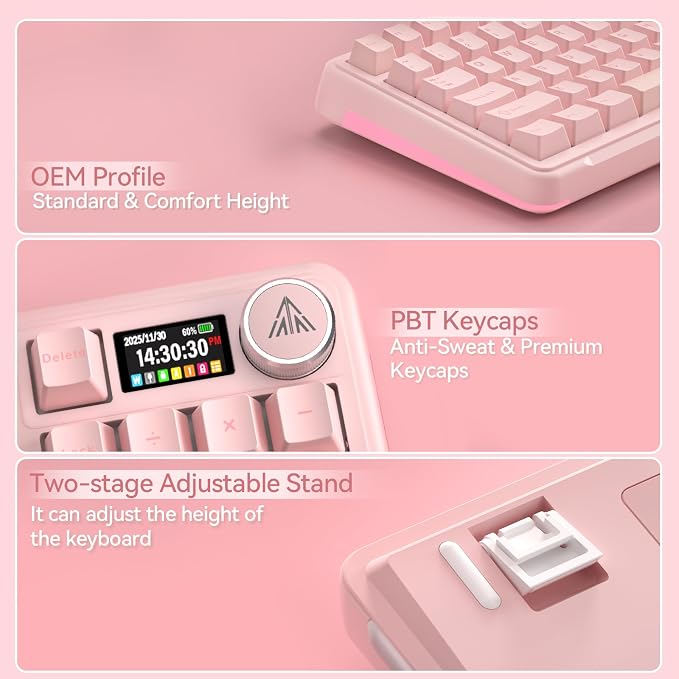
- Multifunctional Screen Display: This gaming keyboard features a LCD screen for more convenient operation. The screen displays information such as date, time, battery level, connected system, connection mode and GIF image, allowing you to obtain this information more quickly. And the wireless gaming keyboard features a multi-functional knob, allowing you to easily set the time, switch systems, change lighting modes, switch lighting colors, adjust lighting brightness and control volume by rotating, short-pressing or long-pressing the button. This way you can easily configure your pc gaming keyboards and make it your own.
- Compatible with Multiple Devices and Systems: The SOLAKAKA A99 Pro wireless keyboard is equipped with high-end tri-mode connectivity technology, supporting BT5.0, 2.4GHz wireless connectivity and USB-C wired connectivity. It can also support up to five devices simultaneously. And all connection methods offer fast response times. Furthermore, this wireless mechanical keyboard is compatible with Windows, Mac, IOS and Android systems, enabling smooth switching between different operating systems.
- Full-Key Hot Swappable Keyboard: Our mechanical keyboard adopts full hot-swappable technology that supports 3/5 pins. It allows you to replace switches and keycaps to your liking without soldering. The mechanical gaming keyboard comes with a keycap puller, making replacement easy for both experienced users and beginners. And the it also uses pre-lubricated LEOBOG star vector switches for smooth and stable typing.
- Superior Gasket Structure: This creamy keyboard utilizes a upgraded and stable gasket structure. It consists of five layers of cushioning pads and a single-key slotted PCB. Noise-dampening cotton pads are filled between the pads and the positioning plate to eliminate internal cavity sounds and noise. This provides a creamy sound, a soft hand feel and comfortable typing experience. The creamy mechanical keyboard is suitable for desktops, laptops, and tablets, and can well meet your daily needs.
- Backlit Keyboard and 96% Layout: This backlit wireless keyboard supports RGB lighting and offers 16 lighting modes to choose from. It also features side backlighting with 5 different modes. These diverse lighting modes provide a more engaging gaming atmosphere and enhance your gaming experience. And it utilizes south-facing LEDs for better light transmission. In addition, this light up keyboard has 97 keys, saving space while retaining frequently used features such as a numeric keypad, arrow keys and essential function keys for both gaming and office work. It will be a great companion for you in games or at work.
- Custom Keyboard: The 96% keyboard supports customizable functions. Through the web driver, you can set sleep time, key mapping, key sensitivity, optimize key bounce, add GIF image to the LCD screen, switch backlight modes and colors(including music rhythm backlight), record macro files and more. You don’t need to download any software. Web Driver: solakakadriver.com (Note: Please access this webpage using a wired connection.)
- Premium Keycaps and an 8000mAh Battery: The keycaps are made of premium PBT material, offering sweat resistance and durability. The office keyboard features a scientifically proven OEM height design, which helps reduce hand fatigue during prolonged use. Furthermore, the computer keyboards boasts an 8000mAh rechargeable battery. It provides approximately 61 hours of use in backlit mode and approximately 170 hours in non-backlit mode. This large-capacity battery can meet daily usage needs. (Please use the original data cable supplied)
Product description
What should I do if the plastic covering on the screen has scratches or curled edges?
How to set the time on the screen?
How do I set up the GIF image?
How can I prevent the GIF image on the screen from switching back to the home page after entering the sleep mode?
How to Switch Systems?
Web Driver: solakakadriver.com (Note: Please access this webpage using a wired connection.)
What should I do if the plastic covering on the screen has scratches or curled edges?
The plastic covering on the screen's surface protects it during transportation. If the plastic covering has scratches or curled edges, it can be peeled off without affecting the screen's use.
How to set the time on the screen?
1. Locate the time settings page on the screen and enter it.
2. Set the year, month, day, hour one by one. Rotate the knob to select, and press the knob briefly to confirm. (For detailed instructions, please refer to the uploaded video)
How do I set up the GIF image?
You need to run the driver software in USB-C wired mode. And click the file download button to access the GIF image management page. Click "Upload" to upload the pre-downloaded GIF image. Click "Apply". The GIF image will appear on the screen.
How can I prevent the GIF image on the screen from switching back to the home page after entering the sleep mode?
Please download and install the firmware of A99 Pro in wired mode. Download address: solakakadriver.com (please download the firmware for the corresponding keyboard). After the application, please reopen the mode switch and reconnect the keyboard.
How to Switch Systems?
How to Switch Systems?
1. Locate the“System”settings on the screen, rotate the knob to select it, then press the knob to confirm.
2. Shortcut Keys for Switching Systems. Press "Fn+W" to switch to Windows; Press "Fn+M" to switch to Mac.