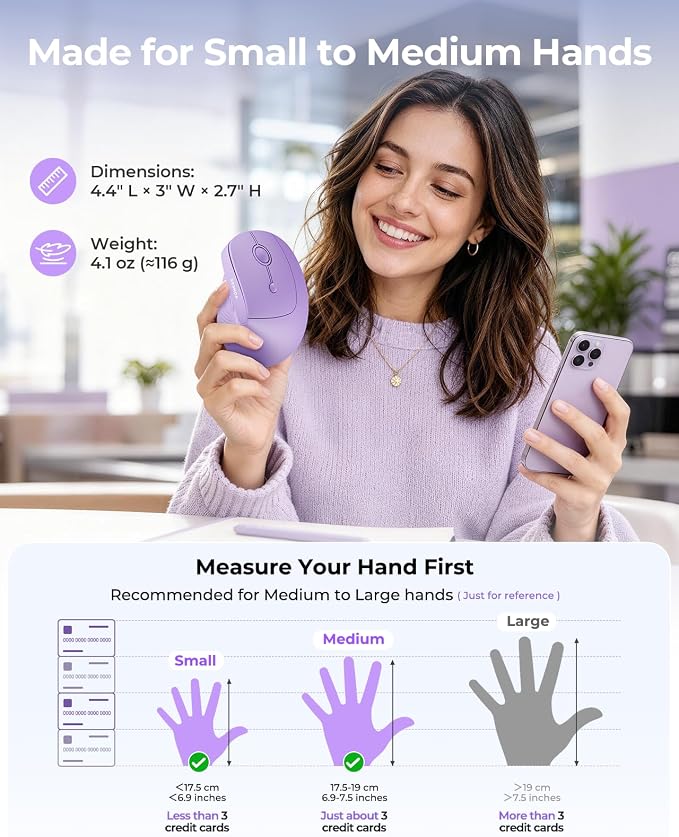
- Comfortable Ergonomic Mouse for Desk Work ? The 52° vertical mouse design helps keep your wrist and forearm in a more natural position, giving small to medium right hands a relaxed grip for office, study, and home work.
- Stylish Black Ergonomic Mouse ? A sculpted, palm-fitting shape and sleek matte black finish add comfort and a clean professional look, while the textured thumb rest helps support a steadier grip.
- Wireless Ergonomic Mouse for 3 Devices ? Switch between desktop, laptop, and tablet using the 2.4GHz USB receiver plus dual Bluetooth channels. One bottom button changes devices without repeated pairing.
- Quiet Bluetooth Ergonomic Mouse ? Low-noise left and right buttons are tested under 40dB, helping reduce click distractions around colleagues, family, or roommates in offices, libraries, shared spaces, and late-night work.
- 3-Level DPI Vertical Wireless Mouse & Easy Page Navigation ? Switch 1000/1600/2400 DPI for spreadsheets, browsing, and design edits, while forward/back buttons make web pages and files easier to navigate.
- Wide Compatibility & Easy Setup ? This wireless ergonomic mouse works with Windows 10+, macOS 10.10+, Android, and Bluetooth/USB-enabled devices. Plug in the 2.4GHz receiver or pair via Bluetooth for quick daily use. Note: Forward/Back buttons are not supported on Mac OS.
Product description
wireless bluetooth mouse
Is there an adjustment period when using this ergonomic vertical mouse for the first time?
What hand size works best for this mouse?
Can I program the buttons or use this with my Mac?
How do I switch between devices?
Is there an adjustment period when using this ergonomic vertical mouse for the first time?
Yes, it takes a learning curve to get used to the shape. Your grip may feedifferent at first, but the ergonomic desigrhelps reduce wrist pressure asoreness from long-term use.
What hand size works best for this mouse?
We recommend this vertical mouse for small to medium hands. For tihe best fit and comfort, please measure your hand size before orderirg.Hand length under 7.5 inches is ideal.
Can I program the buttons or use this with my Mac?
Sorry, none of the buttons are programmable. Also, the forvwand and back buttons are not compatible with Mac OS systems
How do I switch between devices?
The device-switch button is located on the bottom of the mouse. Flipit over, press once to cycle through devices, and you'll see the corresponding indicator light.