CoreDrive
Raspberry Pi Screen 10.1 Inch Touchscreen Monitor IPS 1024×600 Dual Built-in Speakers HDMI Portable Monitor Compatible with Raspberry Pi 5/4/3/ZeroDriver Free
Raspberry Pi Screen 10.1 Inch Touchscreen Monitor IPS 1024×600 Dual Built-in Speakers HDMI Portable Monitor Compatible with Raspberry Pi 5/4/3/ZeroDriver Free
Couldn't load pickup availability
- 【IPS FHD Screen & Full Viewing Angle】10.1inch IPS HD raspberry pi touchscreen monitor equipped with an expansive 178° viewing angles. The Raspberry Pi display features a touchscreen with a resolution of 1024x600, which can be go up to maximum of 1920x1080. - 【Plug & Play & Responsive】iPistBit 10.1’’ raspberry pi monitor supports up to 5-point touch. Simply connect the screen to your device via the HDMI interface and power it through the USB touch port to enable touch functionality, with no need to install any drivers! The highly sensitive touchscreen responds within 3-5ms during use. Please check if your Raspberry Pi or other devices support touch interaction before use. - 【Widely Compatible】iPistBit 10.1 inch raspberry pi monitor is compatible with Raspberry Pi 5/4/3/2/1 Debian, Ubuntu, Banana Pi, Retro Pi, NOOBS, Kodi, Windows 7/8/10 PC, TVs, as well as gaming consoles such as NS/XBOX/PS4. It's also an ideal choice as a secondary monitor for monitoring CPU, GPU, RAM, or data. - 【Ideal for Raspberry Pi Portable Display】iPistBit 7-inch raspberry pi screen features 4 corner holes for easy attachment to the Pi. Additionally, this Raspberry Pi display comes with 2 portable stands that are easy to install and remove. The backlight and volume can be adjusted according to your preferences. Equipped with 2 audio speakers to enhance your audiovisual experience. You have complete control over your viewing experience with adjustable backlighting and volume settings. - 【Customer-Friendly Commitment】iPistBit 10.1-inch raspberry pi touchscreen comes with a quality guarantee. We offer a 12-month warranty service. If any product encounters issues within 12 months of purchase, we will provide prompt repair or replacement. Feel free to contact us if you encounter any problems during this period. Our customer support team will respond to your email inquiries within 24 hours to ensure your issues are resolved promptly.
Product description
Where can I get a valid software driver?
Why is my screen not working?
Why can't my screen be touched?
How to test whether the screen is working properly?
178° Full Viewing Angle
Dual Built-in Speakers
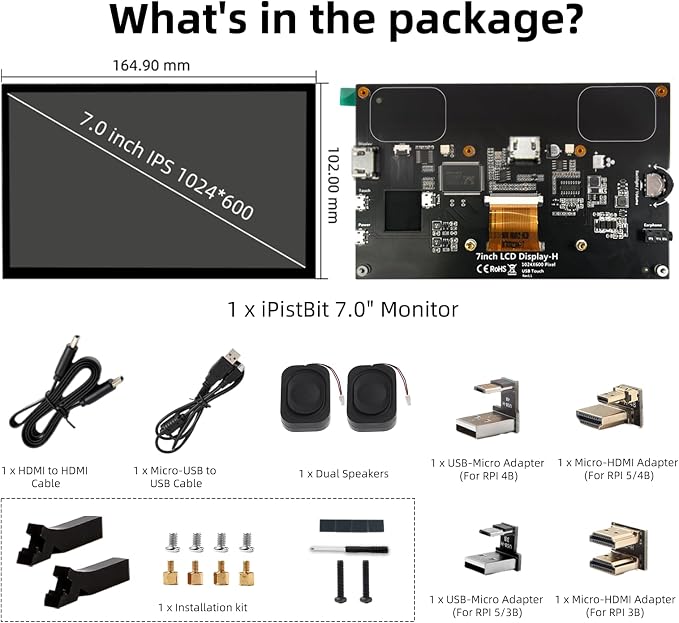
Package List
Where can I get a valid software driver?
Please refer to the usage guide: lcdwiki.com/10.1inch_HDMI_Display-H
Why is my screen not working?
Please ensure that the HDMI and USB adapter are well connected and the system has installed the driver.
Why can't my screen be touched?
Examine whether the USB cable properly links any of the Raspberry Pi's USB ports to the USB Touch interface on the LCD screen. (Ensure the connection is secure and intact, as a loose or faulty connection might lead to touch malfunction.)
How to test whether the screen is working properly?
Attach the USB touch interface of the display to a USB port on the computer. And check if the computer can be recognized and respond to touch normally.
We recommend downloading the debugged image, which offers plug-and-play functionality, ensuring perfect compatibility with the system.
lcdwiki.com/10.1inch_HDMI_Display-H
The touch screen resolution is 1024*600 and supports up to 1920*1080. Note: Please remove the screen protector before use to present a more vivid image.
This LCD screen built-in speaker replaces traditional external speakers and saves desktop space.
Share