CoreDrive
Quell Pro 75% Wireless Mechanical Gaming Keyboard – Hot Swappable Pre-Lubed Switches Creamy Typing Sound Smart Screen & Control Knob RGB Backlit PBT Keycaps Compact Keyboard for PC
Quell Pro 75% Wireless Mechanical Gaming Keyboard – Hot Swappable Pre-Lubed Switches Creamy Typing Sound Smart Screen & Control Knob RGB Backlit PBT Keycaps Compact Keyboard for PC
Couldn't load pickup availability
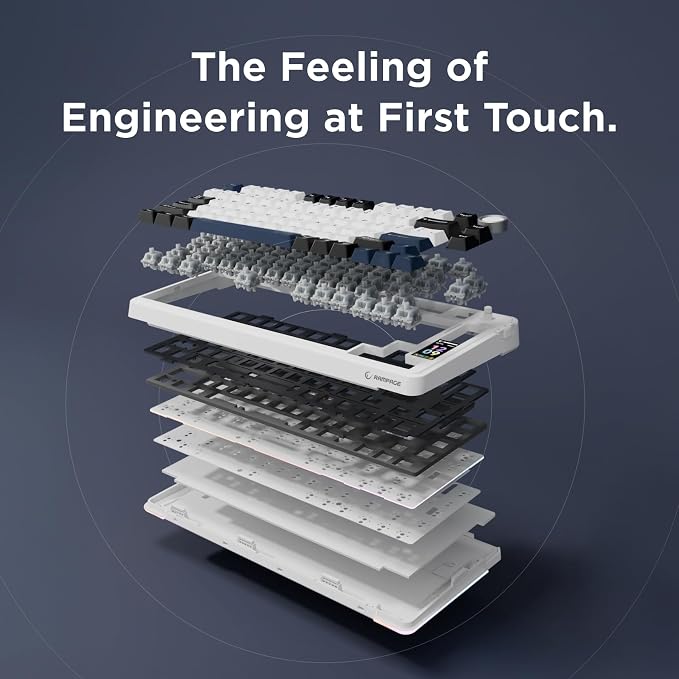
- Customizable Screen & Smart Knob ? The RAMPAGE QUELL PRO wireless mechanical keyboard features a vibrant LCD smart screen that displays battery level, date, time, system status, GIFs, volume, and lighting effects in real time. Paired with the multifunction knob, you can quickly adjust brightness, volume, RGB, and more. (Note: Windows software in wired mode required for screen customization and time/date calibration.) - Tri-Mode Gaming Keyboard ? Connect your way with BT 5.0, 2.4GHz wireless, or USB-C wired modes. Easily switch between up to 5 devices using the side button or control knob. With strong, stable connectivity, the QUELL PRO is ideal for PC, Mac, tablets, smartphones, PS, iOS, and Android?perfect for gamers, creators, and professionals alike.Tri-Mode Gaming Keyboard ? Connect your way with BT 5.0, 2.4GHz wireless, or USB-C wired modes. Easily switch between up to 5 devices using the side button or control knob. With strong, stable connectivity, the QUELL PRO is ideal for PC, Mac, tablets, smartphones, PS, iOS, and Android?perfect for gamers, creators, and professionals alike. - Hot-Swappable Mechanical Keyboard ? Enjoy full DIY customization with hot-swappable PCB supporting 3-pin and 5-pin switches. No soldering needed. Includes keycap/switch puller for easy upgrades. Pre-lubed switches and stabilizers provide a smooth, creamy keystroke and fast responsiveness for competitive gaming. (Tip: Power off before switching keys.) - Premium Creamy Typing Feel ? Built with an advanced five-layer silencing structure, integrated silicone pad, and PCB slotting, the QUELL PRO offers softer key presses, improved resilience, and reduced cavity noise. Experience a solid, elastic, “thocky” sound with every keystroke, whether gaming or typing. - Compact 75% Layout with Durable PBT Keycaps ? Designed for performance and space-saving efficiency, the 75% layout raetains essential arrow keys while freeing up desk space. The double-shot PBT keycaps with side-engraving are resistant to wear, sweat-proof, and retain their premium texture for long-lasting use. - RGB Backlight & Macro Software ? Personalize your setup with 19 RGB effects, 16.8 million colors, and side glow lighting for an immersive gaming atmosphere. Control lighting via knob, shortcuts, or driver software. The QUELL PRO driver also enables full-key macro programming to boost workflow efficiency and gaming performance. (Note: Software supports Windows in wired mode.)
Product description
User Manual & software Installation Steps
Type Every Command. Conquer Every Game With your Quell Pro Keyboard
Complete Control at Your Fingertips
Smart Customization with TFT Display
Wireless Freedom with Long-Lasting Power
QUELL PRO User Manual
How to download the software/driver? Is it compatible with Mac?
How to calibrate the date/time and custom GIF images on the screen?
How to view the instruction manual?And how to quickly solve keyboard unresponsive or other unknown issues
How to adjust the Rampage Gear Quell PRO backlight/side light?
Is there anything to note when charging the Quell PRO keyboard?
How to download the software/driver? Is it compatible with Mac?
1. Enter the URL bit.ly/m/rampage
2. Download and install the Quell Pro keyboard's driver.
3. This Quell Pro mechanical keyboard is compatible with Windows, Mac, IOS and Android systems, but the software only supports Windows system and wired mode
How to calibrate the date/time and custom GIF images on the screen?
1.Download and install the Quell pro driver in wired mode with windows system.
2.Find the "TFT screen" and click to "Time Syns" button.
3.Upload an image or gif
Note: The LCD screen has a transparent protective film that can be peeled off before use.
How to view the instruction manual?And how to quickly solve keyboard unresponsive or other unknown issues
1.Scan the QR at the above image to view the electronic manual.
2.Reset the Rampage Quell Pro 75% Pro creamy keyboard by holding down FN+ESC for a few seconds until the keyboard light flashes.
How to adjust the Rampage Gear Quell PRO backlight/side light?
Backlight Adjustment:
FN+\|=switch 19 lighting effects;FN+Tab=switch lighting colors;FN+↑/↓=lighting brightness+/-;FN+→/←=lighting speed+/-
Side Light Adjustment:
FN+Right Shift=Switch effect;FN+/?=Switch color;FN+Right Alt=Switch brightness
Is there anything to note when charging the Quell PRO keyboard?
1. Please use only the USB interface of the computer to charge the keyboard;
2. Do not use the mobile phone fast charging charger/over-voltage/over-current power adapter to charge the keyboard.
Share