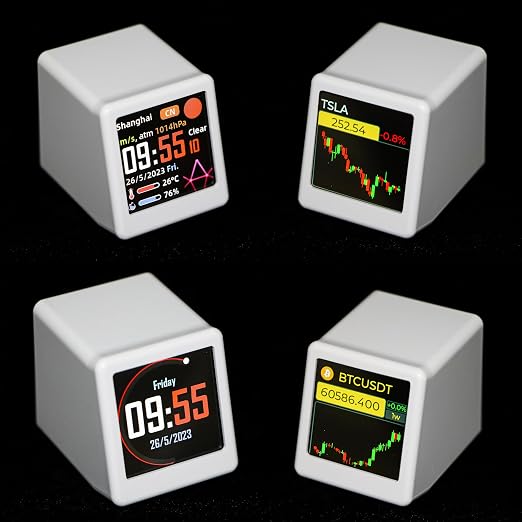
- - PRO Upgraded Version | Clearly Different from Basic Version ? This is the full-featured PRO upgraded model, not the simplified basic version. It retains all complete core features including full-data stock & Bitcoin ticker, dual-city weather sync, high-precision environment sensing, full-screen GIF looping and photo slideshow. No function cutdowns, no data delay, delivers complete and smooth smart desktop experience that the basic version cannot support.
- - Real-Time Stock & Bitcoin Tracking ? Adopts upgraded high-speed data refresh module to monitor Bitcoin and mainstream stock market fluctuations in real time. Support custom exclusive asset watchlist for one-glance price checking. Avoid frequent mobile app switching, help you capture market trends instantly without disrupting work and daily study.
- - Dual-City Weather & Precise Environmental Monitoring ? Built-in upgraded high-sensitivity sensor chip to accurately detect indoor temperature and humidity in real time for comfortable environment adjustment. Support simultaneous dual-city weather display, easily track weather conditions of hometown and family’s city to take care of your distant loved ones anytime.
- - Full-Screen Custom GIF & Photo Slideshow ? PRO Version supports true full-screen dynamic GIF loop playback and auto JPG photo cycle slideshow. Freely upload family portraits, travel snapshots and personalized images to customize exclusive desktop decoration, warmer and more vivid than ordinary basic display devices.
- - APP-Free Web Setup & OTA Continuous Upgrade ? Featured sensitive long/short touch control for fast mode switching. No cumbersome APP required, 2.4G WiFi connection supports browser webpage one-key setting and photo upload. Equipped with OTA wireless upgrade function to continuously optimize system performance and expand new functions for long-term use.
Product description
Mini Multi-function Smart Weather Clock: Time, Weather, Temperature, Humidity, Wind Speed Display, with Picture and GIF Playback
Equipment parameter information
Completing Network Configuration
Confirming the Address
Customizing Time Color and Images/GIF
System Settings
Brand name: Vastarry
Model: SMALLTV PRO
Display type: Digital
Language: English only
Function: Touch sensing
Power type: USB powered
Data source: Obtained by WIFI
Smart device: Yes;Weight: 25 grams
Size: 35x38x45 mm/1.69x1.25x1.41 inches;
After powering on the device, wait for about 20 seconds. On the "Weather" interface, touch the top to switch to "Settings." Long press the top to enter the "Settings" interface. Then, use your phone to open "WLAN" and connect to the "Smalltv Pro" Wi-Fi network. Using a phone browser, enter the IP address displayed at the bottom of the device to open the IP address and access the device's backend. In the interface, enter your home Wi-Fi account and password, then click "SAVE" to complete the first step of network configuration.
After completing the network configuration, the device will restart and return to the "Settings" interface. Find the IP address again. On your phone or computer, enter the IP address to access the device's backend. Click on "Weather" and then click "1.Click me to search your city code after the internet is connected" to open a webpage. Enter the address name to obtain the current address ID. In "Weather," enter the ID in "City code 1" and click "SAVE" to save the address.
In the system backend, select "Picture" at the top. Set the rotation mode, rotation interval, and upload the desired images in JPG/GIF format with a size of 240x240.
Adjust the overall brightness, set the nighttime mode time period, customize the auto-start programs, and perform a system reset or firmware upgrade.
Completing Network Configuration
Confirming the Address
Customizing Time Color and Images/GIF
System Settings