CoreDrive
Plugable USB C Hub: 10-in-1 Multiport Adapter (8K/4K 144Hz HDMI 2.1 2.5G Ethernet 140W Charging 10Gbps Data) Driverless IT Deployment for MacBook Pro/Air Windows Thunderbolt Chromebook USBC-10IN1E
Plugable USB C Hub: 10-in-1 Multiport Adapter (8K/4K 144Hz HDMI 2.1 2.5G Ethernet 140W Charging 10Gbps Data) Driverless IT Deployment for MacBook Pro/Air Windows Thunderbolt Chromebook USBC-10IN1E
Couldn't load pickup availability
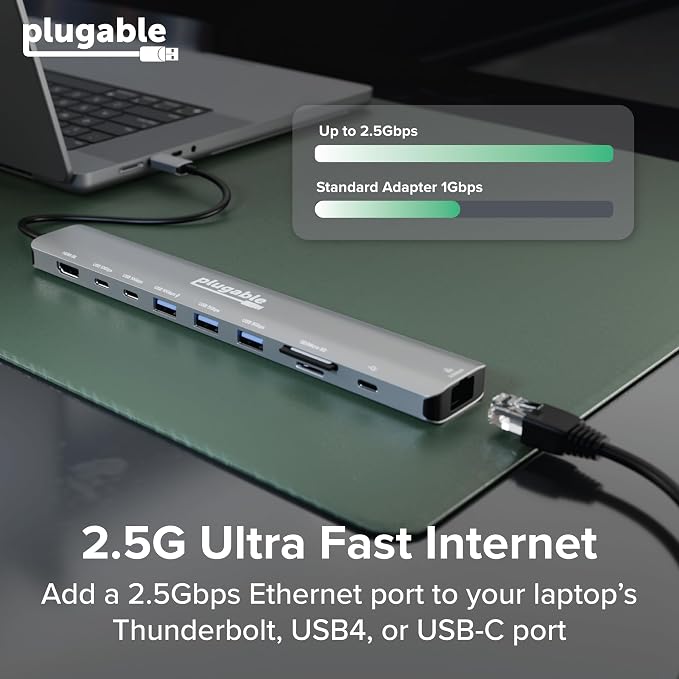
- Flagship Performance in a USB-C Hub: Recognized as a MacWorld Editors' Choice 2026, the USBC-10IN1E turns a single USB-C port into 10 pro-grade connections, featuring a 4K 144Hz / 8K HDMI 2.1 port, 2.5Gbps Ethernet, 2x USB-C (10Gbps) 3x USB (1x 10Gbps, 2x 5Gbps), SD and Micro SD, and 140W EPR Power Delivery passthrough. No drivers to download, just plug-and-play productivity - True 140W EPR Power Delivery: Stop battery drain on even the most demanding laptops. This USB C hub supports PD 3.1 EPR, accepting up to 140W chargers and delivering up to 125W directly to your host. It is engineered to keep 16-inch MacBook Pros and other mobile workstations running at full speed under heavy loads - Next-Gen Visuals And Networking: Experience pixel-perfect precision with HDMI 2.1 supporting up to 8K 30Hz or 4K 144Hz for fluid motion. Combined with 2.5Gbps Ethernet, this USBC hub provides the high-bandwidth stability required for creative pros and prosumers - Universal Driverless Compatibility: Seamlessly plug-and-play with Thunderbolt, USB4, and USB-C systems on Windows 10/11, macOS 11+, and ChromeOS. Supports MacBook Neo, Pro, and Air (M1, M2, M3, M4, M5), Dell XPS, Surface, others. Note: Maximum resolution and refresh rate may vary by system capabilities - see Display Resolution Compatibility Guide below for full details - Lifetime Support: This multiport hub has been designed with reliability at its core and was built to meet the deployment demands of IT departments and the ease of use necessary for home offices. Includes lifetime support from our North American team of connectivity experts
Product description
Technical Specifications
What is the maximum resolution/refresh rate on Windows computers?
What is the maximum resolution/refresh rate on Macs?
Can I plug a monitor into the 10Gbps USB-C ports?
Does the 140W PD port charge my laptop, or is it for powering the hub?
I’m using a 140W power adapter, but my laptop says it’s only receiving 100W (or less). Why?
Plugable USB Hubs
What is the maximum resolution/refresh rate on Windows computers?
On systems with DP 1.4 + DSC (e.g., 12th Gen Intel CPUs and later), you can reach up to 8K 30Hz or 4K 144Hz. Legacy DP 1.2 systems are limited to 4K 30Hz or 1080p 60Hz. For best results, use a certified HDMI 2.1 cable.
What is the maximum resolution/refresh rate on Macs?
With macOS 26+ and a Pro, Max, or M3+ chip (including M5, M5 Pro, M5 Max), you can reach 8K 30Hz or 4K 144Hz. Base M1/M2 and MacBook Neo models can achieve up to 4K 60Hz. For best results, use a certified HDMI 2.1 cable.
Can I plug a monitor into the 10Gbps USB-C ports?
No. The two 10G USB-C ports are dedicated to high-speed data (SSDs, drives). Video output is only supported via the HDMI port. For charging, please use the separate PD 140W port.
Does the 140W PD port charge my laptop, or is it for powering the hub?
Both! The PD 140W port is designed to take power from your wall adapter and pass it through to your laptop. The hub itself uses 15W for its own operation, so if you use a 140W charger, your laptop will receive up to 125W of high-speed charging.
I’m using a 140W power adapter, but my laptop says it’s only receiving 100W (or less). Why?
For >100W, your laptop/cable/charger must support PD 3.1 EPR. Many laptops use proprietary tech to exceed 100W. The hub also reserves ~15W for its own ports, passing ~125W to EPR devices (like MacBook Pro 16") when using a 140W power adapter.
Share