CoreDrive
Plugable USB-C Docking Station Dual Monitor 4K 60Hz (2×HDMI) 65W Charging Gigabit Ethernet USB-C & 3×USB-A 5Gbps Audio Driverless for Windows/ChromeOS (UD-MSTH2)
Plugable USB-C Docking Station Dual Monitor 4K 60Hz (2×HDMI) 65W Charging Gigabit Ethernet USB-C & 3×USB-A 5Gbps Audio Driverless for Windows/ChromeOS (UD-MSTH2)
Couldn't load pickup availability
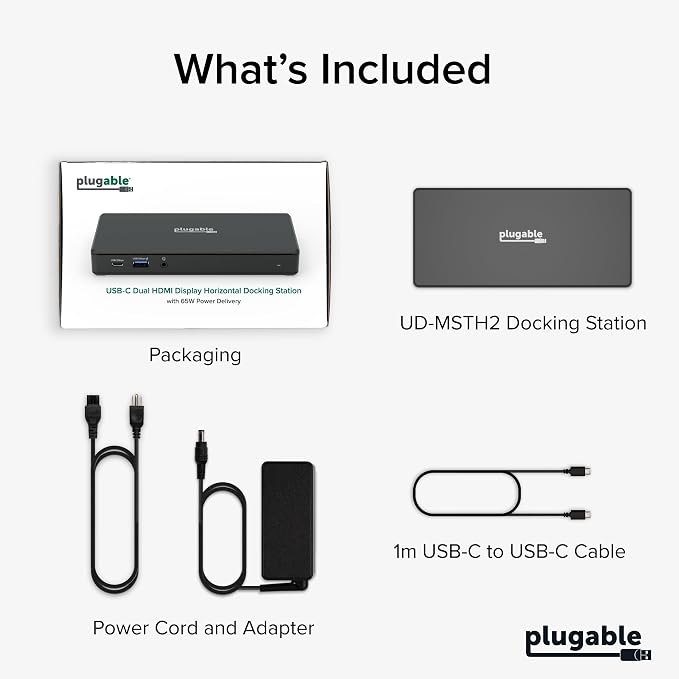
- One Cable Desk Setup: Turn your laptop into a full workstation with one connection, run two HDMI monitors (up to 4K 60Hz each on supported systems) and keep your desk setup ready for multitasking, spreadsheets, and video calls. Monitor resolution and refresh rate depend on your host system’s capabilities (dual 4K 60Hz requires a host that supports higher-end display output). - Compatibility Checklist: Designed for Windows 10+ / USB4 / Chromebook systems that support DP Alt Mode + MST. Not recommended for macOS if you need dual extended displays (Mac will be limited to one external monitor). - Easy Setup, No Drivers: True plug-and-play, no software installation required on supported systems. Just connect power, plug into your laptop, and attach your monitors and accessories. Host must support USB-C DisplayPort Alt Mode (DP Alt Mode) for video output (not all USB-C ports support video). - 10-in-1 Connectivity for a Ready to Go Workstation: Connect your everyday desk essential ? keyboard/mouse, external storage, Ethernet, and a headset for calls through one dock. Includes 1x USB-C (5Gbps), 2x USB-A 3.0 (5Gbps), 1x USB-A 2.0 (480Mbps), Gigabit Ethernet, and audio in/out, plus a secure K-Lock slot for office environments. - What’s Included + Lifetime Support: In the box you’ll get the UD-MSTH2 dock, 110W power adapter, 1m USB-C host cable, and a Quick Start Guide for fast setup. Backed by Plugable’s lifetime support from our North American team of connectivity experts.
Product description
Top Pick by WIRED Best Dual-Monitor Dock
Will this dock work with any laptop?
Is my Apple Mac computer compatible with the Plugable UD-MSTH2 docking station?
Do I need to install software or drivers in order to use the UD-MSTH2?
Are my monitors compatible with the UD-MSTH2 docking station?
What cable type or length should I use?
Compare Plugable Products
Walk up, plug in, and start working with the Plugable USB-C laptop dock, featuring dual HDMI display support up to 4K 60Hz, 65W charging, 1x USB-C 5Gbps, 2x USB-A 5Gbps, 1x USB-A 480Mbps, Gigabit Ethernet, and 3.5mm audio. No drivers needed with compatible USB-C laptops using DP Alt Mode and MST.
Will this dock work with any laptop?
A computer that has a full featured USB-C / USB4 / Thunderbolt 4 or 3 port that is running Windows 10 or 11, ChromeOS version 100+ should be compatible with the Plugable UD-MSTH2. Computers that do not meet these requirements are not supported
Is my Apple Mac computer compatible with the Plugable UD-MSTH2 docking station?
macOS does not support MST. UD-MSTH2 will power/charge a Mac and drive one external HDMI display; a second external display will not extend. For dual displays on Mac, choose one of our DisplayLink-based docks instead
Do I need to install software or drivers in order to use the UD-MSTH2?
No. UD-MSTH2 is driverless. For best results, keep your laptop’s graphics and USB-C firmware up to date.
Are my monitors compatible with the UD-MSTH2 docking station?
Any monitor with HDMI input works. For 4K 60Hz, use HDMI 2.0 capable screens and certified HDMI 2.0 cables. Dual 4K 60Hz is dependent on system's graphics capabilities.
What cable type or length should I use?
Use the included USB-C cable. HDMI cables should be Premium Certified 4K60 (HDMI 2.0), no longer than 6 ft for best signal quality
Share