CoreDrive
Plugable Dual 1080p HDMI Universal Docking Station for USB-C & USB 3.0 Laptop 10 Ports Windows/ChromeOS Plug & Play macOS Driver Required (UD-3900Z)
Plugable Dual 1080p HDMI Universal Docking Station for USB-C & USB 3.0 Laptop 10 Ports Windows/ChromeOS Plug & Play macOS Driver Required (UD-3900Z)
Couldn't load pickup availability
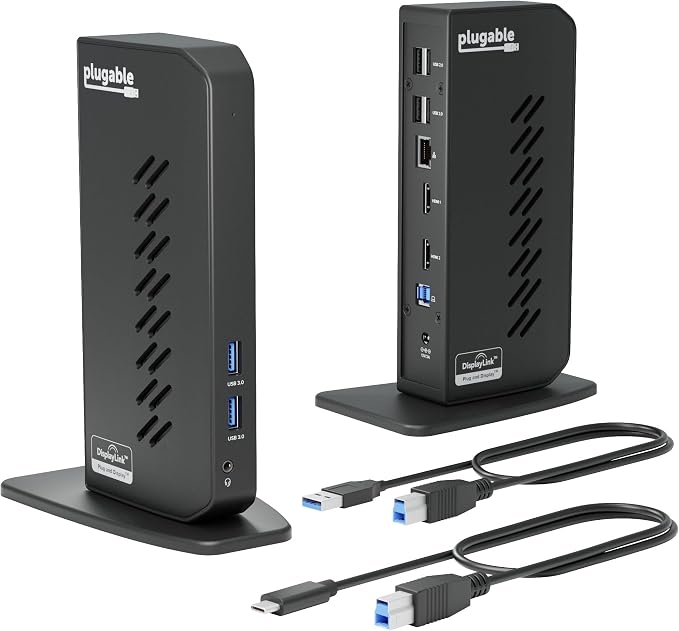
- Standardize Dual-Monitor Workstations: This laptop docking station enables dual HDMI displays up to 1920x1200 from a single USB connection. Supports M1 to M5 MacBooks and MacBook Neo, and expands multi-monitor support on M1-M3 and Neo systems normally limited to one external display. A practical solution for organizations standardizing workstations across mixed device fleets. Does not charge laptops. - Designed for Windows, macOS, and ChromeOS environments. Windows installs drivers automatically via Windows Update, macOS requires DisplayLink software installation for external displays, and ChromeOS works without additional setup. Ideal for IT-managed deployments across multiple operating systems. - 10 Ports with USB-C or USB-A Host Connectivity: Includes two HDMI ports, two 5Gbps USB ports, four USB 2.0 ports, Gigabit Ethernet, and a 3.5mm audio jack. Both USB-C and USB-A host cables are included, allowing compatibility with newer and older laptops while the compact vertical design helps reduce desk clutter. - Best Suited for Office & Productivity Use: Optimized for business software, web applications, and everyday productivity workflows. Does not support HDCP, so encrypted or copy-protected content such as Netflix or Hulu will not play. Not recommended for gaming or full-screen video playback. DisplayPort monitors not supported. - Expert Lifetime Support: Backed by North American-based technical support and our compatibility guarantee if something doesn’t work, we’ll make it right. Trusted by IT professionals worldwide, Plugable provides direct access to the engineers who design our products for deployment assistance, troubleshooting, and lifecycle support. We resolve issues quickly to minimize downtime and help organizations maintain productivity at scale.
Product description
Mutitaking made easy
How to download displaylink
Does the UD-3900Z charge my computer?
Do I need to install software or drivers in order to use the UD-3900Z docking station?
Will this dock really allow me to connect dual displays to my Mac?
Are my monitors compatible with the UD-3900Z docking station?
Can I watch protected video content from Netflix, Hulu, or Amazon Prime on this docking station?
Plugable Docking Stations
Does the UD-3900Z charge my computer?
No, the UD-3900Z does not charge laptops. You must use your laptop’s original power adapter to charge while using the UD-3900Z.
Do I need to install software or drivers in order to use the UD-3900Z docking station?
Yes. DisplayLink software is required for displays on macOS and must be installed manually. Windows can use automatic drivers via Windows Update, and ChromeOS does not require driver installation.
Will this dock really allow me to connect dual displays to my Mac?
Yes, really. DisplayLink Technology allows Macs normally limited to a 1 external monitor (like M1 - M3 and Neo) to connect to dual extended displays. Note: DisplayLink software must be installed manually in macOS
Are my monitors compatible with the UD-3900Z docking station?
Monitors with an HDMI input supporting up to 1920x1200 at 60Hz are compatible. DisplayPort monitors are not compatible with UD-3900Z.
Can I watch protected video content from Netflix, Hulu, or Amazon Prime on this docking station?
No. DisplayLink docks do not support HDCP, which is required for protected content from streaming services such as Netflix, Hulu, and similar platforms.
Share