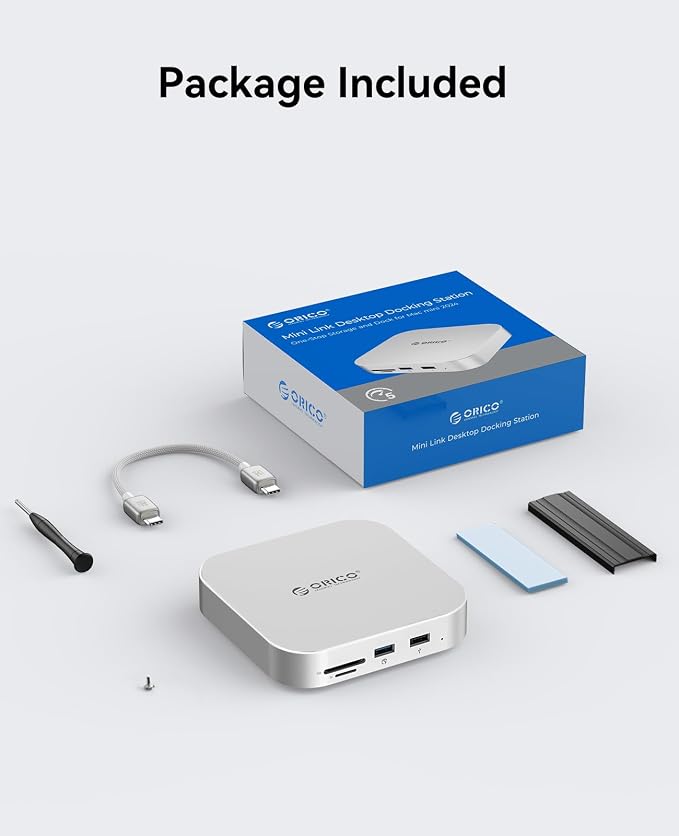
- 【Mac Mini M4 Dock & Hub】The ORICO 9-Port Mac Mini hub is a multifunctional solution specifically designed for the Mac Mini M4, featuring an M.2 slot, USB ports, SD/TF card reader, and audio interfaces. Easily connect a variety of peripherals and unlock the full potential of your Mac Mini
- 【Supports M.2 Hard Drive Enclosure】The built-in M.2 hard drive enclosure is compatible with NVME/SATA drives, supporting up to 8TB of storage (only supports 2280 size). Whether you're storing large amounts of data or running applications, it offers exceptional performance, making it the ideal solution for data management and backups
- 【10Gbps Superfast Data Transfer】Featuring two USB-A 3.2 ports (10Gbps) and two USB-A 2.0 ports, this dock meets your high-speed needs. Enjoy ultra-fast data transfer while still supporting essential peripherals like a mouse and keyboard, ensuring an efficient work and entertainment experience
- 【Audio & Card Reader Expansion】Equipped with 3.5mm headphone and microphone ports, this dock lets you connect audio devices directly without extra accessories. The built-in SD/TF card reader supports simultaneous card reading with transfer speeds up to 104MB/s, making media import/export fast and easy for creative tasks
- 【Designed for M4/M4 Pro】With its sleek curved design, the silver aluminum housing perfectly complements the Mac Mini M4/M4 Pro. Paired with a USB-C to C cable, compatible with both Mac Mini M4/M4 Pro, and a USB-C to C/A cable, supporting USB-C/A laptops for versatile device compatibility
Product description
ORICO Apple Extend Series
USB-C (10Gbps)
Input Interface
USB-C (40Gbps USB4 )
9 IN 1
Output Interface
7 IN 1
Slot *1
M.2 SSD Slot
Slot *2
10Gbps
Transmission
3000MB/s, 1000MB/s
HDMI Interface
NVMe PCIE and SATA
Support SSD Protocol
NVMe PCIE
1X 8TB
Support Capacity
2X 4TB
USB-C (10Gbps)
Input Interface
USB-C (10Gbps)
9 IN 1
Output Interface
10 IN 1
Slot *1
M.2 SSD Slot
Slot *1
10Gbps
Transmission
10Gbps
HDMI Interface
NVMe PCIE and SATA
Support SSD Protocol
NVMe PCIE and SATA
1X 8TB
Support Capacity
1X 8TB
USB-C (10Gbps)
Input Interface
USB-C (10Gbps)
9 IN 1
Output Interface
5 IN 1
Slot *1
M.2 SSD Slot
/
10Gbps
Transmission
10Gbps
HDMI Interface
NVMe PCIE and SATA
Support SSD Protocol
/
1X 8TB
Support Capacity
Built-in 1TB/2TB SSD
USB-C (10Gbps)
Input Interface
USB-A (5Gbps)
9 IN 1
Output Interface
/
Slot *1
M.2 SSD Slot
Slot *1
10Gbps
Transmission
10Gbps
HDMI Interface
NVMe PCIE and SATA
Support SSD Protocol
NVMe PCIE and HDD
1X 8TB
Support Capacity
8TB +24TB*2
Why is the USB-A 2.0 port even designed?
What's the transfer speed of the USB3.0 SD/TF card slot??
Why isn’t my SD/Micro SD card reader working?
Is this suitable for [Pro]-level products?
Why does actual speed differ from advertised?
Why is the USB-A 2.0 port even designed?
The USB-A 2.0 port ensures plug-and-play compatibility with mice, keyboards, and other low-speed peripherals. Its stable signal transmission prevents input lag, while universal compatibility eliminates driver hassles.
What's the transfer speed of the USB3.0 SD/TF card slot??
Maximum theoretical speed: Up to 104MB/s (USB3.0 interface limit).?Typical real-world speeds:? Read operations: 50-80MB/s (with UHS-I/U3 cards);Write operations: 40-60MB/s (with UHS-I/U3 cards)?
Why isn’t my SD/Micro SD card reader working?
First, verify the SD/Micro SD card is properly inserted. If inserted correctly, test the card on another device. If it works elsewhere but the reader still fails to recognize it, contact ORICO's after-sales support for assistance.
Is this suitable for [Pro]-level products?
This product supports up to 10Gbps, which may meet basic needs but is recommended for non-Pro devices. For Pro-level products with higher speed requirements, please choose models accordingly.
Why does actual speed differ from advertised?
Actual speed varies due to device interface, file size, partition format, OS, and transmission method (e.g., large files vs small fragments). Advertised speed reflects optimal conditions.