CoreDrive
NUROUM C40 2K Video Conference Webcam with Microphone and Speaker | 4 Noise Cancelling Mics 120° FOV AI-Powered Auto Framing 5x Zoom 16ft Voice Pickup Plug and Play Broad Compatibility
NUROUM C40 2K Video Conference Webcam with Microphone and Speaker | 4 Noise Cancelling Mics 120° FOV AI-Powered Auto Framing 5x Zoom 16ft Voice Pickup Plug and Play Broad Compatibility
Couldn't load pickup availability
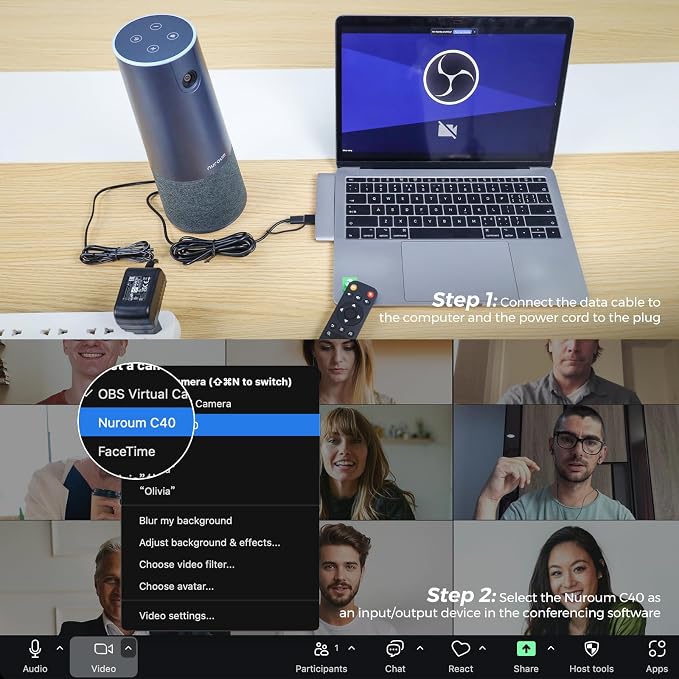
- All in one Webcam for Conference Room: The Nuroum C40 video conference system combines a 120° ultra-wide-angle camera with a 5MP premium CMOS sensor, delivering 2K@30fps and 1080p@60fps images. Equipped with 4 AI noise canceling microphones and a premium high-fidelity loudspeaker, it ensures high-quality video and audio clarity for online meetings, presentations, and discussions, suitable for corporate teams. - Built-in Optimized Speaker & Noise Cancellation Mics: Featuring an optimized full-duplex speaker, the conference room webcam ensures clear communication for up to 15 offline participants within 16ft from the base. The 4-element omnidirectional microphone array, enhanced by compressed neural network technology, suppresses background noise, cancels echoes, and highlights voices, providing distortionless sound even in high-volume scenarios. - AI-Powered Auto Framing & 5X Zoom: The conference camera employs self-developed face recognition technology for precise framing of single and multiple participants. With automatic frame adjustment as more participants join, it keeps everyone in the optimal position. Additionally, the camera offers up to 5x zooming capacity, allowing users to focus on essential details with remote control. - Easy Setup & Enterprise-Grade Privacy Protection: The USB webcam is driver-free, offering a hassle-free plug-and-play experience with a single USB cable (a power adapter is provided for increased speaker volume). The remote control and top buttons provide convenient options to turn off the camera and mute the microphones. The round light ring displays the real-time status, ensuring user privacy is always under control. - Diverse Compatibility & Tailored Configuration: Compatible with desktop or laptop computers running Windows, macOS, Linux, or ChromeOS, the conference camera works seamlessly with popular VC platforms like Zoom, Teams, Google Meet, Webex, Hangouts, GoToMeeting and more. The Nuroum NearSync application facilitates firmware updates and allows customization of image settings such as brightness and saturation, available for both Windows and MacOS on Nuroum's official website.
Product description
aplus content video
4 Noise Reduction Mics
aplus content video
Auto-Framing
C40 2K Video Conference Webcam with Microphone
5m/16ft Voice Pickup
aplus content video
Plug & Play
aplus content video
NearSync Software
C40 2K Video Conference Webcam with Microphone
C40 2K Video Conference Webcam with Microphone
Technology
C40 2K Video Conference Webcam with Microphone
Training
C40 2K Video Conference Webcam with Microphone
Nonprofit
Consulting
Medicare
Laboratory
How do I activate and deactivate the auto framing function?
Is it necessary to download and install NUROUM NearSync on my PC before using the C40 video conference webcam?
How can I disable noise cancellation? I'm a Yoga teacher and need background music for my courses.
Is the power adapter required for using the all-in-one conference webcam?
What should I do if the webcam is not recognized by my PC?
NUROUM All-in-one Conference Webcam
Immerse yourself in professional video quality with the 2K lens featuring a premium 5MP CMOS sensor.
4 built-in mics offer an impressive 360° coverage and an extended voice pickup radius of up to 16ft.
The Hi-Fi integrated conference speaker can clearly broadcast the voice of the remote participants.
120° FOV allows for a more inclusive and immersive experience ensuring all participants are visible.
You can place the webcam directly on a table or on a stand or tripod due to the 1/4'' thread.
The video conference camera can automatically adjust to keep everyone in the best framing position.
The zoom function helps focus on specific important details, providing flexibility during team work.
Enabling pan and tilt after zooming provides users with precise control over the visual focus.
Swiftly disabling the camera and muting the microphones provides an essential privacy safeguard.
You can effortlessly customize parameters as you like and update the device firmware in NearSync.
The conference webcam is empowered by a cutting-edge 4-element omnidirectional microphone array and bolstered by advanced compressed neural network technology, our system excels in suppressing background noise, eliminating bothersome echoes, and accentuating voices. This ensures crystal-clear sound reproduction even in bustling environments, guaranteeing an unparalleled auditory experience, regardless of volume levels.
The C40 conference room camera utilizes proprietary face recognition technology to accurately frame both individual participants and groups. It automatically adjusts the frame as more participants join, ensuring everyone remains optimally positioned throughout the meeting.
With its meticulously engineered full-duplex speaker, our computer camera delivers pristine communication, accommodating up to 15 offline participants within a 5m/16ft radius from the base. This ensures that every voice is heard with clarity and precision, fostering seamless interactions even in larger gatherings. Suitable for meeting rooms for 3-15 people, with sizes ranging from 96ft² to 500ft².
Our USB conference camera boasts a driver-free design, providing a hassle-free plug-and-play experience with just a single USB cable. Setting up the device is incredibly user-friendly, ensuring effortless installation for users of all skill levels.
This all-in-one device to be honest l think this is pretty good value. In summary in terms of the audio visual capabilities of the Nuroum C40 it pumps out really good quality video and the audio is not too bad. For its class, it offers commendable value, making it a solid choice for small to mid-sized meetings.
As an HR professional who WFH frequently, I used to find it frustrating having to constantly adjust my webcam during training. That all changed with the C40's autoframing. It automatically detects and frames the speaker! Amazing! So l can stay focused on the conversation without worrying about camera angles.
I've been using the Nuroum C40 webcam recently, and the autoframing is seriously impressive. lt automatically centers the shot when I move or when someone joins the frame-no manual adjustment needed, very smooth and natural. Perfect for video calls.
I'm a study abroad consultant working in a busy office with a large team, things can get quite noisy during peak hours. Last week l purchased C40. Its 4 ENC noise-cancelling mics work really really well and have significantly improved the efficiency of my online communication with students. I've already recommended it to my colleagues.
We run multiple meetings per week with folkswfh. The folks at home feel like more included because they can see the face of whoever speaks clearly. The meetings are now being 10x more effective and none of the meetings are wasted because everything is so clear.
We recently started using a few units of the Nuroum C40 in our lab. lt combines an HD camera, microphone, and auto-framing.... and it's ready to go. We didn't need to install any drivers! For a research setting where quick setup and reliability matter, it's been a solid, hassle-free option.
How do I activate and deactivate the auto framing function?
You can enable or disable the AI framing function using either the touch button located on the top of the conference camera or the remote control.
Is it necessary to download and install NUROUM NearSync on my PC before using the C40 video conference webcam?
No, the webcam has a plug-and-play feature. No additional software or driver required. However, we recommend using NearSync upon receipt to update to the latest firmware version (V1.0.0.9.9.240130) for optimized image and audio performance.
How can I disable noise cancellation? I'm a Yoga teacher and need background music for my courses.
Currently, the option to disable noise cancellation is not available. However, our team is actively working on releasing a new firmware that will include this feature to better suit your needs.
Is the power adapter required for using the all-in-one conference webcam?
No, the power adapter is optional and is primarily used to enhance the speaker volume. Upon plugging in the power adapter, the speaker's power increases from 1.5W to 3W for an elevated audio experience.
What should I do if the webcam is not recognized by my PC?
If the round light is ON, please write to us for further assistance or to request a replacement. If the light is OFF, try using another USB cable.
If the issue persists, ask for support and, if necessary, request a replacement.
Share