CoreDrive
NUROUM 360 Pro Conference Room Camera and Microphone 2026 Upgrade 3 AI Video Modes Conference Webcam with Noise Suppression All in One Webcam for Zoom/Teams/GoogleMeet on PC/Laptop/Desktop
NUROUM 360 Pro Conference Room Camera and Microphone 2026 Upgrade 3 AI Video Modes Conference Webcam with Noise Suppression All in One Webcam for Zoom/Teams/GoogleMeet on PC/Laptop/Desktop
Couldn't load pickup availability
- 360 Degree Camera for Natural Conversations: Equipped with professional HD fisheye lenses, this C50 video conferencing camera provides a wide field of view, delivering clear images in group video calls. It records panoramic videos in 1080P@30FPS. Placing the camera at the front of the table ensures that all participants can be seen clearly by your conversation partners. This allows you and your remote workers to engage in a conversation that feels as natural as a face-to-face meeting. - 3 AI-Powered Capture Modes: The compact all in one video conferencing system offers three different modes for various conference scenarios: The "Discussion Mode" highlights up to three different participants in close-up, making it ideal for group videos. In "Global Mode," only the content within the 115° field of view is captured without adjusting the video. The "Presentation Mode" identifies the active speaker and highlights them on the screen. - 6 Omnidirectional Microphones & Full-Duplex Speaker: The 360-degree conference room camera system delivers crystal-clear audio with its 6 integrated microphones and Hi-Fi speaker. The microphones capture sound from all directions, even from a distance of up to 5 meters. The full-duplex audio system also minimizes background noise and echos, ensuring that all participants can be seen and heard clearly. - Easy Setup & Reliable Data Privacy: Setup is extremely easy - simply plug and play using the included USB cable and power adapter. The remote control and top buttons make it easy to control the camera, volume, and AI features. If you don’t want to use the webcam temporarily for privacy reasons, you can turn off the camera and mute the microphones quickly. - Versatile Compatibility & Flexible Installation: The C50 webcam with microphone and speaker is compatible with PC, desktop and laptop computers running Windows, macOS, and Linux. It works seamlessly with popular communication platforms like Zoom, Teams, Google Meet, GoToMeeting, and others. Perfect for online conferences and webinars. Its 1/4-inch thread at the base also allows for tripod installation.
Product description
Discussion Mode
Nuroum 360 Pro Video Conference Camera with Mic
Global Mode
Nuroum Camera de videoconference 360 Pro
Presentation Mode
Nuroum Camera de videoconference 360 Pro
6 Omnidirectional Microphones
360 Pro Conference Webcam with Microphone
5m / 16ft Voice Pickup Range
360 Pro Conference Camera with Microphone
Leigh Moore-Executive Director, Scenic Walton
Frank Jacob-Sales Manager
Lison B.-Training Coordinator
Taloy Lee-Product Manager
Emily R.-Language Teacher
Mark T.-Ops Manager
Is it necessary to download and install Nuroum NearSync on my PC before using the C50 video conference webcam?
How big of a room is this product for?
What range of sounds can be recognized by the product?
Why is this product so expensive?
NUROUM All-in-one Conference Webcam
C50 video conference webcam offers greater audio capture and more professional noise cancellation.
C50 offers cost-effective, high-quality conference experiences, is a good choice for enterprises.
With 360° camera, C50 ensures all participants can be seen clearly by your conversation partners.
The 6 omnidirectional mic arrays can suppress noise, cancel echoes, and highlight human voices.
The integrated speaker transmits the voices of absent participants as if they were in the same room.
In discussion mode, three participants can be shown on the screen at the same time, giving you an immersive experience as if you were in a face-to-face meeting. In addition, the speaker's border will appear green.
In global mode, the all in one conference webcam offers a 115° field of view without adjusting the video, the 360-degree lens can capture more portraits at once. In this mode, if you need to switch the video angle, you can only adjust it with the remote control.
In presentation mode, the conference room camera can focus on a particular speaker, improve meeting focus and efficiency.
The all in one conference webcam delivers crystal-clear audio with its 6 integrated microphones and Hi-Fi speaker. The microphones capture sound from all directions and the full-duplex audio system also minimizes background noise and echos, ensuring that all participants can be seen and heard clearly.
With its meticulously engineered full-duplex speaker, our video conferencing camera delivers pristine communication, accommodating up to 15 offline participants within a 5m/16ft radius from the base. This ensures that every voice is heard with clarity and precision, fostering seamless interactions even in larger gatherings.
Allow you to adjust the volume, mute the microphones, and switch modes just through the buttons.
You can turn on/off the camera, move the directions and adjust magnification with remote control.
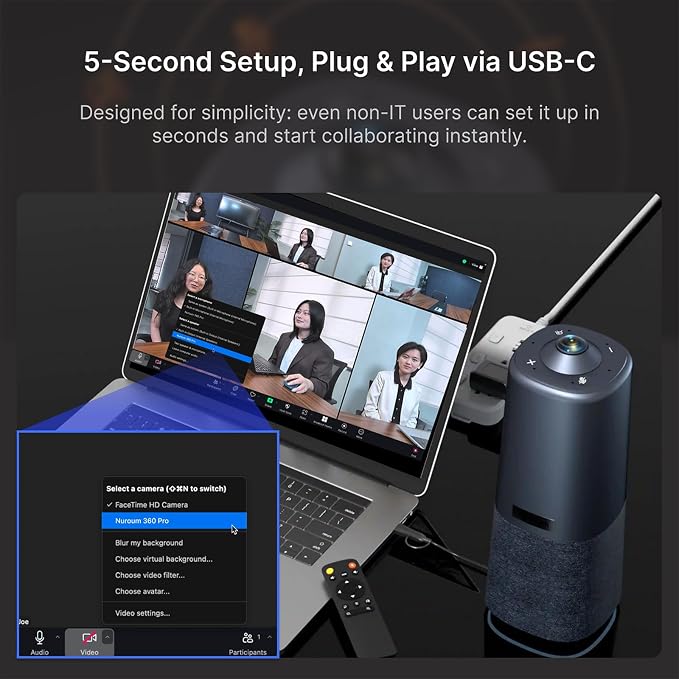
Without the need for extra data cables and labor costs, our conference webcam is plug and play.
Multiple mounting options: place it on the desktop, mount it to a tripod, or on a desk stand.
You can effortlessly customize parameters as you like and update the device firmware in NearSync.
Our board first used 360 Pro for a hybrid meeting, and setup was straightforward. We had struggled with audio and video before, but it delivered clear sound and better video.
We host multiple weekly meetings with remote staff. Since switching to this equipment, participants feel more engaged as they can clearly see speakers. Meetings are now far more effective.
As a SkillTech trainer, I used to adjust the camera constantly. The AI discussion mode on this 360 camera auto-focuses on my face, saving time and keeping sessions smooth. It’s best for team meetings!
At our startup, hybrid Friday meetings often had issues. The 360 camera’s noise-cancelling mic reduces background noise, making meetings seamless. Its crystal-clear video improves video conferencing.
I struggled to engage remote students in hybrid classes due to poor sound and video. The 360 Pro captures every angle and ensures clear audio, making students feel present more interactive.
In our hotel, laptop mics and cameras caused inconsistent call quality. The 360 Pro fixed this with 360 video and clear sound, ensuring everyone is seen and heard and making meetings more engaging.
Is it necessary to download and install Nuroum NearSync on my PC before using the C50 video conference webcam?
No, the webcam has a plug-and-play feature. No additional software or driver required. However, we recommend using NearSync upon receipt to update to the latest firmware version (V1.100.1.5.R.240613) for optimized image and audio performance.
How big of a room is this product for?
The camera of our product captures 360° panoramic views and accommodates larger groups without losing clarity, suitable for huddle rooms, small rooms and medium rooms( up to 15 people, 500ft²).
What range of sounds can be recognized by the product?
The product can pickup a 5m/16ft radius range voice from the base.
Why is this product so expensive?
We are committed to providing professional conference equipment for businesses. The premium 360° lens and 6 omnidirectional mics aims to enhance your meeting efficiency.
Share