CoreDrive
NEWQ iPad Docking Station Stand 11-in-1 Dock with 4K 120Hz HDMI 10Gbps Data SD/TF 4.0 RJ45 Ethernet Audio Ventilated Design for iPad Tablets Steam Deck ROG Ally Legion Go MSI Claw
NEWQ iPad Docking Station Stand 11-in-1 Dock with 4K 120Hz HDMI 10Gbps Data SD/TF 4.0 RJ45 Ethernet Audio Ventilated Design for iPad Tablets Steam Deck ROG Ally Legion Go MSI Claw
Couldn't load pickup availability
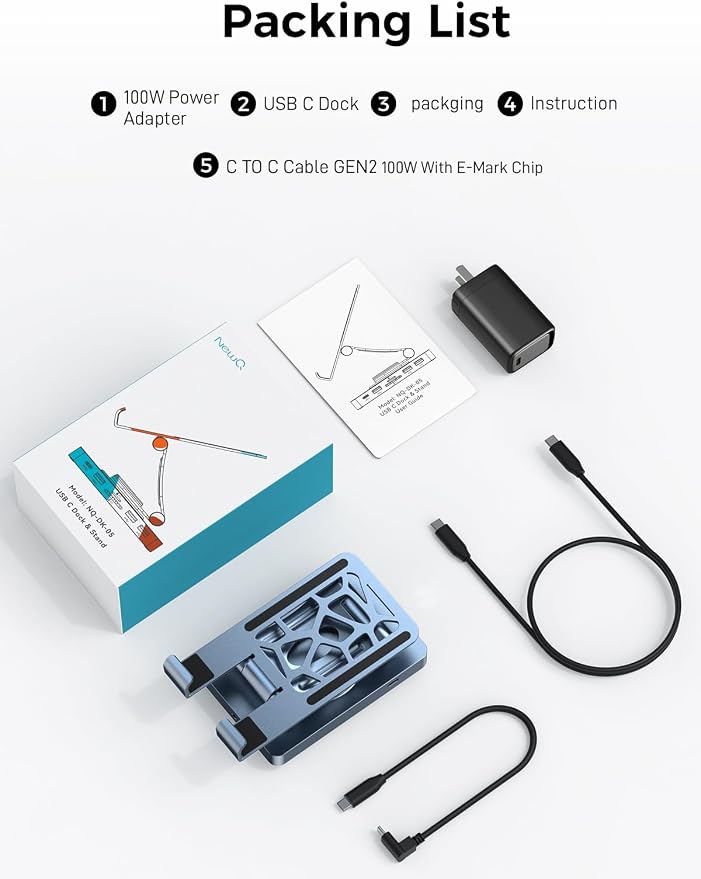
- 4K 120Hz Ultra-Smooth HDMI Output: Enjoy 4K 120Hz ultra-smooth visuals and sharper detail when connecting your tablet to an external monitor for work, design, streaming, or gaming. For optimal performance, we recommend using a 40W+ power adapter when connecting multiple devices. - Industry-First Cooling Stand Design: The integrated stand features a honeycomb ventilation structure that improves airflow around tablets and gaming devices, helping maintain stable performance during long work sessions or high-performance gaming. - 11-in-1 Docking Expansion: Features 4K@120Hz HDMI output, 100W USB-C Power Delivery, and 10Gbps high-speed data ports, plus SD/TF card readers and additional connectivity to support monitors, keyboards, mice, and storage drives in one powerful desktop docking station. - The Essential iPad Companion: The perfect iPad desktop docking solution, Turn your tablet into a powerful desktop workstation. Connect displays, storage, and peripherals while keeping your device elevated on a stable stand for a clean and organized desk setup. - Incredible Compatibility ? Not Compatible with Lightning iPads, Nintendo Switch, Nintendo Switch OLED, or Amazon Fire: This USB-C docking station requires no drivers and supports Windows, macOS, XP, Chrome OS, iPadOS, Android, Unix, and Linux. Works with iPad and iPad Pro, Steam Deck, ROG Ally, Legion Go, iPhone 15/16/17, Samsung tablets, MacBook Air/Pro, and laptops from Dell, HP, Lenovo, Surface, Huawei, Samsung, and other USB-C devices (including Thunderbolt 3/4).
Product description
Versatile USB C Dock For USB C Devices
Interface Specification and Precautions
Why a 65W Power Adapter Is Recommended?
PD-IN 100W Max
Industry-Leading 10Gbps Data Transfer
Latest SD 4.0 Tech
Fast and Stable Ethernet
Premium Sound Transmission
3.5mm & Type-C Dual Headphone Jacks
Can this connect my Switch to an external monitor?
How does the NewQ iPad docking station supply power to my devices?
I’m looking for a desktop dock for my ROG Xbox Ally and need 4K@120Hz output. Is this suitable?
Is this dock compatible with my iPad Pro 13-inch (M5)?
How does the dock handle heat dissipation?
When connecting a monitor and multiple peripherals to your tablet through the dock, power demand increases. Since most original tablet adapters provide 18W?40W, using a 65W power adapter helps ensure stable performance and reliable connectivity.
The USB-C PD-IN port can support up to 100W. It can quickly charge your devices while providing sufficient power to all 11 ports.
Notes:
1)The NQ-DK-05 itself takes up about 8W, so if you want to charge iPad at full speed, we recommend to use an adapter with at least 30W.
2)For other devices, please consider the power required by the dock itself when choosing an adapter.
This docking station features 2× USB 3.2 Gen 2 ports (10Gbps) and 2× USB-A 2.0 ports (480Mbps) for flexible connectivity.
The high-speed 10Gbps ports enable rapid file transfers for external SSDs and storage devices, while the additional USB-A ports are ideal for peripherals such as keyboards, mice, and other accessories.
This device utilizes the technology of SD4.0 with a read speed of up to 300Mbps, which is three times faster than SD3.0.
If you have a need to quickly back up the contents of your SD card, this will be your first choice in a USB-C Dock.
Please make sure that your SD/TF card itself also supports high-speed transfer.
No spotty wireless signal any more. Just plug in,enjoy your super fast and reliable wired ethernet. It's a perfect choice for playing games, online video streaming, downloading, uploading, etc.
1) Plug and play, enjoy high quality music immediately without any driver or adapter, providing perfect music transfer and clear sound quality.
2) Besides the 3.5mm Audio port, USB-C3.0 also supports headphones. But you can't use 2 pairs of headphones at the same time.
Can this connect my Switch to an external monitor?
We do not recommend this use. Due to proprietary protocols, some functions may be limited or not supported.
How does the NewQ iPad docking station supply power to my devices?
This iPad dock features a PD-IN 100W port. You can connect a 40W+ power adapter to provide stable power when using multiple external devices.
I’m looking for a desktop dock for my ROG Xbox Ally and need 4K@120Hz output. Is this suitable?
Yes. The NewQ Dock features an HDMI port that supports 4K@120Hz output for smooth, high-refresh display. The stand also offers three adjustable height positions, making it ideal for desktop setups with handheld gaming devices.
Is this dock compatible with my iPad Pro 13-inch (M5)?
Yes. This is a multifunction docking station specifically designed for iPads. It works as both a desktop stand and an expansion hub, allowing you to connect multiple external devices. It is ideal for iPad, iPad Pro, and iPad Air models.
How does the dock handle heat dissipation?
The stand features a ventilated honeycomb structure that improves airflow beneath your device. Combined with the all-metal construction, it helps dissipate heat efficiently and maintain stable performance during extended work sessions or gaming.
Share