- True Plug & Play, All Cables Ready - Forget driver CDs or complicated setups. This laptop dual monitor extender delivers true plug-and-play simplicity?just connect and go. Comes with everything you need: two high-speed USB-C full-function ports, one USB-C 2.0 DP Alt-Mode port, and all necessary cables packed in the box. Works instantly with Windows, Linux, and select phones/tablets. For Mac: also plug-and-play, no drivers required. Note: On M1/M2/M3 MacBook Air, extended mode is not supported; only mirror and full mode is available. This is a macOS limitation, not a product fault.
- Triple-Screen Workstation, Five Ways to Work - Expand your laptop into a 3-screen powerhouse. Choose from dual extended displays, a single ultra-wide 23.8" view (spanning both screens), mirror mode, split-screen, or portrait orientation?five flexible layouts for every task. Compare spreadsheets side-by-side, code with documentation open, present a full timeline, or game in an immersive wide view. Whether you're a remote worker, traveler, student, or creative pro, this portable monitor setup turns any space into your most productive office.
- Vivid Full HD with HDR, Built for Long Days - Dual 15.6" 1080P FHD IPS matte panels now feature HDR and true 8-bit color depth (16.7M colors) with 60Hz smooth refresh?so images look crisp, colors pop, and transitions stay fluid. 300 nits brightness keeps things clear even by a sunny window, and 100% sRGB plus 1000:1 contrast mean your work matches your laptop screen without constant tweaking. Flicker-free & low blue light tech helps reduce eye fatigue during all-day sessions. Exclusive advantage: each screen has independent brightness and color controls?adjust one side for notes, the other for reference, without compromise.
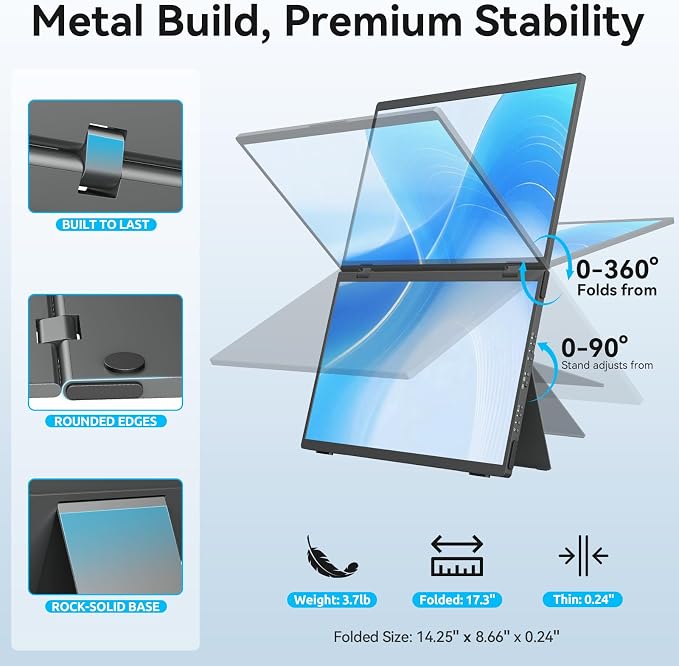
- 360° Fold & One-Button Flip for Instant Sharing ? Lightweight & Fully Adjustable.The upper screen rotates 180° and fold 360° with a single side button ? perfect for face-to-face meetings and client presentations with no software needed. The full-metal body weighs just 3.7 lbs, folds flat for backpack travel, and both screens are supported by a 90° kickstand that works in landscape or portrait mode. Each display has independent brightness & color controls, and it’s plug-and-play with Windows & macOS (no drivers required) ? giving you a complete dual-screen workstation anywhere.
- Lifetime Support & Industry-Leading Warranty - We stand behind every MAGICRAVEN triple-screen monitor with confidence: 30-day hassle-free returns, 90-day direct replacement for any quality issue, a full 2-year warranty, and free lifetime technical support. Our 24/7 customer team responds within 8 hours?because a portable monitor should work as reliably as your ambition.
Product description
What should l know before buying?
Does it work with my specific laptop model?
How many ports does the monitor have, and does it support HDMI?
Why does my dual monitor show “No Signal” when connected to the computer?
What should I do if my monitor flickers, brightness resets, or remains black?
What should l know before buying?
No touchscreen, Bluetooth, Wi-Fi, or battery. Insufficient power may cause flickering ? always use the included high?wattage charger.
Does it work with my specific laptop model?
1.Windows & Linux: Plug?and?play, no drivers needed.
2.Mac: Works with mirror and full mode. Note that M1/M2/M3 MacBook Air does not support Extended Mode due to macOS limitations.
How many ports does the monitor have, and does it support HDMI?
The monitor has three USB?C ports. Two of them are full?power ports (for both video and power input), and the remaining one is for power only. There is no HDMI port.
Why does my dual monitor show “No Signal” when connected to the computer?
Make sure your computer is connected to the monitor’s USB?C Display Port ? not the USB?C power?only port.
What should I do if my monitor flickers, brightness resets, or remains black?
Make sure you are using the original power adapter included in the package. Using an insufficient or incompatible power source may cause flickering, brightness resets, or a black screen.