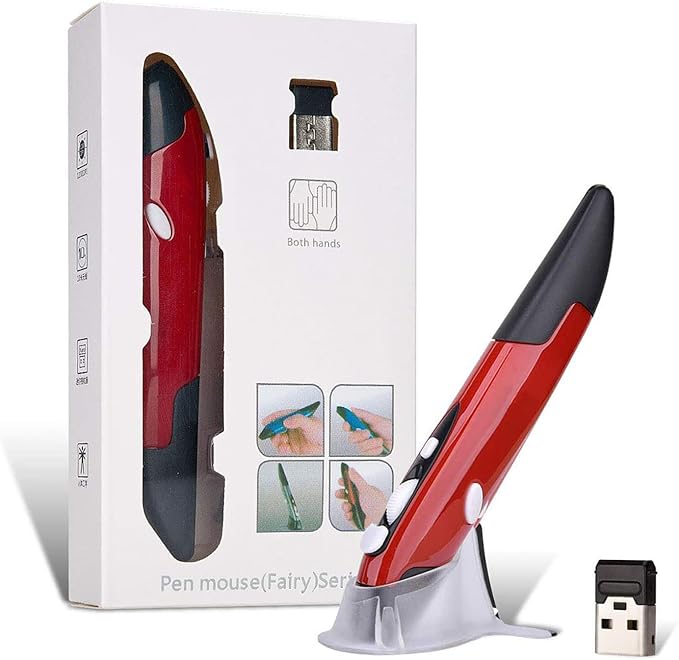
- **Ultra-portable: 5.7 x 0.6 x 1 inches mini size, just like a pen. It fits in your pocket, take it to your class, meeting and wherever you go. You can use a wireless mouse anywhere you like.
- **DPI Adjustable ? 800/1200/1600 DPI adjustable. The adjustable DPI helps in finding a proper 'speed'. The grip is very natural and you can position your arm close to the body, or even on the body for comfort.
- **Power Saving - Wireless 2.4G touch screen pen mouse, come with USB receiver, up to 33ft effective distance. The mouse is power by one AAA battery(Not Include), plug and play, no extra driver needed. The auto sleeps function, no worry about waste of your battery.
- **Easy to Use ? Good for using in limited space or unusual places where a normal mouse is a bit bull to use, fits comfortably in the hand, button placement for left and right mouse clicks are in good placements for easy clicks.
- System Supported: Compatible with: Windows10/ ME/ NT/2000/XP/Vista/7/8 ,Android ,Mac, OC etc. Battery: 1 x AAA battery (not included).
Product description
Compact Design
Ergonomically Design ,best mouse for who suffered from "mouse pain"
Portable, a pocket wireless mouse you can take it anywhere you like.
Widely used for PPT, Hand writing, Drawing, Metting ...
FAQ & Solutions
Innovative mini pen-style mouse
With handwriting input function, you can use it as a writing board for your tablet, laptop, desktop at will.
A best tool for conference and multimedia teaching
Equal to PowerPoint presenter when needed, use mouse wheel to turn pages freely, presenting ppt at business meeting or assisting multimedia teaching. Remote control distance range is up to 10 meters so you can free to move around the room and interact with your audience.
Two tracking speed
Provides 800/1200/1600 cpi switch, press the switch button and choose the mode you perfer all times.
Low voltage alarm
When the alarm lights up, remind you to change battery in time, in case of stopping normal use.
**This fairy pen mouse with compact design,Light weight with 4Keys and mount. ** Adjustable CPI :800/1200/1600
** This mouse unlike standard mouse, it like a pen you can handle,more comfortable. **Now, using this mouse all of your wrist pain will be gone away! It takes some adjustment to get used to, but this mouse is AWESOME for those trying to find a more ergonomic life. **Package: 1 * Pen Mouse 1 * USB 2.4GHz Receiver 1 * Mount 1 * English Manual
Specifications:
1. 2.4 G Hz touch pen mouse with web browsing. Approx 33ft effective distance.
2. Ergonomics design: fits comfortably on your hand; Nano dongle
3. Resolutions Adjustable: 800/1000/1200dpi
4. Support 7 / 8 /10/ Vista / XP / 2000 / ME / NT
5. Compatible device: Perfect for laptop, tablet pc, smart phone.
6. Battery: 1.5V AAA(not included)
7. Number of keys: 4
8. Operating Frequency: 2.402GHZ-2.480GHZ; Channel: 16 with automatic frequency hopping
9. Tracking Method: optical technology; Maximum acceleration: 14 inches/s
**Easy to Use ? Good for using in limited space or unusual places where a normal mouse is a bit bull to use, fits comfortably in the hand, button placement for left and right mouse clicks are in good placements for easy clicks.
**System Supported: Compatible with: Windows10/ ME/ NT/2000/XP/Vista/7/8 ,Android ,Mac, OC etc.
1.The wireless mouse still not work after install battery,how to do it? Tips:This wireless mouse is powered by 1x AAA battery,please make sure use the right type battery and use it in right way. 2.The wireless mouse was worked for about few hours and than stopped working,how to do it? If you meet this situation,please try the following ways: 1.Check if this mouse device keep “on “.Right side have a little power button. 2.Check USB port or receiver if well connected, pls make sure it well connected. 3.Try to use other computers. 4.Try to change a new brand battery . 4.Re-connect the receiver and re-put the battery, done continuously .