CoreDrive
KEFEYA Laptop Screen Extender Portable Monitor 14 FHD IPS 1200P Travel Dual Second Monitor for Laptop
KEFEYA Laptop Screen Extender Portable Monitor 14 FHD IPS 1200P Travel Dual Second Monitor for Laptop
Couldn't load pickup availability
- ?【Improve Efficiency 200% & Convenient Work Leisure & Save Time】-Our 14” Laptop Screen Extender Portable Monitor support you open multiple tasks at the same time, no need switch back and forth on single screen, save a lot time and increase your efficient up to 200%.Perfect for travel ,remote work, conference ,gaming, picture video design etc (Plug and play, no driver required,Applicable for all size Laptops (VS other only 13-17 IN) . - ?【Widely applicable & Plug and Play No Need Driver】-The Travel Portable Dual Second Monitor for Laptop compatible most Windows,MacOS,Linux,Intel,Chrome,Switch,PS4/5, Xbox One etc (Suit Mac M1 Pro/Max , M2 Pro/Max , M3 Pro/Max , M1/ M2 /M3 chip laptop). Just make sure your device or laptop has 1 USB-C port (full function),or 1 HDMI +1 USB-A port . - ?【Multiple Use Mode & 210°+ 360°Sharing Angle】 -The Extension Laptop Monitor Extender offer multiple display modes(Extend/ Mirror/Landscape/Portrait ). The unique bracket base design support monitor 210°+ 360°angle sharing(VS other 180-270°),allow you customize view angles. Also help you easily share screen to others efficiency communicate .The Lightweight aluminum shell (Vs other plastic) is more durable, better for heat dissipation. - ?【1920 x 1200P FHD IPS Monitor & Support Independently Adjust】-14" Full FHD Portable Travel Dual Second Monitor can be easy take out in backpack. Configured with more higher resolution 1920x1200 / IPS 178°clear images view angle / 300 nit brightness / 72% NTSC color gamut / 1:1000 contrast ratio, provide a bright vivid and immersive visual experience.The Monitor also with button can independently turn On/OFF and adjust (brightness, volume, font size etc). - ?【Package & Service】-KEFEYA provide all accessories for using the Portable Computer Monitor for Laptop Extension (Monitor Screen*1, USB-C to C cable *1, USB-A to C cable *1 HDMI to MINI HDMI cable *1, Bag*1).Easy use just need 1 USB-C to C cable (offer video & power),Or HDMI to MINI HDMI cable (offer video) + USB-A to C cable ( offer power ).High-quality 100% QC.Please message us if you need any help , We will reply in 24H.
Product description
KEFEYA Portable Monitor for Laptop Screen Extender
Support you open multiple tasks at the same time and improve your work efficiency up to 200%!Perfect for people who working on the go,remote worker, watch movie,IT professionals, programmers, game player etc!
Specification:
Compatible :Most Windows,Mac OS,Linux,Intel ,Chrome,Switch,PS4/5,Xbox One (Suit Mac M1 Pro/Max , M2 Pro/Max , M1/ M2 chip laptop).
Applicable : All size laptops,Plug and play, no driver required
Screen:14 IN High resolution 1920x1200 P/ IPS 178°/ 300 nit brightness /72% NTSC color gamut /1:1000 contrast ratio
Bracket base :Support monitor 210°+ 360°angle sharing,And also support upper on laptop angle.
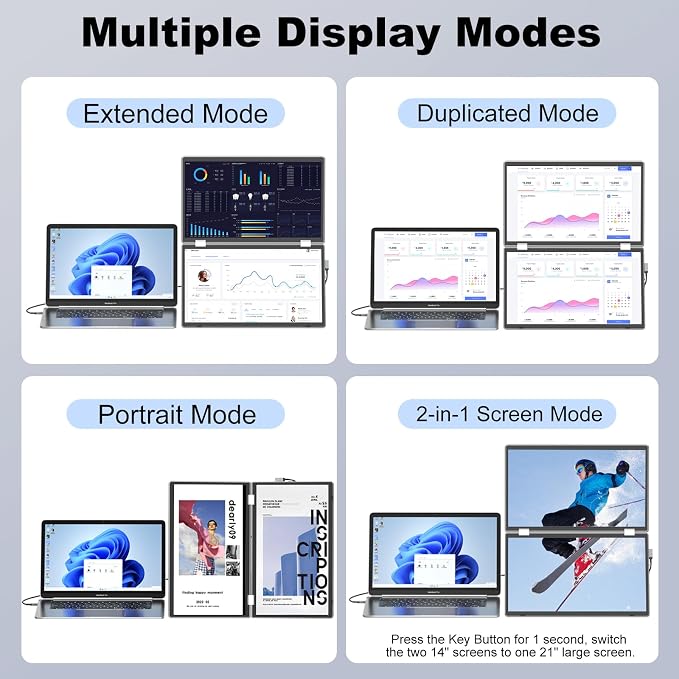
Support:Extend/ mirror/Landscape/portrait
Support independently : Turn On/OFF and adjust (brightness, volume, font size, backlight etc).
Lightweight aluminum shell : more durable, better for heat dissipation.
Easy use:Just need 1 USB-C to C cable ( full function offer video & power), Or HDMI to MINI HDMI cable (offer video) + USB-A to C cable ( offer power ).
Tips:Some laptop USB-C Port is not full function port (only support power or video ), Please check before use.
Advantage :
1. Improve Efficiency 200% & Convenient Work Leisure & Save Time
Our 14” Laptop Screen Extender Portable Monitor support you open multiple tasks at the same time, no need switch back and forth on single screen, save a lot time and increase your efficient up to 200%.Perfect for travel ,remote work, conference ,gaming, picture video design etc (Plug and play, no driver required,Applicable for all size Laptops (VS other only 13-17 IN) .
2. Widely applicable & Plug and Play No Need Driver
The Travel Portable Dual Second Monitor for Laptop compatible most Windows,MacOS,Linux,Intel,Chrome,Switch,PS4/5, Xbox One etc (Suit Mac M1 Pro/Max , M2 Pro/Max , M3 Pro/Max , M1/ M2 / M3 chip laptop). Just make sure your device or laptop has 1 USB-C port (full function),or 1 HDMI +1 USB-A port.
3. Multiple Use Mode & 210°+ 360°Sharing Angle
The Extension Laptop Monitor Extender offer multiple display modes(Extend/ Mirror/Landscape/Portrait ). The unique bracket base design support monitor 210°+ 360°angle sharing(VS other 180-270°),allow you customize view angles. Also help you easily share screen to others efficiency communicate .The Lightweight aluminum shell (Vs other plastic) is more durable, better for heat dissipation.
4.1920 x 1200P FHD IPS Monitor & Support Independently Adjust
14" Full FHD Portable Travel Dual Second Monitor configured with more higher resolution 1920x1200 ,offer IPS 178°clear images view angle,300 nit brightness, 72% NTSC color gamut, 1:1000 contrast ratio, provide a bright vivid and immersive visual experience.The Monitor also with button can be independently turn On/OFF and adjust (brightness, volume, font size, backlight etc).
5.Easy Use
Easy use,Just need 1 USB-C to C cable ( full function offer video & power), Or HDMI to MINI HDMI cable (offer video) + USB-A to C cable ( offer power ).
Some laptop USB-C Port is not full function port (only support power or video ), Please check before use.
Package :
Monitor Screen*1,
USB-C to C cable *1,
USB-A to C cable *1,
HDMI to MINI HDMI cable *1
Bag*1
Quick Guide:
Q1: How to check Tpye-C port on computer is an all-function port or not ?
A: If your laptop have a USB-C port with one of the following symbols (or the Thunderbolt 3, Thunderbolt 4, DP 1.2), then it is the Full-function Type-C port, you can use the USB C to C cable to connect each screen. (You can check the manual or go online to check the computer port parameters.)
Q2: Monitor Screen display show "No Signal"
A: 1>If you use USB-C to C connect, it means your computer's C port only support power not support video transmission,You can connect a HDMI cable to the monitor provide video transmission.
2>If you use HDMI cable (Provide video transmission). Please connect an USB-A/C to C cable (Provide power) 5V/2A to the monitor .
Q3: Monitor Screen Flickers & Black Screen
A:It may be that your laptop is low battery or voltage is insufficient,use an extra USB-A to C cable to power laptop or monitor screen extender.
Q4: Monitor screen not light up after connecting?
A:It may be that your laptop does not have enough power. Please charge the monitor with an extra power supply that provide 5V/2A.
Please active your laptop screen to avoid extender screen into sleep mode.
Share