KEFEYA 14.2 Portable Triple Monitor & H6 USB Video Transmission Hub Data to Video Signal Conversion Hub Laptop Screen Extender Compatible with M1/M2/M3 MacBook
- 【Portable & Travel-Friendly】Engineered for the mobile professional, the KEFEYA 14.2" portable monitor transforms any space into an efficient workstation. It features 0-180° rotating screens that fold into a compact size for effortless storage in any laptop bag. The included premium carrying case ensures maximum durability. Perfect for business trips, remote work, online classes, gaming, and video conferences.
- 【Easy Setup & Plug-and-Play】KEFEYA Laptop Screen Extender allows you to light up one screen with a single Type-C cable when a full-featured Type-C port is available. The kit includes all necessary cables (Type-C, HDMI, USB-A) and works seamlessly with Windows, Mac, Switch, PS4 and Xbox One. No drivers needed?ready in seconds. If your device does not have this port, you can use a USB-A + HDMI cable instead (the second screen connects according to the available port).
- 【Crisp Full HD IPS Display】Boost productivity with a vibrant 1920x1080 IPS panel that delivers wide viewing angles and accurate colors, providing stunning clarity for both intricate spreadsheet details and rich multimedia content. Share content seamlessly in meetings or collaborative sessions, and customize brightness, contrast, and color temperature via intuitive controls?all of your settings are automatically saved for future use.
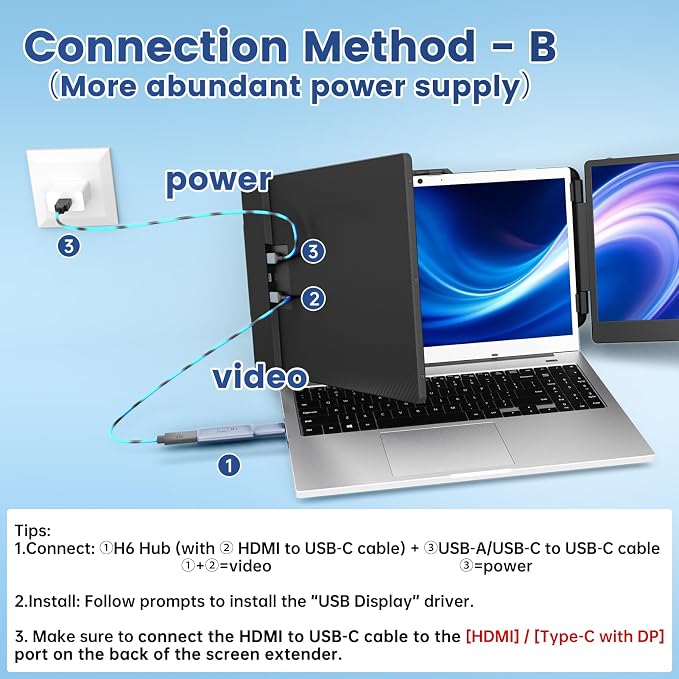
- 【Product Features】The H6 Hub is a versatile 2-in-1 solution that converts standard USB-A and non-video USB-C ports on your laptop into functional video outputs, enabling easy connection to external displays or Kefeya screen extenders even without dedicated video ports.
- ?【Note】[1] Driver installation is required. [2] You will also need to provide your own USB-C to HDMI cable and connect it to the Type-C (with DP) or HDMI port on your display device. [3] H6 can only convert USB-A and non-full-function USB-C ports to video output ports, does not provide power. Before using the H6 hub to connect laptop to an external display, please connect the power cord to the external display first.