- Keeps confidential work secure from prying eyes so only you see what you're working on
- Multi-layer film with louver construction blacks out screen image when viewed from either side, while keeping a crystal-clear image when viewing the screen straight-on
- Reduces glare, increases contrast, protects the display from scratches and dirt, and can help health care institutions meet HIPAA Patient Privacy Act compliance
- Reduces blue light emissions by over 40%
- Lightweight, thin, frameless design is easy to attach and remove, and easy to clean with microfiber cleaning cloth included
- Easy installation with 2 attachment options included: 1.) Clear adhesive strips; 2.) Side mount tabs
- Fits Widescreen Notebooks with a diagonal screen measurement of 12.1" (viewable area only) and a 16:10 aspect ratio; actual filter dimensions are 10 1/4" W x 6 7/16" H
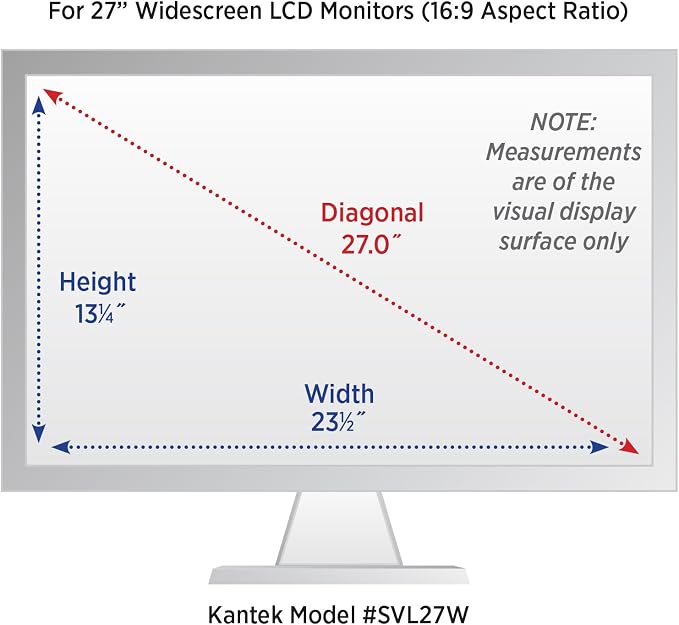
- Before choosing your screen, use measuring instructions in image carousel to ensure you choose appropriately (chart of all available filter sizes available under Technical Specification)
From the manufacturer
Kantek Secure-View Blackout Privacy Filter
How to Select Correct Secure-View Filter Size
Secure-View filters are made of multi-layer film with micro-louver technology that blacks out screen image when viewed from either side while keeping a crystal-clear image when viewing the screen straight-on.
Secure-View filters keep confidential work secure from prying eyes so only you see what you're working on. Sides blacked out at 30° angle from center.
Secure-View filters reduce harmful blue light emissions (-490-450 nm) by over 40%. Reduce glare and increase contrast to protect your eyes.
To confirm that the filter you wish to purchase will fit properly on your screen, please find the correct Secure-View Filter Model# on the size chart located under technical specifications.
If you know your monitor diagonal size and aspect ratio, select the Secure-View Filter Model# that matches. If you are not sure of your monitor size please measure as follows: