CoreDrive
IOGEAR USB-C to 1 to 3 Adapter - 1 HDMI Out - 1 USB A Out - 1 USB-C - 100W Power - 4K@30Hz - MacBook Pro - iMac - Chromebook - More Type-C - GUC3C3H
IOGEAR USB-C to 1 to 3 Adapter - 1 HDMI Out - 1 USB A Out - 1 USB-C - 100W Power - 4K@30Hz - MacBook Pro - iMac - Chromebook - More Type-C - GUC3C3H
Couldn't load pickup availability
- Expand your USB-C port to HDMI, USB-C and USB Type-A port. 4K Video Resolution of up to 3840 x 2160@30HZ - Supports USB-C Power Delivery up to 60W. USB-C downstream port x 1 (5Gbps) - USB Type-A port x 1 (5Gbps) - Compatible with Thunderbolt 3 (USB-C) - DP (DisplayPort) ALT Mode (Compatible with DP ALT mode supported USB-C and Thunderbolt 3 (USB-C) laptops)
From the manufacturer
Get More Out Of Your USB-C Port
USB-C to HDMI / USB Multiport Adapter
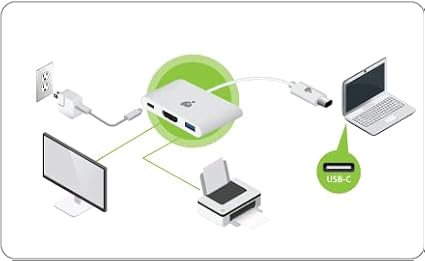
This all-in-one adapter allows customer to easily output 4K video via HDMI and add a USB Type-A port while powering their laptop up to 60W. If the USB-C port is not utilized, it can become a standard USB-C port for use with any USB-C peripheral device such as a hub, Ethernet adapter, card reader and more.
- Expand your USB-C port to HDMI, USB-C and USB Type-A port.
- 4K Video Resolution of up to 3840 x 2160@30HZ.
- Supports USB-C Power Delivery up to 60W*.
- USB-C downstream port x 1 (5Gbps).
- USB Type-A port x 1 (5Gbps).
- Compatible with Thunderbolt 3 (USB-C).
- DP (DisplayPort) ALT Mode1.
1Compatible with DP ALT mode supported USB-C and Thunderbolt 3 (USB-C) laptops *A total of up to 60W can be charged to the laptop after deduction of 7.5W is used by the adapter.
Add an HDMI video port to your laptop and extend your monitor for a more complete workstation. The USB-C to HDMI / USB Multiport Adapter supports up to 4K resolution from the HDMI video output for an astonishing video experience. To add your extra HDMI monitor, no drivers are needed- making this a simple Plug-N-Play installation.
Connect any of your current USB devices with the USB Type-A 3.0 port like your keyboard, mouse, printer, scanner, etc. When you are not charging your laptop, you can use the USB-C port to plug in any cutting edge USB-C devices.
No need to worry about running out of power while using your USB-C port. Connect your laptop's original USB-C charger to the multiport adapter and charge your laptop while you work or play. Providing up to 60w of power, your laptop will charge at the fast rate you expect from USB-C.
Share