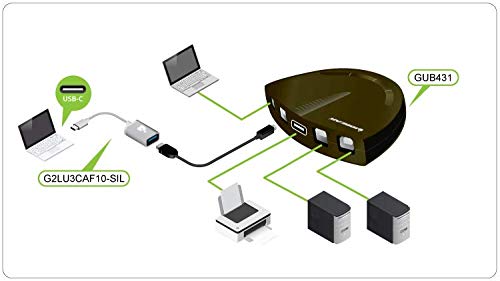
- USB 2. 0 support with data transfer rate up to 480Mbps and USB 1. 1 backward compatible
- {SHARE ONE USB PRINTER BETWEEN TWO WORKSTATIONS} Connect your workstations via USB 2.0 ports on the device, allowing you to share one printer, or Multi-function printer.
- {AUTOMATIC OR MANUAL SWITCHING} Downloading the automatic switching software will automatically switch the Printer Switch to the computer that is submitting the task. However, manual switching can be done by pressing the switch-button on the device.
- {MULTI-PURPOSE USE} Manually switch a wide range of USB peripheral devices (scanners, external hard drives, etc) via the push button located on the device itself.
- No external power supply needed
- Switch-lock function prevents other users from switching the USB device and ensures data access consistency
- **Automatic Switching software requires Admin rights
Product description
Automatic Printer Switching
Software Installation
aplus content video
Automatic Printer Switching
Software Configuration
aplus content video
Do I need to load the software on all computers for automatic switching?
Do I need administrative rights?
Can the switch be locked on a specific computer?
Can the sound notification be turned on or off?
The automatic switch function is software based and only available with USB printer or the printer function of a multi-function printer. For connecting and using other types of USB devices, you can switch computers by using the push-button on the USB switch or with the included software.
Do I need to load the software on all computers for automatic switching?
Yes, a software download is required on ALL computers connected for automatic switching.
Do I need administrative rights?
Yes, administrative rights are needed for the automatic switching function to work.
Can the switch be locked on a specific computer?
Yes, the switch can be locked to a specific computer by using the software or by pressing and holding the lock port button.
Can the sound notification be turned on or off?
Yes, there is a switch on the side of the device that can turn off the audible notification when switching between devices.