CoreDrive
intpw USB C Hub 4 in 1 VGA to HDMI Adapter with PD 100W 4K HDMI Type-A 3.0 5Gbps 1080P VGA Alumimun USB Hub for Laptop MacBook Pro/MacBook Air/ipad Pro/Dell XPS
intpw USB C Hub 4 in 1 VGA to HDMI Adapter with PD 100W 4K HDMI Type-A 3.0 5Gbps 1080P VGA Alumimun USB Hub for Laptop MacBook Pro/MacBook Air/ipad Pro/Dell XPS
Couldn't load pickup availability
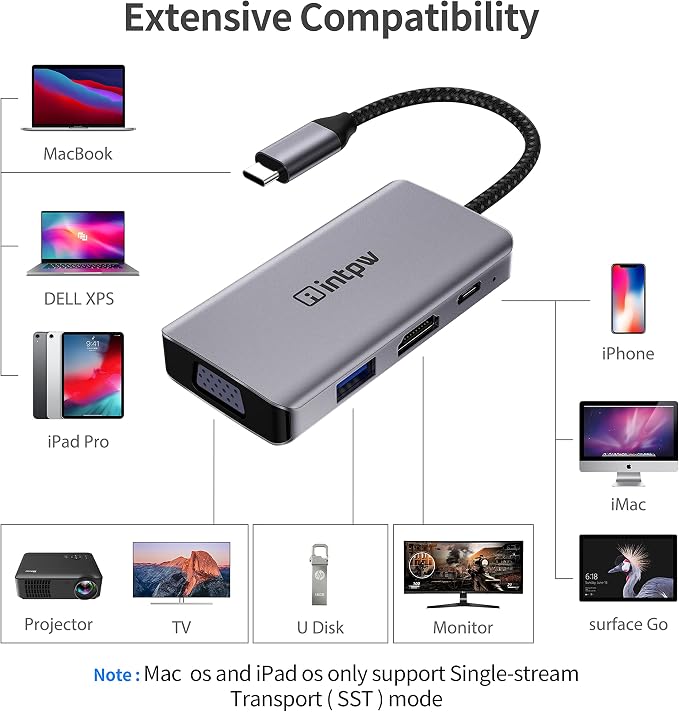
- ? 4 IN 1 VGA to HDMI Adapter - Equipped with 4K@30Hz HDMI, 1080P@60Hz VGA, USB 3.0 5Gbps, PD 100W Charging port, plug-and-play USB C to HDMI adapter connects and mirrors a Type-C-equipped PC or Mac laptop to HDMI/VGA-enabled TV or display, while also connecting a standard USB device. ??NOTICE: USB-C laptop must support DisplayPort Alt mode and power delivery. USB C to VGA HDMI Adapter can be output simultaneously to a display, projector, presentations, conferences, workshops, lectures - ? 4K@30Hz Video Output-The usb c hub delivering true 4K@30Hz output with smooth, ghost-free visuals?ideal for conference presentations, online classes, video editing, live streaming, and gaming. Enjoy clearer details and more fluid motion for professional and immersive viewing. ??NOTE: For Mac OS laptop, The display will only duplicate and not extended. For HDMI port, ONLY when your devices support 4K resolution, the video output will be 4K - ? 5Gbps Data & PD 100W Charging- Powered USB hub for laptop supports PD 100W high-power pass-through charging to keep MacBooks, Windows laptops, and iPad Pro powered even during multitasking. Prevents unexpected shutdowns during meetings, long classes, live sessions, or intensive editing. USB 3. 0ports offer up to 5Gbps transfer speed?perfect for instantly moving 4K footage, high-resolution photos, and large project files - ? Wide Compatibility- INTPW USB to HDMI adapter for MacBook Pro 2026-2016, MacBook 2026-2015, iPad Pro 2018, Surface Book, Samsung Galaxy Book S/Note series, HTC U11/U12, Pixelbook, Dell XPS 15 / XPS 13, Galaxy Book, and many other USB-C Devices. NOTE: For Windows, In extended mode you can only get two identical/different screen images(ABB/ABC).??Note: For Mac OS, In extended mode you can only get two identical screen images.(ABB) - ? What You Can Get- 1 x USB C Hub, 1 x User Manual, 1 x Nice Box; Plug and Play, No Software or Drivers Required (Thunderbolt 3 Compatible), Plug in the cable and use it easily, We provide friendly quality protection service for this Thunderbolt 3 to HDMI VGA Hub. Our company is customer friendly and always do our best to satisfy our customers. If you have any questions, please feel free to contact us
Product description
aplus content video
Intpw USB HDMI Adapter with Dual Video Output
Wide Compatility
1 * HDMI Port and 1 * VGA Port: Supports for Mirroring and Extending mode at 4K@30Hz and 1080p@60Hz
1 * USB 3.0 Port: High speed data transfer, which is 10 times faster than 2.0 ports.
1* USB C PD Charging Port: 100W pass through charging allows each device to take only the power it requires.
Equipped with HDMI Port for you much more flexibility and boosting your productivity. It also supports a single HDMI display up to 3840*2160@30Hz, and offers backwards compatibility to 1080p and 720p. VGA Resolutions up to HD 1080p@60Hz, downward compatible with 1080i, 720p, 576p, 480i/480p
USB C to HDMI VGA Hub can Extend and Mirror to two external displays at the same time, and enjoy crystal-clear 4K UHD or full HD 1080p videos on HDTV.Mirror your screen with the USB C adapter’s HDMI and VGA Port for a cinema-like visual feast.
How to connect Extend Mode for Windows OS?
Right-click desktop→Intel display Settings →Settings screen select display→ select multi-screen display→ expand the desktop
Share