CoreDrive
IBW 15.6 Portable Monitor Touchscreen 1080P FHD IPS USB-C Travel Monitor | Tempered Glass 10-Point Touch Dual Speakers Kickstand HDMI External Monitor for Laptop MacBook Phone PS5 Switch Xbox
IBW 15.6 Portable Monitor Touchscreen 1080P FHD IPS USB-C Travel Monitor | Tempered Glass 10-Point Touch Dual Speakers Kickstand HDMI External Monitor for Laptop MacBook Phone PS5 Switch Xbox
Couldn't load pickup availability
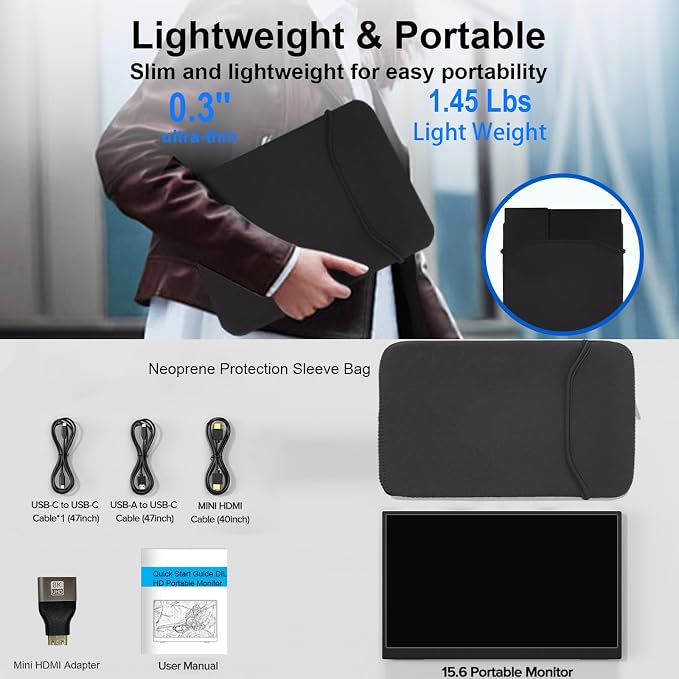
- 【10-Point Touchscreen Portable Monitor】IBW 15.6-inch portable monitor features a responsive capacitive touchscreen with up to 10-point touch support on Windows devices and single-point touch support on macOS devices. Connect via a full-featured USB-C cable for video, power, and touch control with devices supporting USB-C 3.1 DP Alt Mode or Thunderbolt 3/4. For devices without USB-C video output, use HDMI for display and USB-A to USB-C for power supply. Note: Touch functionality requires a USB-C connection with touch data transmission support; HDMI-only connections provide display output only. - 【1080P FHD IPS Touch Display】 Portable monitor featuring a 1920×1080 Full HD resolution and IPS panel, this touchscreen portable monitor delivers vivid colors, sharp details, and a wide 178° viewing angle for a consistent viewing experience from any direction. The 1000:1 contrast ratio enhances image depth with balanced brightness and detailed visuals, making it ideal for gaming, entertainment, work, and streaming. Eye-care technology with low blue light reduction and flicker-free design helps reduce visual fatigue during extended use. - 【Portable Second Monitor】Stay productive wherever you go with this slim and lightweight portable second monitor. Designed for travel, business trips, remote work, study, and home office, it fits easily into backpacks or luggage. A protective nylon sleeve is included for added convenience, making it an ideal portable monitor for laptop users, students, professionals, and frequent travelers. - 【Versatile USB-C & HDMI Connectivity】Equipped with dual full-featured USB-C ports, a standard HDMI port, and a USB-A port, this portable monitor works as an external monitor and connects easily to laptops, desktops, MacBooks, smartphones, gaming consoles, and more for work, gaming, and entertainment. A mini-HDMI to HDMI adapter is included for expanded device compatibility. (Power adapter not included. For best performance, use a 5V/2A USB-A power adapter.) - 【Built-in Kickstand & Dual Speakers】The IBW portable touchscreen monitor features an integrated 0?45° adjustable kickstand, allowing you to find the ideal viewing angle for work, entertainment, presentations, or video calls. It also includes dual built-in speakers that deliver clear, enhanced audio for movies, meetings, gaming, and everyday use.
Product description
Why isn't the touch function working with my HDMI connection?
Why does the touch response appear on my laptop screen instead of the portable monitor?
Which devices support the touchscreen function?
What should I do if there is "No Signal" when using a USB-C to USB-C connection?
Why does the screen flicker, look dim, or restart when I increase brightness?
Why isn't the touch function working with my HDMI connection?
If you use an HDMI or (Mini) DP cable for video, the touch signal requires a separate data connection. Please also connect the included USB-C to USB-C cable from your computer to the monitor's Type-C port to enable touch functionality.
Why does the touch response appear on my laptop screen instead of the portable monitor?
Windows: Go to Control Panel > Hardware and Sound > Tablet PC Settings > Setup to map touch to the portable monitor.
macOS: Touch input works on the screen where the cursor is located; move the cursor to the portable monitor to use touch.
Which devices support the touchscreen function?
Touch is supported when the monitor is connected to Windows/macOS computers and mini PCs.
It's not supported when connected to smartphones, tablets, gaming consoles (PS5, Xbox, Switch), TV sticks, or when using a capacitive stylus pen.
What should I do if there is "No Signal" when using a USB-C to USB-C connection?
Make sure your laptop’s USB-C port supports Thunderbolt 3/4/5 or DP Alt Mode.
Make sure you’re using the original USB-C to USB-C display cable provided in the package, as some USB-C cables do not support video transmission.
Why does the screen flicker, look dim, or restart when I increase brightness?
This indicates insufficient power supply. The monitor requires more power at higher brightness levels. To ensure stable performance, please connect the monitor to a wall outlet using a power adapter (5V/2A) that meets the required specifications.
Share