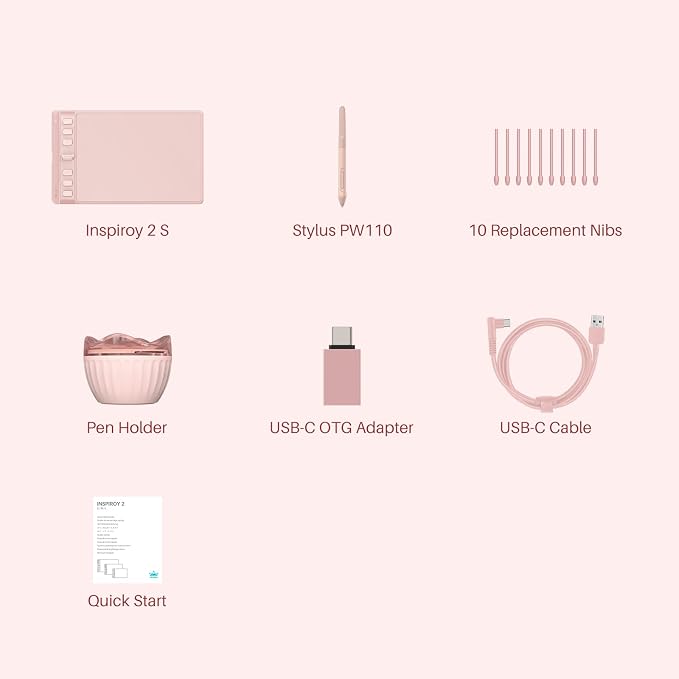
- Advanced PenTech 3.0: Upgraded from PenTech 2.0 to PenTech 3.0, Inspiroy 2 art pad offers amazing precision & control over every line with no noticeable lag & wobble, just like a standard pen.
- Ergonomics Pen Design: The new digital stylus PW110 is improved designed with slimmer body, soft silicone grip & accessible side buttons for better ergonomics & comfort.
- Programmable Scroll & Shortcut Keys: Unique scroll wheel & 8 press keys can be customized to your favorite shortcut so that your creative work become smoother and more efficient. You also can change the setting for different apps.
- Mobile Friendly: Enjoy creating on your Inspiroy 2 and see your drawings and paintings come to life on your Android smartphone or tablet (OS version 6.0 or later).
- Multi-OS Compatibility: Inspiroy 2 pen tablet is compatible with Mac (MacOS 10.12 or later), PC (Windows 7 or later), Linux(Ubuntu) , Android devices (OS version 6.0 or later) and ChromeOS 88 or later
- Please note: The art tablet is not a standalone product and has no internal power source. It must be connected to a computer, laptop, or smartphone using the included cable to work.
Product description
aplus content video
Get Total Digital Freedom
Digital Creativity
Work From Home
Digital Classroom
Electronic Signature
Compare Similar Drawing Tablets
Does this tablet need to connect to a computer?
How to know if my mobile phone or tablet is compatible with this tablet?
What pen technology does the PW110 employ?
What are the improvements on the battery-free digital pen PW110?
Is it only for drawing or can I use it with other software?
Adjust brush size easily with the intuitive scroll wheel and start painting quickly.
Feel greater friction and bring a paper feel when you draw and write on Inspiroy 2.
Works with Mac, Windows, Linux PC, ChromeOS 88 or later as well as certain Android phones & tablets.
You can easily pack it in your laptop bag and brought it to the coffee shop for on-the-go creation.
The press keys and Scroller are placed symmetrically, you can adjust the tablet 0°~180°.
3-Set 8 Customized press keys, with button preview interface, without memorizing it.
By pressing any of the group keys, the corresponding group of shortcuts will be enabled.
This is only the recommended key, which is different from the actual default key.
If you like listening to music, you can set up a group of multimedia Keys to have higher creativity.
Inspiroy 2 M is a creative editing tablet designed to speed up content creation whether it’s illustration, animation, graphic design or photo editing.
Digital pen technology helps you annotate documents, and make presentations with ease while working from home or in a video conference.
Sketch shapes, write formulas & equations with Huion graphics tablet on computer is easier. It's ideal for subjects like math, biology, or physiology.
A more convenient solution for signing documents electronically is using Huion pen and tablet. Digital pen technology is designed for paperless office
Does this tablet need to connect to a computer?
Yes, it is not a standalone tablet. It must be connect to PC/smartphone/tablet to work.
How to know if my mobile phone or tablet is compatible with this tablet?
Your phone or tablet must be equipped with Android 6.0 or above and should have OTG function. If you are not sure, please consult us for further information.
What pen technology does the PW110 employ?
The battery-free pen PW110 is powered by Huion PenTech 3.0, which improves user experience over the previous PenTech 2.0. It has a short retraction distance and can provide a more stable and natural drawing experience with improved accuracy delivery.
What are the improvements on the battery-free digital pen PW110?
1.PW110 has a longer silicone grip, which provides a more comfortable grip experience and reduces fatigue after long use.2.Anti-slip grip prevents sweating and slipping.3.The buttons on the pen keep the same height as the pen body against wrong press
Is it only for drawing or can I use it with other software?
It can replace computer mouse and be used for image editing, illustration, animation, graphic design, annotation, online learning, remote working with most creative software as well as many online learning applications and platforms on PC and Mac.