CoreDrive
EPOMAKER Aula WIN60 HE 60% Wired Magnetic Keyboard with Adjustable Actuation 8000 Hz Polling Rate Hall Effect Switches Hot-Swap for FPS Games (Black)
EPOMAKER Aula WIN60 HE 60% Wired Magnetic Keyboard with Adjustable Actuation 8000 Hz Polling Rate Hall Effect Switches Hot-Swap for FPS Games (Black)
Couldn't load pickup availability
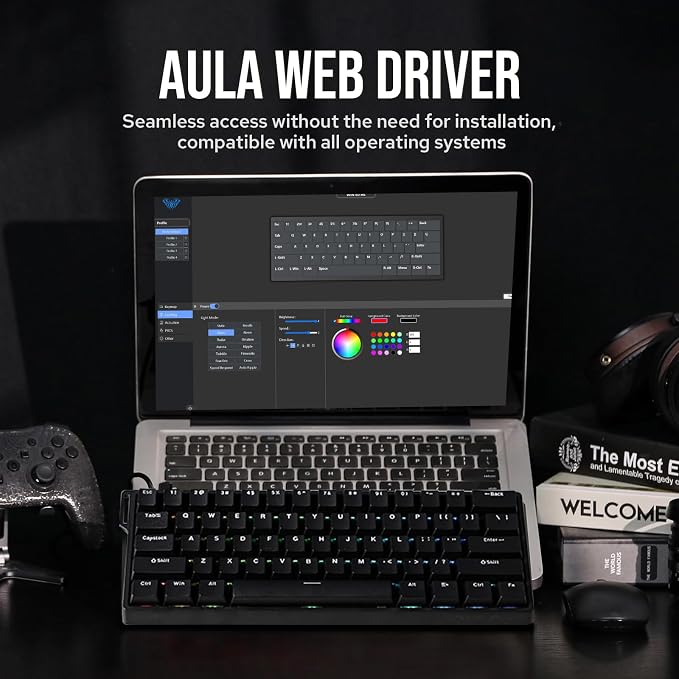
- Up to 0.01mm RT Sensitivity: Ready to dominate every move? With just 0.01mm of break on Max and a mere 0.02mm on Standard version, the WIN60 responds instantly, executing commands with precision. Experience this rapid fast keyboard, as WIN60 handles even the most complex manoeuvres effortlessly, becoming a seamless extension of your reflexes. - 0.3ms Latency Tested, 8000Hz Polling Rate: The WIN60 keyboard is a magnetic powerhouse, featuring both 8000Hz polling and 32KHz scan rates. Its ultra-low latency outperforms most 8000Hz magnetic switch keyboards, delivering a game-changing 8x faster response than traditional gaming keyboards. - 60% Ultra-compact Layout: The 60% layout of the WIN60 combines a sleek, space-saving design with enhanced typing efficiency. Its compact form allows for faster mouse movements and improved ergonomics, making it perfect for gamers and professionals alike. - Snap Tap & Dynamic Keystroke: Snap Tap ensures lightning-fast directional changes in FPS games by prioritizing the latest input between two keys. Dynamic Keystroke introduces true analog input, enabling up to 4 actions in a single stroke for seamless combos and macros. - Adjustable Actuation Point: The WIN60 features fully adjustable Hall magnetic switches, allowing you to customize each key’s actuation point from 0.08mm to 3.4mm in 0.02mm increments, with Max version upgraded to 0.1mm to 3.4mm per 0.01mm. Take full control for rapid keypresses or ultra-precise typing tailored to your needs. - Double-shot Durable Keycaps: Crafted with advanced dual-shot injection molding, the WIN60’s custom keycaps boast vibrant, durable legends that resist fading over time. This process not only enhances the keyboard’s sleek, minimalist design but also ensures a premium, long-lasting feel. - Stunning RGB Backlighting: The WIN60 HE RGB keyboard offers 20+ lighting modes and up to 16.8 million of colours available with online driver. With intuitive driver software, you can easily customize lighting effects and colours to match your unique style. Elevate your setup with a personalized and vibrant typing experience! - Online WEB Driver: The WIN60 HE’s web driver simplifies settings and parameter adjustments for users of all levels. All system performance parameters are fully customizable, with real-time visual feedback, including per-key rapid-trigger and sensitivity adjustments on the keyboard preview.
Product description
High-Performance Magnetic Gaming Keyboard with Unmatched Precision and Control
Snap Keys (SOCD)
Dynamic Rapid Triggering (RT)
Toggle Key (TGL)
DKS (Dynamic Keystroke)
Premium Details: Online Software, Magnetic Switch, RGB Backlit, and Package
AULA Online Driver (Chrome)
How to connect software
EPOMAKER Aula WIN60 HE
Hall Effect Magnetic Switch
Trigger precision up to 0.02mm, ensuring every keypress is accurate
Dynamic RGB Backlight
Multiple effects for preference
Package Content
How to fix the ghosting problem? Why the keys keep triggering?
What is magnetic key switches? What is the speciality of hall effect switch?
What is the difference between WIN60 HE Standard version and MAX version?
Why is my browser unable to recognize the WIN60 HE keyboard and why can't I use the Aula online driver?
Why the WASD on my WIN60HE Standard/MAX keyboard starts to act like arrow keys?
Compact Layout Gaming/Office Magnetic Keyboard from EPOMAKER
No more halting in the heat of battle. With SOCD, only latter key is prioritized and activated when two opposing directions are pressed simultaneously
RT eliminates delays from switch movement. it activates and deactivates keys instantly with minimal travel, making it perfect for FPS gaming.
Set "hold" or "double-click" as the trigger for continuous input and "tap" as termination. Release your finger for operation elsewhere.
The current key can be modified to bind 1 to 4 functions based on the degree of pressing and releasing.
Experience the unmatched speed of a magnetic keyboard with the wired version, boasting 8x faster response times. Powered by Hall sensor technology, it ensures millisecond-level precision for quicker and more accurate inputs. Plus, with fully customizable key actuation, you can adjust the trigger distance from 0.08mm to 3.4mm to suit your unique preferences.
Experience stunning, customizable RGB effects that enhance your gaming environment, complemented by an ergonomic layout designed for comfort during extended sessions, and superior heat dissipation properties.
Every keystroke is accurately registered when multiple keys are pressed at the same time.
It ensures millisecond-level precision for quicker and more accurate inputs
User-friendly customization via Web Driver allows real-time layout changes without downloads
Perfect for users seeking a compact keyboard without sacrificing essential functions
Switch between Mac/Win mode with FN+A/S for cross-system multitasking
Features thick double-shot ABS keycaps, making its aesthetics as impressive as its functionality
How to fix the ghosting problem? Why the keys keep triggering?
Due to the special triggering principle of the magnetic axis keyboard, the bumpy movement during shipment may affect the triggering accuracy of the keyboard. Calibrating all the keyboard keys via AULA web driver can solve this problem.
What is magnetic key switches? What is the speciality of hall effect switch?
Magnetic switches use hall effect while mechanical switch use physical contact to input letters. It is resistant to dust and liquids for long lifespan. And it provide an even typing feel across switches.
What is the difference between WIN60 HE Standard version and MAX version?
The MAX version features adjustable polling rates, unlike the standard version. The differences between them lie in keyboard latency, keycap design, switch, and RT Trigger precision, and the Max version offers more RT functions.
Why is my browser unable to recognize the WIN60 HE keyboard and why can't I use the Aula online driver?
WIN60 HE's driver is only compatible with Chrome and browsers that use the Chromium-based, such as IE Edge or Google.
Why the WASD on my WIN60HE Standard/MAX keyboard starts to act like arrow keys?
Standard: FN+W to enable/disable WASD as arrow keys. MAX: FN+WSAD=↑↓←→
Share