CoreDrive
ELECROW 5 Inch Touch Screen Monitor 800×480 LCD Display for Raspberry Pi | Resistive Touchscreen Compatible with Raspberry Pi 5/4/3/2B/Zero Banana Pi Jetson Nano Windows 11/10/8/7 Plug & Play
ELECROW 5 Inch Touch Screen Monitor 800×480 LCD Display for Raspberry Pi | Resistive Touchscreen Compatible with Raspberry Pi 5/4/3/2B/Zero Banana Pi Jetson Nano Windows 11/10/8/7 Plug & Play
Couldn't load pickup availability
- Clear Visual Experience: 5 inch TFT LCD panel with 800×480 native resolution; bright color presentation and stable picture output; adjustable backlight to meet different ambient lighting demands - Industrial-Grade Resistive Touchscreen: The resistive touchscreen comes with a touch pen for easy use. It has reserved mounting holes for shell integration; built-in OSD menu to adjust brightness, contrast, saturation, and image parameters - Wide Compatibility: The touchscreen works perfectly with Raspberry Pi 5/4B/3B+/3B/2B/Zero and other HDMI signal devices; GPIO for touch function and power supply, HD interface for display - Multiple Application Scenarios: The LCD Display is ideal for smart home control panel, 3D printer monitor, retro game console, industrial HMI, robot display, and various DIY Raspberry Pi embedded projects - Note: This mini LCD can also work with standard HDMI-compatible devices such as a PC monitor. Please adjust output resolution to 800*480 and use a 5V 2A power supply to power it; the touch function is not available in this case
Product description
Fit for Your Creative DIY Projects
How to install driver to get Touchscreen work?
Online installation (RPi need to be connected to the Internet)
1) Log onto the Pi by Putty SSH (User: pi; Password: raspberry)
2) Download the driver from github then execute the following command
chmod -R 755 LCD-show
cd LCD-show/
sudo ./LCD5-show
3) Wait for a moment after executing, then you can use the corresponding Raspberry LCD.
When you test the item and find the screen appear to be blank white, white line, black screen, no touch function and flashing etc?
Please modify the config.txt to adjust the output resolution. Details refer to user manual.
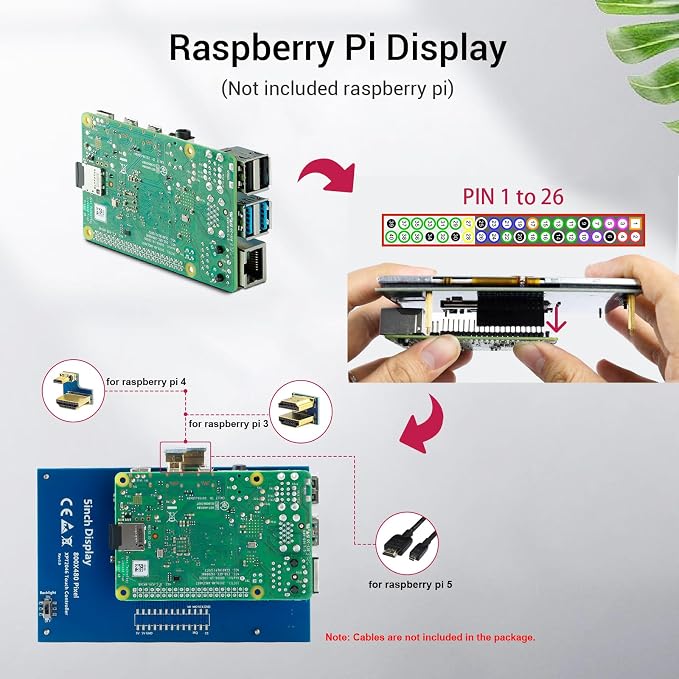
1. Micro USB: get 5V power (not need when connect by GPIO)
2. HD interface: Audio/video transmission
3. Backlight switch: turn on/off the backlight (save power)
4. GPIO (13*2): get 5V power& touch function
5. Extended interface
5 Inch Touch Display x1
Dual HD Connector x1
Micro HD to HD Connector x1
Copper Pillars (4pcs) x1
Touch Pen x1
CD x 1
Why Choose ELECROW 5-Inch Resistive Touch Screen?
This 5-inch TFT LCD Display with a touch function is a panel-mountable mini monitor. It's small and simple, and the shape makes it easy to attach to an electronic product.
Specifications:
5" TFT LCD Module
Resolution: 800x480
Touch Screen Type: Resistive
LCD driver IC: ILI9486L
Refresh rate: 60Hz
LCD Size: 121.11 mm x 77.93 mm
Compatible Devices & OS:
1. The monitor can work with standard HDMI-compatible devices (adjust output resolution to 800*480), while the touch function is only available for Raspbian and Ubuntu systems.
2. Touch panel function NOT supported---Retropie, Windows 10 IOT, Kodi, Windows 10/8/7, Jetson Nano.
3. When working with Raspberry Pi 4, for the system image after 2021-10-30, for example, on Bullseye, please modify "dtoverlay = vc4-kms-v3d" to "dtoverlay = vc4-fkms-v3d" in the config file, otherwis,e it may fail to start. But on Buster, please comment out "dtoverlay = vc4-fkms-V3D" by adding #.
Share