CoreDrive
ELECOM HUGE Trackball 2.4GHz Wireless USB Index Finger Control Customizable 8-Button Large Soft Palm Rest 52mm Ball Windows PC Mac (M-HT1DRBK)
ELECOM HUGE Trackball 2.4GHz Wireless USB Index Finger Control Customizable 8-Button Large Soft Palm Rest 52mm Ball Windows PC Mac (M-HT1DRBK)
Couldn't load pickup availability
- ?《Optical Tracking Technology》The ELECOM trackball provides precise cursor movement for superior accuracy so you can get where you want on the screen quickly with less hand movement, improving productivity and efficiency. - ?《Functional 8 Buttons》It is very easy to move in any direction. It comes with 8 physical buttons on the device and the two extra buttons are the scrollwheel tilting that allow horizontal scroll. - ?《DPI Cursor》Designed with a high-performance gaming optics system sensor and lens. The DPI button can easily change between 500(LOW), 1000(MID) and 1500(HIGH) DPI, making the movements of your cursor faster or slower. - ?《Easy Maintenance 》The ball rolls on three 2.5 mm large artificial ruby ball bearings. They are extremely smooth and the relatively large size prevents dust and dirt from clogging them. So you don’t have to clean the ball bearings too often. The ball is held in place by the ball bearings, but can easily be popped out of the device, by pushing it through the hole in the bottom and it can be easily cleaned. - ?《Product Details》System requirements: Windows 7, Windows 8, Windows 10 or later, macOS 10.13 or later, Size: W4.5"(114.7mm) X L7.2"(181.9mm) X H2.3"(57.2mm), Weight: 9.2oz(without battery), DPI: 500/1000/1500 count (switchable), Connectivity: wireless, 1 X AA battery(Included)- Battery Remaining Light Lamp equipped.
Product description
ELECOM Trackball Series
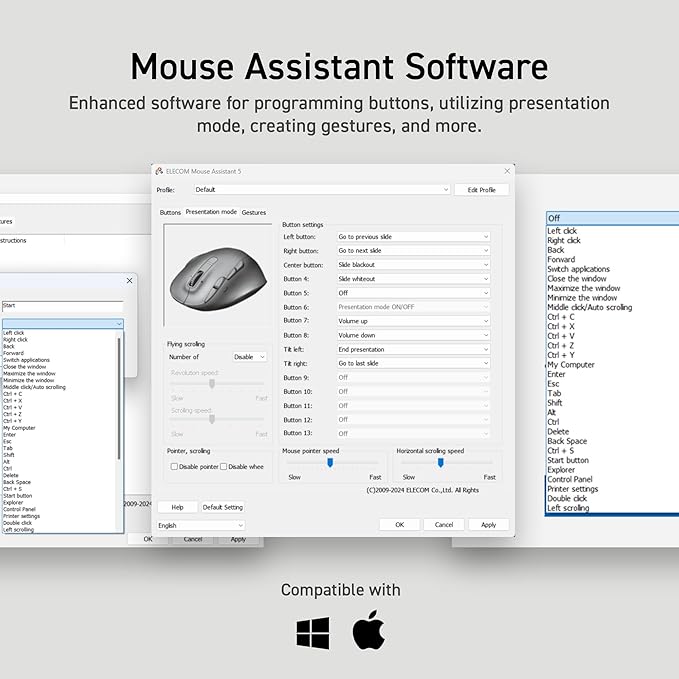
Q: How can I install Mouse Assistant software?
Q: How can I get the English Product Manual?
Q: How do I clean a trackball mouse?
Q: What are the benefits of using a trackball mouse?
Q: How can I install Mouse Assistant software?
A: Head to the ELECOM USA site to download the software.
Q: How can I get the English Product Manual?
A: The PDF manual is can be found attached to this product listing page or on the ELECOM USA site.
Q: How do I clean a trackball mouse?
A: Turn off your computer and disconnect your mouse. Remove the ball using the ball removal hole in the back of the mouse. Use a soft, lint-free cloth and rubbing alcohol to clean the ball housing.
Q: What are the benefits of using a trackball mouse?
A: The main benefits decreased wrist and arm movement, which can reduce strain and the risk of repetitive stress injuries, and the ability to use the mouse in narrow spaces because it doesn't need to be physically moved around.
Share