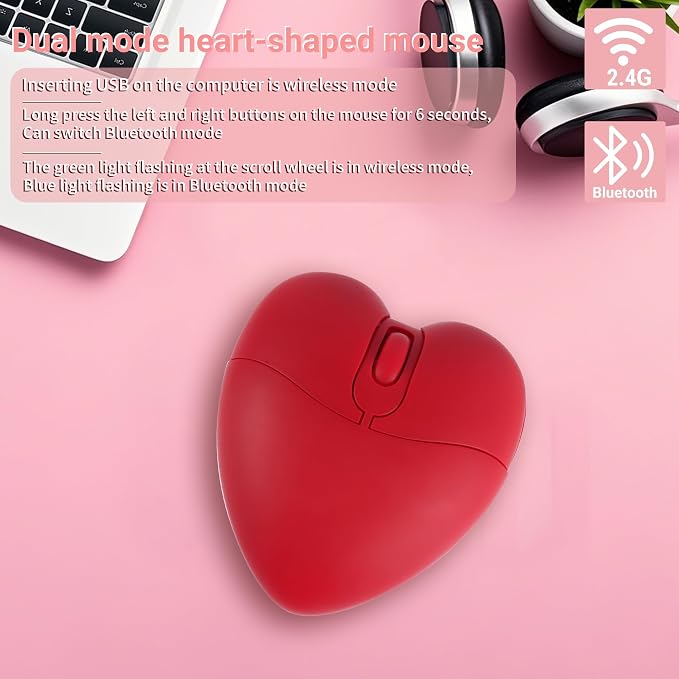
- Quiet and Wireless: Enjoy a silent working environment with this wireless mouse.
- Dual Mode Connectivity: Connect via Bluetooth or USB for seamless compatibility with various devices.
- Portable and Durable: Compact size and durable build make it perfect for both travel and everyday use.
- High Precision Tracking: Smooth and accurate tracking on any surface for improved productivity.
- Wide Compatibility: Works with laptops, computers, and Chromebooks for versatile usage.
- Long-lasting Battery Life: Equipped with a built-in blue rechargeable battery. Please use the product's included charging cable for recharging when the battery is low. Do not replace the battery or charging cable with third-party alternatives to avoid rendering the product unusable.
- Perfect Gift Option: A thoughtful present for family and friends, expressing your care and appreciation.
Product description
aplus content video
**Why is the mouse not working?**
How do I charge my device properly?
**How to switch modes:** ?
What should I do if my device still doesn’t work?
**How to turn the LED breathing light on/off?**
How long does the bedazzled mouse typically last?
**Why is the mouse not working?**
To connect correctly, ensure the mouse mode is right. A green light at the scroll wheel indicates 2.4G, while a blue light indicates Bluetooth. Press and hold left&right buttons & scroll wheel for 6+ seconds to switch modes before connecting.
How do I charge my device properly?
Use only the blue rechargeable lithium battery included. Connect the mouse to a power source for approximately 2 hours until the red charging light turns off***Do not replace the battery yourself; only use the original blue rechargeable battery***
**How to switch modes:** ?
Turn on the switch, then press and hold left&right buttons & scroll wheel for 6+ seconds to toggle modes: green LED near the scroll wheel:2.4G, blue LED near the scroll wheel: Bluetooth.
What should I do if my device still doesn’t work?
First, ensure you’re using the original batteries. Different batteries may cause issues. Check your mode and follow the setup instructions closely. If it still doesn’t work after troubleshooting, PM for a replacement or assistance.
**How to turn the LED breathing light on/off?**
Simultaneously press and hold the right button and the middle button to toggle the lighting on or off.