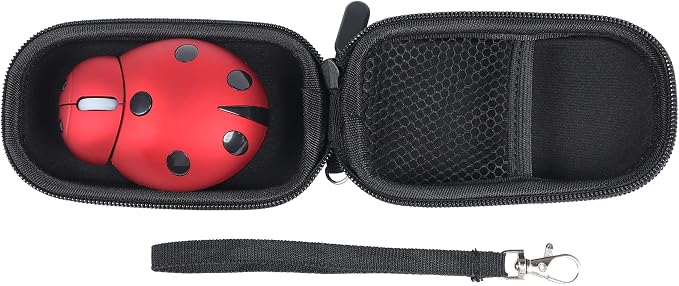
- Excellent learning accessories suitable for children. A small cute wireless mouse is suitable for laptop computer desktop computers. Animal ladybugs are cute designs. It is a good choice for children [Note: USB receiver is close to the battery slot and built-in mouse]
- Ergonomic design: For a long time, there will be no spasm or pain; luster materials, sweat-proof, and pollution-proof; smart wheel design makes browsing easier.
- Portable mini and light quality: 3.4 x 2.6 x 1.2 inches (about 8.6 x 6.6 x 3.0 cm) mini small size, 47 grams weight, suitable for female friends, suitable for school family office travel; 2.4 GHz wireless mouse provides strong and reliable connections, The effective distance can reach 10 meters.
- That is to plug-and-play technology: a small wireless receiver built into the mouse, which is convenient for inserting the USB port of the computer to occupy the smallest space. 1 AAA battery (excluding within the scope of supply) is required.
- Excellent learning accessories suitable for children. It is very suitable for game enthusiasts and has good gifts for children of all ages, friends, and children; compatibility system: Windows 95/98/2000/XP/NT/Win7/Win8, etc.
- Warranty:If you have any product quality problems after receiving this mouse, please feel free to contact us, we will give you a satisfactory solution within 24 hours!
Product description
Step 1 get the novelty mouse
Step 2 usb receiver near the battery slot
Step 3 plug and play, easy to use
Step 4 Wide compatible system
More details
1. Prepare an AAA battery→ to open the battery cover at the bottom of the mouse→put in the battery. (Pay attention to the correct placement of the positive and negative electrodes.)
2. At the same time, you can see the USB receiver near the battery slot →take out the receiver.
3. Change the battery cover → to open the bottom ON/OFF switch.
4. Plug the receiver into your computer→ The mouse can be used normally.
*If there is no connection, re-install the battery and repeat this step.
step 1
step 2
step 3
step 4
*Ergonomic mouse makes it comfortable and not easy to get tired for long time use.
*The ergonomic design and natural surface are designed to be comfortable to hold.
*The creative looking makes the atmosphere a happier environment!
*Portable, suitable for school home office travel.
*Smart wheel design makes browsing easier.
*A tiny wireless receiver built in the mouse, conveniently slots into your computer's USB port, taking up minimal space.
*Compatible with Windows 2000, XP, Linux, Vista, windows 7, 8 also windows 10 and Mac OS X.
*Suitable for Microsoft Mac HP Dell Lenovo Sony Asus Acer Tablet/PC/Notebook.