- 【8 IN 1 USB C Docking Station】: Laptop Docking Station converts your USB C Windows Laptops one Type C/Thunderbolt 3 port into 8 Ports: 2 x 4K@60Hz HDMI, 1 x USB 3.0, 1 x USB 2.0, 1 x USB C data, SD/TF card reader, 100W PD.
- 【4K60Hz Docking Station with 2 HDMI Ports】: The USB C Dual HDMI adapter with 2 HDMI ports, allow your USB C laptops to extend 2 different monitors, no need any drivers or software, just plug and play. Support both SST and MST mode. 2 HDMI ports can be used simultaneously, resolution up to 4K@60hz(DP1.4 Laptop) . Notice: MacOS ONLY support SST(Mirror Mode: display the SAME image) due to the MacOS limitation. Windows support MST(Extend Mode) and SST(Mirror Mode).
- 【Fast Data Transfer and SD/TF Card Reader】: 3 * USB ports (1 * USB A 3.0 & 1 * USB A 2.0 & 1 * USB C data) high speed data transfer (5Gbps for USB 3.0, 480Mbps for USB 2.0), we recomend you connect mouse and keyboard to USB2.0, SD/TF Card reader can only be alone work writing /reading speed 20MB/S, which can access files for Type-C devices, quickly view your photos or videos, good for Photographer or Designer or Video editor,etc. Note:The USB C data port is only for data transfer, it won't support power delivery and extending a monitor.
- 【100W PD Powerful Charging】: Type-C PD port supports PD 3.0 protocol to quickly charge your device up to 85W of power (the hub consumes 15W power). Tip: This PD Type-C port does not support data transfer, PD charging doesn't works for laptop own a AC adapter. Charger and power cord not included.
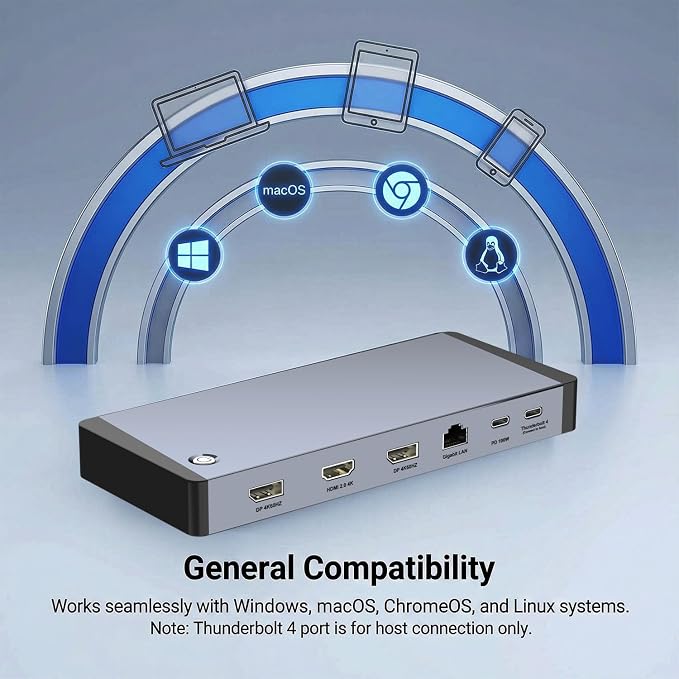
- 【Universal Compatible】: This USB C dock dongle hub multiport adapter compatible with Macbook air,Macbook pro,iMac,iPad Air,Dell, HP, Huawei, Lenovo and other laptops or pc with thunderbolt3/4/USB Type-C(with vidieo output function ).
Product description
Compatible Device's Models (not full list)
8 in 1 USB C Dual HDMI Adapter USB C Docking Station Dual HDMI Monitors for Window/iOS/Linux/Android System
1*PD3.0 Charging Port: Up to 100W input and 85W output
HDMI 1 Max resolution: 4K@60Hz
HDMI 2 Max resolution: 4K@60Hz
1* USB A 3.0 port: Data transfer up to 5Gbps
1*USB A 2.0 port: Data transfer up to 480M/S
1*USB C 2.0 port: Data transfer up to 480M/S
1*SD/TF Card reader: Up to 104MB/S
Please note:Insufficient power supply may cause unstable video output. This adapter does not provide additional power to your computer. To ensure normal and stable image output, you should use a separate power adapter to charge your computer.
Note: NOT for all USB-C port laptops, Make sure your laptop or PC supports ” Thunderbolt 3” ” Thunderbolt 4”or “displayport output mode(DP ALT mode.
What is USB-C DP ALT Mode?
DP Alt Mode allows USB-C ports to transfer dataideo via multiple interfaces, including the increasingly popular DisplayPort video interface. USB-C ports capable of transferring DisplayPort signals are either called USB-C DisplayPort or DP Alt Mode. They allow you to connect video sources (e.g. PCs, Blu-Ray players, etc.) and display devices (e.g. TVs, projectors, etc.) that support DisplayPort to each other via their USB-C ports to broadcast high-definition video.
But now not all USB-C ports feature DisplayPort Alt Mode functionality.
How do I know if my device supports DisplayPort over USB-C?
The best method to decipher whether your device supports DisplayPort over USB-C is to check either the product specs on the manufacturer’s official website or to check websites with in-depth product reviews and/or information. Within those sites you’ll be able to find detailed breakdowns of each port on the device.
Basically, Thunderbolt 3, Thunderbolt 4, and USB C 3.1 Gen 2 (or above) support video output. If you are not sure, you are welcome to ask us for a device compatibility check before purchase.
Windows System-Multiple Display Mode-Mirror Mode & Extend Mode:
Mirror Mode (AAA Mode):Laptop shows same images with external dual displays.
Extend Mode (ABB and ABC Mode):Laptop shows different images with external dual displays.
How to extend monitor on Windows: When the HUB is connected to the laptop and connected to the display with an HDMI cable, you can use the shortcut key combination Win+P to select other modes such as expansion and copy, and support multiple expansion combinations such as ABC. In Windows Settings-System-Screen Settings, you can select the display order and resolution of the secondary screen through the settings, and you can change the refresh rate of the secondary screen in advanced display settings.
If one of the display does not display, How to do?
1.Right-click desktop > Graphics Settings > Select One or More Active Displays.
2.When using two video ports (HDMI1 + HDMI2), both displays support up to 4K@60Hz on Windows with DP1.4. On Windows with DP1.2, only 4K@30Hz is supported when using dual HDMI. Please adjust the device's resolution to a compatible range to ensure the display works correctly.
MacOS System -Mirror Mode & Extend Mode -Only SST Supported:
Mirror Mode (AAA Mode):Laptop shows same images with displays.
Extend Mode (ABB Mode):3 external screen display same images but different with laptop.
Note: ON MacOS only SST mode (AAA and ABB mode) supported due to MacOS limitation.
How to extend monitor on Mac: When the HUB is connected to the laptop and connected to the display with an HDMI cable, you can change the resolution, refresh rate, mirroring and extension mode of the secondary screen in System Preferences-Display Settings, and support ABB’s extension mode and AAA’s copy mode.
Lightweight and Portable
With a compact and portable design, all ports are in one hand. The USB C for laptop weighs about 3.3 oz and works well at the office, business trips and also for everyday use.
SD/TF Card Reader
SD/TF Card reader support writing /reading spped 20MB/S, which can access files for Type-C devices, quickly view your photos or videos, good for Photographer or Designer or Video editor,etc.
Note: SD/TF can not be read simutaneously.
Crystal Clear Dual 4K@60hz Video Output
USB C to HDMI adapter allows you to display the content of your laptop to 2 monitors at the same time at 3840*2160@60Hz.
Note: Please make sure that your laptop monitor, HDMI cable support 4K@60hz, otherwise, the output will not be 4K@60hz, the actual resolution depend on your device and video source.